Updating


Re
#84 in Top Free Apps > Medical
iPhone Screenshots



Description
Are you ready to stay One Step Ahead of your diabetes?
Now you can, from wherever you are, with Dexcom CLARITY.
View glucose patterns, trends and statistics so you know how close you are to your target range, anytime, anywhere you have internet connectivity. Log in with your Dexcom account to view patterns and trends so you can make informed decisions to help you manage your diabetes.
• Check in with the Summary dashboard to track your progress.
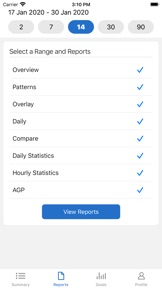
• With Reports, you can view, save, print or email any or all of CLARITY's reports.
• Use Share to accept your clinic's sharing code so they have access to your data to make your appointments more efficient.
• In Profile, turn on weekly notifications and emails.
This app store should not be used as your first point of contact to resolve technical or customer services issues. In order to protect your privacy and personal information, and promptly resolve any technical or customer services issues you are having with any Dexcom product, please contact your local Dexcom representative.
What's New in Version 2.12.0
Dexcom CLARITY has updated Time in Range to reflect clinical standards with new range names, a fifth Very High range, and recommended ranges from an international consensus.
Dexcom CLARITY settings default to reflect these ranges. Tap Profile > Glucose Ranges to review and adjust your ranges.
Seller
Name
DexCom, Inc.
Information
Developer
Categories
Version
2.12.0
Size
25.2 MB
Game Center
No
VPP Device Licensing
Yes
Rating
Rated: 4+
Compatibility
iOS 11.4 or later
Devices
iPhone 5s, iPhone 6, iPhone 6 Plus, iPhone 6s, iPhone 6s Plus, iPhone SE, iPhone 7, iPhone 7 Plus, iPhone 8, iPhone 8 Plus, iPhone X, iPhone XR, iPhone XS, iPhone XS Max, iPhone 11, iPhone 11 Pro, iPhone 11 Pro Max, iPhone SE (2nd generation), iPad (5th Generation) Wi-Fi, iPad (5th Generation) Wi-Fi + Cellular, iPad (6th generation) Wi-Fi, iPad (6th generation) Wi-Fi + Cellular, iPad Pro, iPad Pro (Cellular), iPad Pro (9.7-inch), iPad Pro (9.7-inch) (Cellular), iPad Pro 12.9-inch (2nd generation), iPad Pro 12.9-inch (2nd generation) Wi-Fi + Cellular, iPad Pro (10.5-inch), iPad Pro (10.5-inch) Wi-Fi + Cellular, iPad Pro (11-inch), iPad Pro (11-inch) Wi-Fi + Cellular, iPad Pro 12.9-inch (3rd generation), iPad Pro 12.9-inch (3rd generation) Wi-Fi + Cellular, iPad Air, iPad Air (Cellular), iPad Air 2, iPad Air 2 (Cellular), iPad Air (3rd generation), iPad Air (3rd generation) Wi-Fi + Cellular, iPad mini Retina, iPad mini Retina (Cellular), iPad mini 3, iPad mini 3 (Cellular), iPad mini 4, iPad mini 4 (Cellular), iPad mini (5th Generation), iPad mini (5th Generation) Wi-Fi + Cellular, iPad (7th generation) Wi-Fi + Cellular, iPad Pro 11-inch (2nd generation), iPad Pro 11-inch (2nd generation) Wi-Fi + Cellular, iPad Pro 12.9-inch (4th generation), iPad Pro 12.9-inch (4th generation) Wi-Fi + Cellular, iPad Air4, iPad Air4Cellular, iPad EighthGen, iPad EighthGenCellular, iPod touch (6th Generation), iPod touch (7th generation)
Languages
English, Czech, Danish, Dutch, Finnish, French, German, Hungarian, Italian, Korean, Norwegian Bokmål, Polish, Portuguese, Slovak, Slovenian, Spanish, Swedish, Turkish
App Store: Customer Ratings
Ratings & Reviews
3.5 of 5 (4 Ratings)
App Store: Customer Reviews
No Entry