AboutTermsPrivacyContact
 
Updating
Pixelable - Pixel Art Editor

Pixelable - Pixel Art Editor

Released: 2016-12-21
© Yosuke Seki
Pixelable - Pixel Art Editor - QR Code
Version 2.10.3
4+
Download on the App Store
Version 2.10.3
4+
Download on the App Store
Released: 2016-12-21
© Yosuke Seki

iPhone Screenshots

Screenshot
Screenshot
Screenshot
Screenshot
Screenshot

iPad Screenshots

Screenshot
Screenshot
Screenshot

Description

Here is a pleasant pixel art editor!
This is an app which pursue the stress-free and intuitively drawing of pixel art.
The app has genuine functions, like layer editing, color making, and various tools. Also, you can operate intuitively. For example you can enlarge and reduce the canvas by pinch in or pinch out.
Main functions are below.
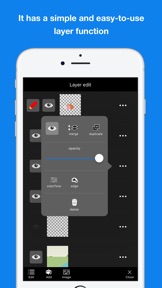
- Layer editing
You can add and erase, and copy layers. Also, you can select display or non-display mode, change the order of layers, and make a layer transparent.
- Tools
The app has basic tools to draw pixel arts. (For example, pen, spuit, filling and transfer)
・Undo and redo
You can cancel drawing.
- Animated GIF export
Each layer is going to be one frame.
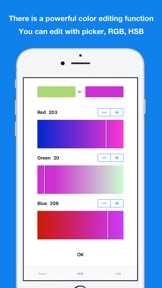
- Color making
You can make your favorite color easily.
You can save 150 colors in maximum by a work.
- Pinch in and pinch out
You can enlarge and reduce the canvas by pinch in and out. It enables you to draw more details.
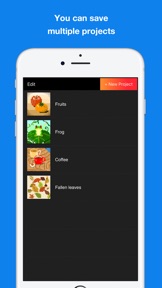
- Saving multiple pictures
You can save several projects, so that you can edit other projects later.
- Setting canvas size
You can select the size of canvas from 5*5 to 256*256.
- Setting a exporting pixel size
You can select exporting size. Pictures will be saved to camera roll as a png file.
- Reflection function
You can reflect the selected layer vertical and horizontal.
※There is another flunked app, ‘Dottable’.
※To prevent a crash, you need more than 150MB of free space to make a new project. Sorry for the inconvenience.

What's New in Version 2.10.3

- Minor fixes.

Seller

Name

Yosuke Seki

Information

Developer

Categories

Version

2.10.3

Size

7.5 MB

Game Center

No

VPP Device Licensing

Yes

Rating

Rated: 4+

Compatibility

iOS 14.0 or later

Devices

iPhone 5s, iPhone 6, iPhone 6 Plus, iPhone 6s, iPhone 6s Plus, iPhone SE, iPhone 7, iPhone 7 Plus, iPhone 8, iPhone 8 Plus, iPhone X, iPhone XR, iPhone XS, iPhone XS Max, iPhone 11, iPhone 11 Pro, iPhone 11 Pro Max, iPhone SE (2nd generation), iPhone 12, iPhone 12 Pro, iPhone 12 Pro Max, iPhone 12 mini, iPhone 13, iPhone 13 Pro, iPhone 13 Pro Max, iPhone 13 mini, iPhone SE (3rd generation), iPhone 14, iPhone 14 Plus, iPhone 14 Pro, iPhone 14 Pro Max, iPad (5th Generation) Wi-Fi, iPad (5th Generation) Wi-Fi + Cellular, iPad (6th generation) Wi-Fi, iPad (6th generation) Wi-Fi + Cellular, iPad Pro, iPad Pro (Cellular), iPad Pro (9.7-inch), iPad Pro (9.7-inch) (Cellular), iPad Pro 12.9-inch (2nd generation), iPad Pro 12.9-inch (2nd generation) Wi-Fi + Cellular, iPad Pro (10.5-inch), iPad Pro (10.5-inch) Wi-Fi + Cellular, iPad Pro (11-inch), iPad Pro (11-inch) Wi-Fi + Cellular, iPad Pro 12.9-inch (3rd generation), iPad Pro 12.9-inch (3rd generation) Wi-Fi + Cellular, iPad Air, iPad Air (Cellular), iPad Air 2, iPad Air 2 (Cellular), iPad Air (3rd generation), iPad Air (3rd generation) Wi-Fi + Cellular, iPad mini Retina, iPad mini Retina (Cellular), iPad mini 3, iPad mini 3 (Cellular), iPad mini 4, iPad mini 4 (Cellular), iPad mini (5th Generation), iPad mini (5th Generation) Wi-Fi + Cellular, iPad (7th generation) Wi-Fi + Cellular, iPad Pro 11-inch (2nd generation), iPad Pro 11-inch (2nd generation) Wi-Fi + Cellular, iPad Pro 12.9-inch (4th generation), iPad Pro 12.9-inch (4th generation) Wi-Fi + Cellular, iPad Air (4th Generation) (Wi-Fi), iPad Air (4th Generation) (Wi-Fi + Cellular), iPad (8th generation) Wi-Fi, iPad (8th generation) Wi-Fi + Cellular, iPad Pro 11-inch (3rd generation), iPad Pro 11-inch (3rd generation) Wi-Fi + Cellular, iPad Pro 12.9-inch (5th Generation), iPad Pro 12.9-inch (5th Generation) Wi-Fi + Cellular, iPad (9th Generation), iPad (9th Generation) Wi-Fi + Cellular, iPad mini (6th Generation), iPad mini (6th Generation) Wi-Fi + Cellular, iPad Air (5th generation), iPad Air (5th generation) Wi-Fi + Cellular, iPad Pro 11-inch (4th generation), iPad Pro 11-inch (4th generation) Wi-Fi + Cellular, iPad Pro 12.9-inch (6th generation), iPad Pro 12.9-inch (6th generation) Wi-Fi + Cellular, iPad (10th generation), iPad (10th generation) Wi-Fi + Cellular, iPod touch (6th Generation), iPod touch (7th generation)

Languages

English, Japanese

App Store: Customer Ratings

Ratings & Reviews

4.0 of 5 (5 Ratings)

App Store: Customer Reviews

2022-01-23

Lovely tool, just missing some minor things

Firstly, great work on this. It has a really intuitive interface!
I have a few suggestions that would make me update my review to 5 stars:
1. Consider using Bresenham’s algorithm, or similar, on the pen tool to make the pen strokes uninterrupted.
2. Allow the canvas to be cropped. I often don’t know the scale of the image I plan to draw, and often need to make the canvas bigger or smaller.
3. I would love to be able to import images, but I’m not sure if that’s possible.
byba7
Version 2.10
2017-10-22

Great

Honestly this is almost certainly more than you are expecting. Great app.
OmniPresentPerson
Version 2.9.6