Updating


iPhone Screenshots


iPad Screenshots

Description
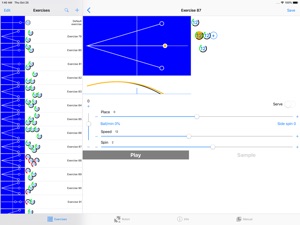
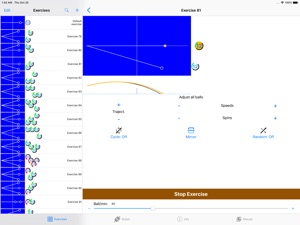
The new AMICUS PRIME sets out to redefine the possibilities of a table tennis robot and will excite fans all over the world. The innovative PRIME is controlled wirelessly via Bluetooth technology from the AMICUS App running on iPhone. AMICUS app software offers a multitude of interactive content, improved and added to with regular updates. Creating exercises, changing spin, speed, placement and trajectory has never been easier. Pre-saved exercises created by professional players and coaches are playable at the press of a button with in-app videos by stars such as Tiago Apolonia just waiting to show the correct execution. Get acquainted with our AMICUS flagship model and discover the new possibilities of the most tireless, and always ready, training partner you will find.
Special features of AMICUS PRIME:
- Control the intensity of the exercise by selecting ball frequency from 5 to 120 balls per minute.
- Vary spin, speed, trajectory, and placement from ball to ball. Control each function through this app.
- Use this mobile application to connect wirelessly via Bluetooth to your AMICUS PRIME robot.
- Keep the software and firmware up to date with help of the app. App notifies you when new update is available.
- Left-Right (mirror) switch for reversing drills to match the dominant hand of the user so forehand/backhand placements are correct. Also can instantly provide a reversed version of any asymmetrical exercise without creating a new exercise.
- Test individual balls within an exercise with the Sample function.
- Individual Frequency Control (IFC) can customize the time interval between any two consecutive balls, especially useful when there is a large difference in ball speed; for example, a short, slow backspin serve followed by several fast, long topspin balls.
- Incorporate interval training into your table tennis practice sessions with the Cycle function.
- Pre-programmed with 21 exercises created by German Butterfly Coach Richard Prause, which can be modified or replaced. Restore these pre-programmed exercises with the Restore Factory Exercises function.
- Watch the integrated demonstration videos to learn how to properly perform each pre-programmed exercise.
- Save virtually unlimited exercises—limited only by available memory of the device used to run the app.
- Sequence together multiple exercises so they run automatically one after the other, or randomly.
- Use the key-fob-like remote control (small, lightweight and easy to fit in pocket) to start and stop ball delivery and change ball frequency.
What's New in Version 1.2.0
New robot firmware, bugfixes, wait for serve option.
Information
Developer
Categories
Version
1.2.0
Size
63.8 MB
Game Center
No
VPP Device Licensing
Yes
Rating
Rated: 4+
Compatibility
iOS 10.2 or later
Devices
iPhone 5, iPhone 5c, iPhone 5s, iPhone 6, iPhone 6 Plus, iPhone 6s, iPhone 6s Plus, iPhone SE, iPhone 7, iPhone 7 Plus, iPhone 8, iPhone 8 Plus, iPhone X, iPhone XR, iPhone XS, iPhone XS Max, iPhone 11, iPhone 11 Pro, iPhone 11 Pro Max, iPhone SE (2nd generation), iPhone 12, iPhone 12 Pro, iPhone 12 Pro Max, iPhone 12 mini, iPhone 13, iPhone 13 Pro, iPhone 13 Pro Max, iPhone 13 mini, iPhone SE (3rd generation), iPhone 14, iPhone 14 Plus, iPhone 14 Pro, iPhone 14 Pro Max, iPhone 15, iPhone 15 Plus, iPhone 15 Pro, iPhone 15 Pro Max, iPhone 16, iPhone 16 Plus, iPhone 16 Pro, iPhone 16 Pro Max, iPhone 16e, iPhone 17, iPhone 17Pro, iPhone 17ProMax, iPhone Air, iPad (4th Generation) (Wi-Fi), iPad (4th Generation) (4G), iPad (5th Generation) Wi-Fi, iPad (5th Generation) Wi-Fi + Cellular, iPad (6th generation) Wi-Fi, iPad (6th generation) Wi-Fi + Cellular, iPad Pro, iPad Pro (Cellular), iPad Pro (9.7-inch), iPad Pro (9.7-inch) (Cellular), iPad Pro 12.9-inch (2nd generation), iPad Pro 12.9-inch (2nd generation) Wi-Fi + Cellular, iPad Pro (10.5-inch), iPad Pro (10.5-inch) Wi-Fi + Cellular, iPad Pro (11-inch), iPad Pro (11-inch) Wi-Fi + Cellular, iPad Pro 12.9-inch (3rd generation), iPad Pro 12.9-inch (3rd generation) Wi-Fi + Cellular, iPad Air, iPad Air (Cellular), iPad Air 2, iPad Air 2 (Cellular), iPad Air (3rd generation), iPad Air (3rd generation) Wi-Fi + Cellular, iPad mini Retina, iPad mini Retina (Cellular), iPad mini 3, iPad mini 3 (Cellular), iPad mini 4, iPad mini 4 (Cellular), iPad mini (5th Generation), iPad mini (5th Generation) Wi-Fi + Cellular, iPad (7th generation) Wi-Fi + Cellular, iPad Pro 11-inch (2nd generation), iPad Pro 11-inch (2nd generation) Wi-Fi + Cellular, iPad Pro 12.9-inch (4th generation), iPad Pro 12.9-inch (4th generation) Wi-Fi + Cellular, iPad Air (4th Generation) (Wi-Fi), iPad Air (4th Generation) (Wi-Fi + Cellular), iPad (8th generation) Wi-Fi, iPad (8th generation) Wi-Fi + Cellular, iPad Pro 11-inch (3rd generation), iPad Pro 11-inch (3rd generation) Wi-Fi + Cellular, iPad Pro 12.9-inch (5th Generation), iPad Pro 12.9-inch (5th Generation) Wi-Fi + Cellular, iPad (9th Generation), iPad (9th Generation) Wi-Fi + Cellular, iPad mini (6th Generation), iPad mini (6th Generation) Wi-Fi + Cellular, iPad Air (5th generation), iPad Air (5th generation) Wi-Fi + Cellular, iPad Pro 11-inch (4th generation), iPad Pro 11-inch (4th generation) Wi-Fi + Cellular, iPad Pro 12.9-inch (6th generation), iPad Pro 12.9-inch (6th generation) Wi-Fi + Cellular, iPad (10th generation), iPad (10th generation) Wi-Fi + Cellular, iPad Air 11-inch (M2) Wi-Fi, iPad Air 13-inch (M2) Wi-Fi, iPad Air 13-inch (M2) Wi-Fi + Cellular, iPad Pro 11-inch (M4) Wi-Fi, iPad Pro 11-inch (M4) Wi-Fi + Cellular, iPad Pro 13-inch (M4) Wi-Fi, iPad Pro 13-inch (M4) Wi-Fi + Cellular, iPad mini (A17 Pro) Wi-Fi, iPad mini (A17 Pro) Wi-Fi + Cellular, iPad (A16) Wi-Fi, iPad (A16) Wi-Fi + Cellular, iPad Air 11-inch (M3) Wi-Fi, iPad Air 11-inch (M3) Wi-Fi + Cellular, iPad Air 13-inch (M3) Wi-Fi, iPad Air 13-inch (M3) Wi-Fi + Cellular, iPad Pro11M5, iPad Pro11M5Cellular, iPad Pro13M5, iPad Pro13M5Cellular, iPod touch (6th Generation), iPod touch (7th generation)
Languages
English, French, German
App Store: Customer Ratings
Ratings & Reviews
0.0 of 5 (No rating)
App Store: Customer Reviews
No Entry