AboutTermsPrivacyContact
 
Updating
MyScript Calculator

MyScript Calculator

Released: 2018-01-23
© MyScript
MyScript Calculator - QR Code
Version 2.0.8
4+
Download on the App Store
Version 2.0.8
4+
Download on the App Store
Released: 2018-01-23
© MyScript

iPhone Screenshots

Screenshot
Screenshot
Screenshot
Screenshot
Screenshot

iPad Screenshots

Screenshot
Screenshot
Screenshot
Screenshot
Screenshot

Description

The new MyScript© Calculator 2 makes daily math fun and easy!
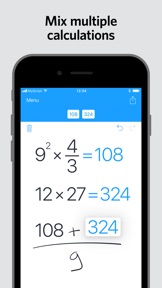
Calculator 2 turns your device into an interactive piece of paper. Simply write a calculation and it gets you the result in real time. Develop it further with editing gestures or by adding new elements anywhere. Reuse previous results with drag and drop. Calculator 2 interprets everything you do on the fly.
Calculator 2 is based on MyScript Interactive Ink®, the next step for digital ink. It is the successor of the award-winning first handwriting calculator.
BENEFITS AND FEATURES
· Write calculations in an intuitive and natural way without a keyboard.
· Erase easily by using scratch-out gestures to remove symbols and numbers.
· Drag and drop numbers from and to the canvas, the memory bar or to an external app.
· Copy your results to the clipboard or export them to other apps.
· Fractions: Display results using decimals, fractions or mixed numbers.
· Multi-line: Continue the same calculation on the next line or write several calculations on multiple lines.
· Memory: Save results into memory. Reuse them anytime in your calculations.
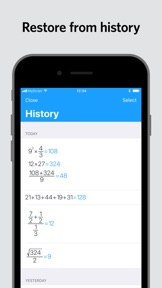
· History: Retrieve all your past calculations to reuse or export.
SUPPORTED OPERATORS
· Basic operations: +, -, ×, ÷, /, ·, :
· Powers, roots, exponentials: 7², √, ∛, e³
· Miscellaneous operations: %, |5|, 3!
· Brackets: ( )
· Trigonometry: sin, cos, tan, cot, cosh, sinh, tanh, coth
· Inverse trigonometry: asin, acos, atan, acot, arcsin, arccos, arctan, arccot, acosh, asinh, atanh, acoth, arcosh, arsinh, artanh, arcoth
· Logarithms: ln, log
· Constants: π, e, phi

What's New in Version 2.0.8

- Stability improvements and bug fixes.

Information

Developer

Version

2.0.8

Size

14.3 MB

Game Center

No

VPP Device Licensing

Yes

Rating

Rated: 4+

Compatibility

iOS 13.0 or later

Devices

iPhone 5s, iPhone 6, iPhone 6 Plus, iPhone 6s, iPhone 6s Plus, iPhone SE, iPhone 7, iPhone 7 Plus, iPhone 8, iPhone 8 Plus, iPhone X, iPhone XR, iPhone XS, iPhone XS Max, iPhone 11, iPhone 11 Pro, iPhone 11 Pro Max, iPhone SE (2nd generation), iPhone 12, iPhone 12 Pro, iPhone 12 Pro Max, iPhone 12 mini, iPhone 13, iPhone 13 Pro, iPhone 13 Pro Max, iPhone 13 mini, iPhone SE (3rd generation), iPhone 14, iPhone 14 Plus, iPhone 14 Pro, iPhone 14 Pro Max, iPhone 15, iPhone 15 Plus, iPhone 15 Pro, iPhone 15 Pro Max, iPhone 16, iPhone 16 Plus, iPhone 16 Pro, iPhone 16 Pro Max, iPhone 16e, iPhone 17, iPhone 17 Pro, iPhone 17 Pro Max, iPhone Air, iPhone 17e, iPad (5th Generation) Wi-Fi, iPad (5th Generation) Wi-Fi + Cellular, iPad (6th generation) Wi-Fi, iPad (6th generation) Wi-Fi + Cellular, iPad Pro, iPad Pro (Cellular), iPad Pro (9.7-inch), iPad Pro (9.7-inch) (Cellular), iPad Pro 12.9-inch (2nd generation), iPad Pro 12.9-inch (2nd generation) Wi-Fi + Cellular, iPad Pro (10.5-inch), iPad Pro (10.5-inch) Wi-Fi + Cellular, iPad Pro (11-inch), iPad Pro (11-inch) Wi-Fi + Cellular, iPad Pro 12.9-inch (3rd generation), iPad Pro 12.9-inch (3rd generation) Wi-Fi + Cellular, iPad Air, iPad Air (Cellular), iPad Air 2, iPad Air 2 (Cellular), iPad Air (3rd generation), iPad Air (3rd generation) Wi-Fi + Cellular, iPad mini Retina, iPad mini Retina (Cellular), iPad mini 3, iPad mini 3 (Cellular), iPad mini 4, iPad mini 4 (Cellular), iPad mini (5th Generation), iPad mini (5th Generation) Wi-Fi + Cellular, iPad (7th generation) Wi-Fi + Cellular, iPad Pro 11-inch (2nd generation), iPad Pro 11-inch (2nd generation) Wi-Fi + Cellular, iPad Pro 12.9-inch (4th generation), iPad Pro 12.9-inch (4th generation) Wi-Fi + Cellular, iPad Air (4th Generation) (Wi-Fi), iPad Air (4th Generation) (Wi-Fi + Cellular), iPad (8th generation) Wi-Fi, iPad (8th generation) Wi-Fi + Cellular, iPad Pro 11-inch (3rd generation), iPad Pro 11-inch (3rd generation) Wi-Fi + Cellular, iPad Pro 12.9-inch (5th Generation), iPad Pro 12.9-inch (5th Generation) Wi-Fi + Cellular, iPad (9th Generation), iPad (9th Generation) Wi-Fi + Cellular, iPad mini (6th Generation), iPad mini (6th Generation) Wi-Fi + Cellular, iPad Air (5th generation), iPad Air (5th generation) Wi-Fi + Cellular, iPad Pro 11-inch (4th generation), iPad Pro 11-inch (4th generation) Wi-Fi + Cellular, iPad Pro 12.9-inch (6th generation), iPad Pro 12.9-inch (6th generation) Wi-Fi + Cellular, iPad (10th generation), iPad (10th generation) Wi-Fi + Cellular, iPad Air 11-inch (M2) Wi-Fi, iPad Air 13-inch (M2) Wi-Fi, iPad Air 13-inch (M2) Wi-Fi + Cellular, iPad Pro 11-inch (M4) Wi-Fi, iPad Pro 11-inch (M4) Wi-Fi + Cellular, iPad Pro 13-inch (M4) Wi-Fi, iPad Pro 13-inch (M4) Wi-Fi + Cellular, iPad mini (A17 Pro) Wi-Fi, iPad mini (A17 Pro) Wi-Fi + Cellular, iPad (A16) Wi-Fi, iPad (A16) Wi-Fi + Cellular, iPad Air 11-inch (M3) Wi-Fi, iPad Air 11-inch (M3) Wi-Fi + Cellular, iPad Air 13-inch (M3) Wi-Fi, iPad Air 13-inch (M3) Wi-Fi + Cellular, iPad Pro 11-inch (M5) Wi-Fi, iPad Pro 11-inch (M5) Wi-Fi + Cellular, iPad Pro 13-inch (M5) Wi-Fi, iPad Pro 13-inch (M5) Wi-Fi + Cellular, iPad Air 11-inch (M4) Wi-Fi, iPad Air 11-inch (M4) Wi-Fi + Cellular, iPad Air 13-inch (M4) Wi-Fi, iPad Air 13-inch (M4) Wi-Fi + Cellular, iPod touch (6th Generation), iPod touch (7th generation)

Languages

English, Chinese, French, German, Italian, Japanese, Korean, Portuguese, Russian, Spanish

App Store: Customer Ratings

Ratings & Reviews

4.8 of 5 (35 Ratings)

App Store: Customer Reviews

2020-01-12

Game changing app

I love using this calculator, it’s completely revolutionary. The handwriting recognition is near perfect and the fact that it can solve complex equations makes it an extremely valuable calculator.
The reason I gave four stars is because the only thing that doesn’t work on the app is the erase function. The scribble either doesn’t erase things or draws a whole new bunch of things to erase. It’s a nice sounding feature that feels fun but honestly, an eraser button or double tap on the pencil is hugely necessary. It really detracts from the experience.
Tristan Nolan
Version 2.0.6
2018-12-19

Absolutely amazing

This is the most brilliant calculator I could have asked for, love every second using it!
One suggestion would be to add the ability for me to change the delay time before converting to text calculation...sometimes it calculates just before I am done which messes up the formula. In some cases like that it’s not as easy to edit the formula, so the best solution I can imagine is the ability to change delay before converting my handwriting.
That said, thanks for the most amazing calculator ever!
jp.jpvr
Version 2.0.5