Updating



+1
#27 in Top Paid Apps > Developer Tools
±0
#13 in Top Paid iPad Apps > Developer Tools
±0
#62 in Top Grossing iPad Apps > Developer Tools
iPhone Screenshots




Description
Hello! We present you a powerful tool for analyzing and viewing HTML, XML, JavaScript, CSS and JSON code, which will provide the following powerful functions:
• work with the application on three types of devices iPhone, iPad and Mac;
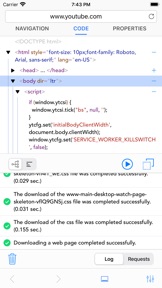
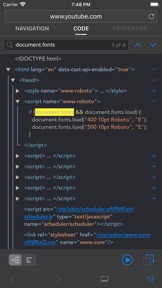
• formatted viewing of HTML, XML and JSON code in a structured and textual view;
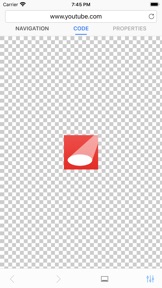
• viewing a web page in the built-in web browser;
• viewing connected styles and their location for the selected web page tag in code or in the built-in web browser;
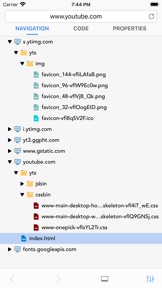
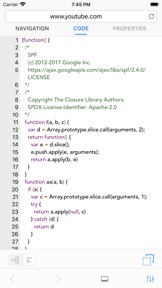
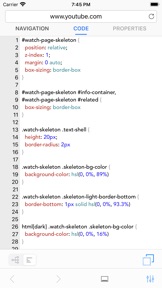
• getting a list and viewing the formatted content of the included JavaScript and CSS files to the web page;
• getting a list and viewing all known image formats included to a web page, including ICO and GIF formats;
• analysis of the structure of HTML and XML and the output of information about detected errors in the log;
• opening links that are available in HTML or XML code;
• text search in the code and in the built-in web browser;
• formatted viewing of JavaScript, CSS, XML and JSON code received separately on request;
• support for the POST / GET / PUT / PATCH / DELETE methods with the addition of headers, cookies and body;
• viewing cookie values from the response of the request;
• changing the value of UserAgent;
• saving the history of requests that were made earlier;
• copying to the clipboard the entire code or its separate parts;
• output of time spent on request execution;
• change the font of any workspace of the application for convenient use.
Your comments and feedback help us to be better! Write what you want to see in new releases and we will do it!
What's New in Version 5.1
Hello dear users of the application! We have prepared a small update for you, in which:
• Added support for synchronizing search history and UserAgent values with iCloud (available only for mobile operating systems version 13.0 and higher);
• Added support for opening or closing a data structure by double-taping on a structure element;
• Improved the application in Slide Over mode.
Information
Developer
Categories
Version
5.1
Size
11.4 MB
Game Center
No
VPP Device Licensing
Yes
Rating
Rated: 4+
Compatibility
iOS 11.0 or later
Devices
iPhone 5s, iPhone 6, iPhone 6 Plus, iPhone 6s, iPhone 6s Plus, iPhone SE, iPhone 7, iPhone 7 Plus, iPhone 8, iPhone 8 Plus, iPhone X, iPhone XR, iPhone XS, iPhone XS Max, iPhone 11, iPhone 11 Pro, iPhone 11 Pro Max, iPhone SE (2nd generation), iPad (5th Generation) Wi-Fi, iPad (5th Generation) Wi-Fi + Cellular, iPad (6th generation) Wi-Fi, iPad (6th generation) Wi-Fi + Cellular, iPad Pro, iPad Pro (Cellular), iPad Pro (9.7-inch), iPad Pro (9.7-inch) (Cellular), iPad Pro 12.9-inch (2nd generation), iPad Pro 12.9-inch (2nd generation) Wi-Fi + Cellular, iPad Pro (10.5-inch), iPad Pro (10.5-inch) Wi-Fi + Cellular, iPad Pro (11-inch), iPad Pro (11-inch) Wi-Fi + Cellular, iPad Pro 12.9-inch (3rd generation), iPad Pro 12.9-inch (3rd generation) Wi-Fi + Cellular, iPad Air, iPad Air (Cellular), iPad Air 2, iPad Air 2 (Cellular), iPad Air (3rd generation), iPad Air (3rd generation) Wi-Fi + Cellular, iPad mini Retina, iPad mini Retina (Cellular), iPad mini 3, iPad mini 3 (Cellular), iPad mini 4, iPad mini 4 (Cellular), iPad mini (5th Generation), iPad mini (5th Generation) Wi-Fi + Cellular, iPad (7th generation) Wi-Fi + Cellular, iPad Pro 11-inch (2nd generation), iPad Pro 11-inch (2nd generation) Wi-Fi + Cellular, iPad Pro 12.9-inch (4th generation), iPad Pro 12.9-inch (4th generation) Wi-Fi + Cellular, iPod touch (6th Generation), iPod touch (7th generation)
Languages
English, Chinese, French, German, Japanese, Russian, Spanish, Swedish, Ukrainian
App Store: Customer Ratings
Ratings & Reviews
0.0 of 5 (No rating)
App Store: Customer Reviews
No Entry