Updating


Re
#98 in Top Free Apps > Developer Tools
+1
#91 in Top Free iPad Apps > Developer Tools
iPhone Screenshots


iPad Screenshots




Description
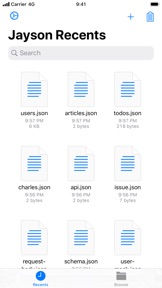
Jayson is a simple yet powerful JSON viewer and editor with Siri Shortcuts, Share Sheet Actions and URL schemes.
Features include:
- Browse JSON files stored on your device.
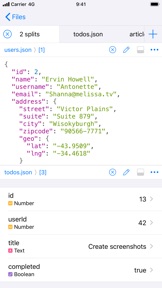
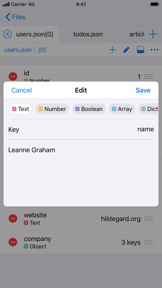
- Toggle between viewing JSON in a table or as syntax highlighted text.
- Tabbed interface to quickly switch between files or different objects in a single file.
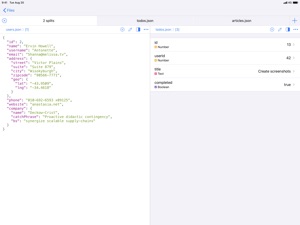
- Use multiple splits to easily compare JSON documents in a single file or across multiple files.
- Multiple windows on the iPad allows for even more options to browse and edit JSON documents.
- Parse text or the contents of a URL in your clipboard to JSON.
- Siri Shortcuts that parse JSON from a text or a link stored in your clipboard. The shortcuts can open the JSON in the app or preview it in an interactive notification.
- Share Sheet Actions for parsing JSON from plain text, loading JSON from a link and importing files as JSON.
- URL schemes for parsing a text, loading the contents of a link as JSON or parsing the contents of your clipboard.
- Choose a location on your device to store imported files.
- Highlight a key from a child of an array to quickly get an overview.
- Short videos that help you get started with the app.
Features that require the "Unlock Everything" in-app purchase:
- Switch between light and dark themes.
- Changing the visual appearance, including the app icon, accent color and type icons.
- Opening more than two tabs.
What's New in Version 1.4
- New: Adds the Prettify JSON action to Shortcuts. It takes a dictionary, list or text as input and outputs a pretty JSON string.
- New: Integrates better with the document browser for creating new files. Files will now be created in the folder you're browsing.
- New: Adds +/- button in the keyboard when adding or editing a number value.
- Bugfix: Numbers written with scientific notation (e.g. 7e+16) could not be parsed when they contained a plus.
- Bugfix: Sometimes decimal numbers weren't displayed correctly.
- Bugfix: The Get File action in Shortcuts no longer requires the file extension in order to find the file.
Seller
Name
Simon Stovring
Information
Developer
Categories
Version
1.4
Size
19.6 MB
Game Center
No
VPP Device Licensing
Yes
Rating
Rated: 4+
Compatibility
iOS 13.0 or later
Devices
iPhone 5s, iPhone 6, iPhone 6 Plus, iPhone 6s, iPhone 6s Plus, iPhone SE, iPhone 7, iPhone 7 Plus, iPhone 8, iPhone 8 Plus, iPhone X, iPhone XR, iPhone XS, iPhone XS Max, iPhone 11, iPhone 11 Pro, iPhone 11 Pro Max, iPhone SE (2nd generation), iPad (5th Generation) Wi-Fi, iPad (5th Generation) Wi-Fi + Cellular, iPad (6th generation) Wi-Fi, iPad (6th generation) Wi-Fi + Cellular, iPad Pro, iPad Pro (Cellular), iPad Pro (9.7-inch), iPad Pro (9.7-inch) (Cellular), iPad Pro 12.9-inch (2nd generation), iPad Pro 12.9-inch (2nd generation) Wi-Fi + Cellular, iPad Pro (10.5-inch), iPad Pro (10.5-inch) Wi-Fi + Cellular, iPad Pro (11-inch), iPad Pro (11-inch) Wi-Fi + Cellular, iPad Pro 12.9-inch (3rd generation), iPad Pro 12.9-inch (3rd generation) Wi-Fi + Cellular, iPad Air, iPad Air (Cellular), iPad Air 2, iPad Air 2 (Cellular), iPad Air (3rd generation), iPad Air (3rd generation) Wi-Fi + Cellular, iPad mini Retina, iPad mini Retina (Cellular), iPad mini 3, iPad mini 3 (Cellular), iPad mini 4, iPad mini 4 (Cellular), iPad mini (5th Generation), iPad mini (5th Generation) Wi-Fi + Cellular, iPad (7th generation) Wi-Fi + Cellular, iPad Pro 11-inch (2nd generation), iPad Pro 11-inch (2nd generation) Wi-Fi + Cellular, iPad Pro 12.9-inch (4th generation), iPad Pro 12.9-inch (4th generation) Wi-Fi + Cellular, iPod touch (6th Generation), iPod touch (7th generation)
Languages
English, Danish
App Store: Customer Ratings
Ratings & Reviews
0.0 of 5 (No rating)
App Store: Customer Reviews
No Entry