Updating


iPhone Screenshots




iPad Screenshots



Description
RunCline provides incline information entered manually in the app and transmits it automatically over Bluetooth. Alternatively, it can read incline directly from your smart treadmill. It will also connect to an external foot pod and/or heart rate monitor and re-transmit the collected metrics over Bluetooth. What's the purpose? You can pair the phone or tablet running RunCline with Zwift and get incline, power, speed, cadence and heart rate. RunCline will also display all metrics on screen for you to view during your running. What's even better? Some smart-er treadmills can also be controlled by RunCline to make them track incline from Zwift on PC or Mac.
Requirements: You need to pair a Bluetooh compliant foot pod and/or supported smart treadmill to RunCline to use the app.
Pairing screen:
* Select one foot pod in range or smart treadmill (required)
* Select one heart rate monitor in range (optional)
* The "Searching" button will display "Start" once the foot pod device or smart treadmill is paired. If the Start button does not appear within 5 seconds, you may need to activate your foot pod by running or walking.
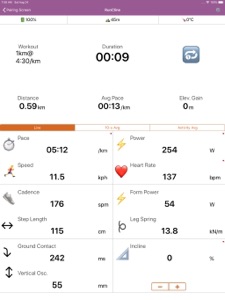
RunCline screen. The running metrics from the foot pod, smart treadmill and/or heart rate monitor will be displayed on screen and re-transmitted to Zwift over Bluetooth. All running metrics are also saved to a .FIT file that can be emailed or exported after the run.
a) Select "Live" to display live metrics or "10-second" to get average metrics from the past 10 seconds.
b) Use the + and - buttons to select the incline (if no smart treadmill connected).
c) You can click the Volume Up and Down buttons on your phone or tablet to get spoken metric values.
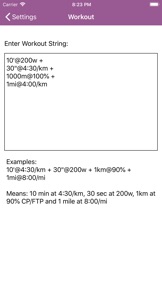
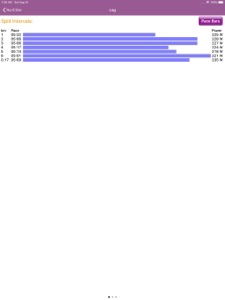
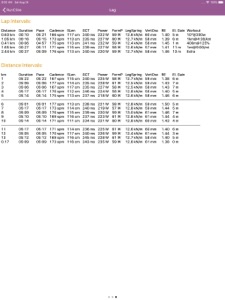
Runcline can be used to run outside. It will provide audio cues at every kilometer or mile. If you are running with power, it can provide audio cues to keep you within your power target. You can define workouts by pace, distance or power. RunCline will notify you at the beginning of each interval. Once your workout is completed, the log report includes detailed results of your run with a summary of all running metrics from your foot pod and more.
List of supported foot pods:
* Stryd
* Zwift RunPod
* MilestonePod
* Runn from NPE
* Garmin foot pods with >CABLE from NPE
* Garmin watches like Fenix 6 with Virtual Run
List of supported Smart Treadmills:
* Bowflex
* CareFitness
* Decathlon Domyos-TC
* DKN RUN
* FitnessFocus (i-Running)
* FitShow
* FlowFitness DTM2000
* Horizon T202
* JTX Sprint 9 (i-Console)
* LifeFitness F3, T3 and T5 with Track Connect
* NoblePro
* Polar (i-Console)
* REEBOK
* SpiritFitness XT285, 385, 485, 685, CT800
* Sole S77, F63, F65, F80, F85 and TT8
* Proform
* TRX3500
* Tunturi
* Woodway 4Front
* XT685
* Treadmills with GEM Retro module
Feedback is more than welcomed and will contribute to make RunCline better for everyone.
What's New in Version 1.6.6
- Added GPS coordinates when running outside (Must enable it in Settings)
- Added a graphical workout summary in the RunCline Workout String menu.
- Workout String now supports efforts as power or pace *ranges* (10'@90%-92%, 10'@200w-210w or 10'@4:10/km-4:00/km)
- Added battery status in individual pairing menu + heart rate for HRM.
- Added ability to enable/disable logs in RunCline. Needs app restart.
- Added Stryd temperature to FIT file.
- Device list is now refreshed automatically in pairing menus.
- Fixed issues when both Stryd and Runn are used at the same time.
- Added support for Kettler S2 to S10 (manual incline buttons)
- Added support for for the newer JTX Sprint treadmills (no incline control)
- Set speed to zero when Bowflex on Pause
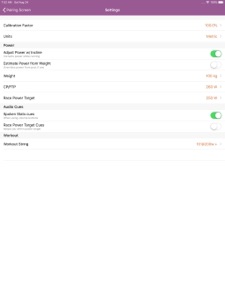
- Added a Settings to change FIT file time between UTC and Local Time.
- Fixed issues when both Stryd and Runn are used at the same time.
- Test code for auto-incline for WdWayC3D treadmill
Seller
Name
Pascal Carrieres
Information
Developer
Categories
Version
1.6.6
Size
18.6 MB
Game Center
No
VPP Device Licensing
Yes
Rating
Rated: 4+
Compatibility
iOS 9.3 or later
Devices
iPhone 4S, iPhone 5, iPhone 5c, iPhone 5s, iPhone 6, iPhone 6 Plus, iPhone 6s, iPhone 6s Plus, iPhone SE, iPhone 7, iPhone 7 Plus, iPhone 8, iPhone 8 Plus, iPhone X, iPhone XR, iPhone XS, iPhone XS Max, iPhone 11, iPhone 11 Pro, iPhone 11 Pro Max, iPhone SE (2nd generation), iPhone 12, iPhone 12 Pro, iPhone 12 Pro Max, iPhone 12 mini, iPad 2 (Wi-Fi), iPad 2 (3G), iPad (3rd Generation) (Wi-Fi), iPad (3rd Generation) (4G), iPad (4th Generation) (Wi-Fi), iPad (4th Generation) (4G), iPad (5th Generation) Wi-Fi, iPad (5th Generation) Wi-Fi + Cellular, iPad (6th generation) Wi-Fi, iPad (6th generation) Wi-Fi + Cellular, iPad Pro, iPad Pro (Cellular), iPad Pro (9.7-inch), iPad Pro (9.7-inch) (Cellular), iPad Pro 12.9-inch (2nd generation), iPad Pro 12.9-inch (2nd generation) Wi-Fi + Cellular, iPad Pro (10.5-inch), iPad Pro (10.5-inch) Wi-Fi + Cellular, iPad Pro (11-inch), iPad Pro (11-inch) Wi-Fi + Cellular, iPad Pro 12.9-inch (3rd generation), iPad Pro 12.9-inch (3rd generation) Wi-Fi + Cellular, iPad Air, iPad Air (Cellular), iPad Air 2, iPad Air 2 (Cellular), iPad Air (3rd generation), iPad Air (3rd generation) Wi-Fi + Cellular, iPad mini (Wi-Fi), iPad mini (4G), iPad mini Retina, iPad mini Retina (Cellular), iPad mini 3, iPad mini 3 (Cellular), iPad mini 4, iPad mini 4 (Cellular), iPad mini (5th Generation), iPad mini (5th Generation) Wi-Fi + Cellular, iPad (7th generation) Wi-Fi + Cellular, iPad Pro 11-inch (2nd generation), iPad Pro 11-inch (2nd generation) Wi-Fi + Cellular, iPad Pro 12.9-inch (4th generation), iPad Pro 12.9-inch (4th generation) Wi-Fi + Cellular, iPad Air (4th Generation) (Wi-Fi), iPad Air (4th Generation) (Wi-Fi + Cellular), iPad (8th generation) Wi-Fi, iPad (8th generation) Wi-Fi + Cellular, iPad Pro 11-inch (3rd generation), iPad Pro 11-inch (3rd generation) Wi-Fi + Cellular, iPad Pro 12.9-inch (5th Generation), iPad Pro 12.9-inch (5th Generation) Wi-Fi + Cellular, iPod touch (5th generation), iPod touch (6th Generation), iPod touch (7th generation)
Languages
English
App Store: Customer Ratings
Ratings & Reviews
0.0 of 5 (No rating)
App Store: Customer Reviews
No Entry