Updating


iPhone Screenshots




iPad Screenshots



Description
Here comes Otamatone Studio, the official app for the note-shaped instrument Otamatone. Change your sound!
-About the app
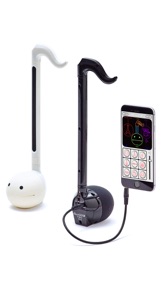
Connect your Otamatone Techno or Otamatone neo to your iPhone or iPad, start Otamatone Studio and play your Otamatone with the sound of various instruments or jam along to built-in rhythms.
We got rid of all the complexities of most available synthesizer simulations and created an app that even beginners will master. It’s really simple!
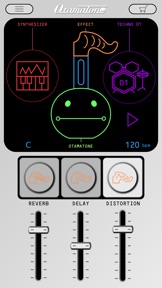
Access all functions via a cute graphical interface that feels like your Otamatone called over a few friends for a basement jam.
-Supported models
・Otamatone neo
・Otamatone Techno
Caution-
You will download a free version of the app. The complete set of features can be unlocked via in-app purchase.
-Main features
●Different sounds
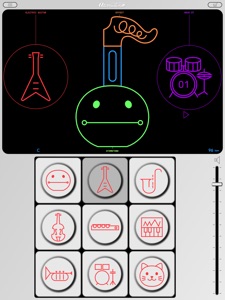
Play your Otamatone with the sound of various instruments. Gather your friends and form a band!
・Instruments(Free Version)
Otamatone / Electric Guitar / Alto Sax
・Instruments (Full Version)
Otamatone / Electric Guitar / Alto Sax
Violin / Flute / Synthesizer
Trumpet / Drums / Cat
Display method
Tap the instrument icon on the right side of the main screen.
●Different scales
With scales your performance will always sound spot on. Play like a pro without all the practicing!
・Scales(Free Version)
Otamatone / 12 Tone / Minor Blues
・Scales (Full Version)
Otamatone / 12 Tone / Minor Blues
Minor / Major / Major Blues
Whole Tone / Pentatonic / Japan
Display method
Tap the face of the Otamatone on the main screen.
●Effects
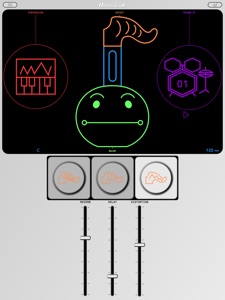
You can alter your Otamatone’s sound with 3 kinds of effects. Push your performance to new heights!
・Reverb
Ever wanted to sound like performing in a concert hall or a bathroom? Look no further! (Reverb is the only effect in the free version.)
・Delay
Adds an echo to your sound.
・Distortion
The trademark of any rock song. Sound like an electric guitar.
Display method
Tap the tail of the Otamatone on the main screen.
●Built-in rhythms
You can choose between different rhythms to play along to. Be your own personal band!
・Rhythms (Free Version)
Rock01 / Techno01 / Japan
・Rhythms (Full Version)
Rock01 / Techno01 / Japan
Rock02 / Samba / Salsa
March / India / Happy Birthday
Happy Birthday is a band arrangement. Surprise someone special to you by playing along to this tune on his/her birthday and you will certainly leave an impression!
Display method
Tap the rhythm icon on the main screen.
●Virtual keyboard
No Otamatone at hand? Display the virtual keyboard and play with Otamatone Studio nevertheless.
Even better
The Otamatone on the main screen will move its mouth during your performance. It doesn’t get much cuter than that!
Display method
Tap the stem of the Otamatone on the main screen. Hold your smartphone sideways to improve playability.
・・・・・・・・・・・・・・・・・・・・・・・・・・・・・・・・・・・・・・・・・・・・・・・・・・・・・・・・・・・・・・・・・・・・・・・・・・・・・
●Further instructions
Further instructions can be found on the Otamatone website. Check it out!
www.otamatone.jp/otstudio/en
(C)MAYWA DENKI
Produced by CUBE Co., Ltd.
Powered by sonosaurus.com
What's New in Version 1.0.1
- Updated user manual and other informational pages
Seller
Name
CUBE Co., Ltd.
Information
Developer
Categories
Version
1.0.1
Size
103.5 MB
Game Center
No
VPP Device Licensing
Yes
Rating
Rated: 4+
Compatibility
iOS 9.0 or later
Devices
iPhone 4S, iPhone 5, iPhone 5c, iPhone 5s, iPhone 6, iPhone 6 Plus, iPhone 6s, iPhone 6s Plus, iPhone SE, iPhone 7, iPhone 7 Plus, iPhone 8, iPhone 8 Plus, iPhone X, iPhone XR, iPhone XS, iPhone XS Max, iPhone 11, iPhone 11 Pro, iPhone 11 Pro Max, iPhone SE (2nd generation), iPhone 12, iPhone 12 Pro, iPhone 12 Pro Max, iPhone 12 mini, iPad 2 (Wi-Fi), iPad 2 (3G), iPad (3rd Generation) (Wi-Fi), iPad (3rd Generation) (4G), iPad (4th Generation) (Wi-Fi), iPad (4th Generation) (4G), iPad (5th Generation) Wi-Fi, iPad (5th Generation) Wi-Fi + Cellular, iPad (6th generation) Wi-Fi, iPad (6th generation) Wi-Fi + Cellular, iPad Pro, iPad Pro (Cellular), iPad Pro (9.7-inch), iPad Pro (9.7-inch) (Cellular), iPad Pro 12.9-inch (2nd generation), iPad Pro 12.9-inch (2nd generation) Wi-Fi + Cellular, iPad Pro (10.5-inch), iPad Pro (10.5-inch) Wi-Fi + Cellular, iPad Pro (11-inch), iPad Pro (11-inch) Wi-Fi + Cellular, iPad Pro 12.9-inch (3rd generation), iPad Pro 12.9-inch (3rd generation) Wi-Fi + Cellular, iPad Air, iPad Air (Cellular), iPad Air 2, iPad Air 2 (Cellular), iPad Air (3rd generation), iPad Air (3rd generation) Wi-Fi + Cellular, iPad mini (Wi-Fi), iPad mini (4G), iPad mini Retina, iPad mini Retina (Cellular), iPad mini 3, iPad mini 3 (Cellular), iPad mini 4, iPad mini 4 (Cellular), iPad mini (5th Generation), iPad mini (5th Generation) Wi-Fi + Cellular, iPad (7th generation) Wi-Fi, iPad Pro 11-inch (2nd generation), iPad Pro 11-inch (2nd generation) Wi-Fi + Cellular, iPad Pro 12.9-inch (4th generation), iPad Pro 12.9-inch (4th generation) Wi-Fi + Cellular, iPad Air (4th Generation) (Wi-Fi), iPad Air (4th Generation) (Wi-Fi + Cellular), iPad (8th generation) Wi-Fi, iPad (8th generation) Wi-Fi + Cellular, iPod touch (5th generation), iPod touch (6th Generation), iPod touch (7th generation), Apple Watch Series 4, Apple Watch Series 5, Apple Watch Series 6 (GPS), Apple Watch Series 6 (GPS + Cellular), Apple Watch Series SE (GPS), Apple Watch Series SE (GPS + Cellular)
Languages
App Store: Customer Ratings
Ratings & Reviews
0.0 of 5 (No rating)
App Store: Customer Reviews
No Entry