AboutTermsPrivacyContact
 
Updating
Epson Smart Panel

Epson Smart Panel

Released: 2020-03-31
© 2019 Seiko Epson Corporation
Epson Smart Panel - QR Code
Version 5.1.0
4+
Download on the App Store
Version 5.1.0
4+
Download on the App Store
Released: 2020-03-31
© 2019 Seiko Epson Corporation

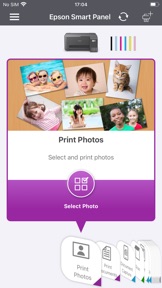
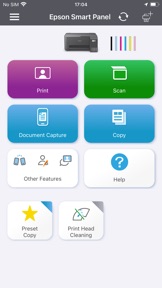
iPhone Screenshots

Screenshot
Screenshot
Screenshot
Screenshot

iPad Screenshots

Screenshot
Screenshot
Screenshot
Screenshot

Description

Visit the website below to find products which are supported by this app.
When using a printer or scanner that’s not listed on the website, please use instead Epson iPrint for printers or Document Scan for scanners. Epson Smart Panel will not be able to find or connect to your product unless it’s on the website’s list of supported products.
https://support.epson.net/appinfo/smartpanel/guide/en/
High performance, easy-to-use mobile command center for your Epson wireless printer or scanner1. Easily set up, monitor and operate your Epson product from the convenience of your mobile device with this powerful new tool.
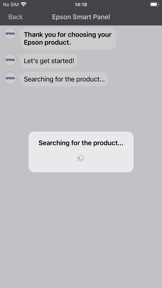
- Easily set up your Epson product on your Wi-Fi
- Innovative action tiles make your Epson Product simple and quick to use
- Fits like a glove -- auto configuration and customization tailors the experience
- Receive the support you need - register, get supplies, or find help all in one convenient place
- One interface for your Epson Printers and Scanners -- auto configuration tailors the app's functions to your device.
1. Requires Epson Smart Panel app download and a compatible smart device. Data usage fees may apply. For more information please visit www.epson.com for support.

What's New in Version 5.1.0

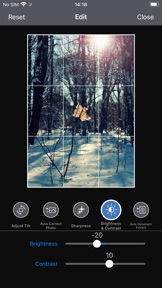
- Improved usability of photo editing and print preview.

Seller

Name

Seiko Epson Corporation

Information

Categories

Version

5.1.0

Size

212 MB

Game Center

No

VPP Device Licensing

Yes

Rating

Rated: 4+

Compatibility

iOS 15.0 or later

Devices

iPhone 5s, iPhone 6, iPhone 6 Plus, iPhone 6s, iPhone 6s Plus, iPhone SE, iPhone 7, iPhone 7 Plus, iPhone 8, iPhone 8 Plus, iPhone X, iPhone XR, iPhone XS, iPhone XS Max, iPhone 11, iPhone 11 Pro, iPhone 11 Pro Max, iPhone SE (2nd generation), iPhone 12, iPhone 12 Pro, iPhone 12 Pro Max, iPhone 12 mini, iPhone 13, iPhone 13 Pro, iPhone 13 Pro Max, iPhone 13 mini, iPhone SE (3rd generation), iPhone 14, iPhone 14 Plus, iPhone 14 Pro, iPhone 14 Pro Max, iPhone 15, iPhone 15 Plus, iPhone 15 Pro, iPhone 15 Pro Max, iPhone 16, iPhone 16 Plus, iPhone 16 Pro, iPhone 16 Pro Max, iPhone 16e, iPhone 17, iPhone 17Pro, iPhone 17ProMax, iPhone Air, iPad (5th Generation) Wi-Fi, iPad (5th Generation) Wi-Fi + Cellular, iPad (6th generation) Wi-Fi, iPad (6th generation) Wi-Fi + Cellular, iPad Pro, iPad Pro (Cellular), iPad Pro (9.7-inch), iPad Pro (9.7-inch) (Cellular), iPad Pro 12.9-inch (2nd generation), iPad Pro 12.9-inch (2nd generation) Wi-Fi + Cellular, iPad Pro (10.5-inch), iPad Pro (10.5-inch) Wi-Fi + Cellular, iPad Pro (11-inch), iPad Pro (11-inch) Wi-Fi + Cellular, iPad Pro 12.9-inch (3rd generation), iPad Pro 12.9-inch (3rd generation) Wi-Fi + Cellular, iPad Air, iPad Air (Cellular), iPad Air 2, iPad Air 2 (Cellular), iPad Air (3rd generation), iPad Air (3rd generation) Wi-Fi + Cellular, iPad mini Retina, iPad mini Retina (Cellular), iPad mini 3, iPad mini 3 (Cellular), iPad mini 4, iPad mini 4 (Cellular), iPad mini (5th Generation), iPad mini (5th Generation) Wi-Fi + Cellular, iPad (7th generation) Wi-Fi + Cellular, iPad Pro 11-inch (2nd generation), iPad Pro 11-inch (2nd generation) Wi-Fi + Cellular, iPad Pro 12.9-inch (4th generation), iPad Pro 12.9-inch (4th generation) Wi-Fi + Cellular, iPad Air (4th Generation) (Wi-Fi), iPad Air (4th Generation) (Wi-Fi + Cellular), iPad (8th generation) Wi-Fi, iPad (8th generation) Wi-Fi + Cellular, iPad Pro 11-inch (3rd generation), iPad Pro 11-inch (3rd generation) Wi-Fi + Cellular, iPad Pro 12.9-inch (5th Generation), iPad Pro 12.9-inch (5th Generation) Wi-Fi + Cellular, iPad (9th Generation), iPad (9th Generation) Wi-Fi + Cellular, iPad mini (6th Generation), iPad mini (6th Generation) Wi-Fi + Cellular, iPad Air (5th generation), iPad Air (5th generation) Wi-Fi + Cellular, iPad Pro 11-inch (4th generation), iPad Pro 11-inch (4th generation) Wi-Fi + Cellular, iPad Pro 12.9-inch (6th generation), iPad Pro 12.9-inch (6th generation) Wi-Fi + Cellular, iPad (10th generation), iPad (10th generation) Wi-Fi + Cellular, iPad Air 11-inch (M2) Wi-Fi, iPad Air 13-inch (M2) Wi-Fi, iPad Air 13-inch (M2) Wi-Fi + Cellular, iPad Pro 11-inch (M4) Wi-Fi, iPad Pro 11-inch (M4) Wi-Fi + Cellular, iPad Pro 13-inch (M4) Wi-Fi, iPad Pro 13-inch (M4) Wi-Fi + Cellular, iPad mini (A17 Pro) Wi-Fi, iPad mini (A17 Pro) Wi-Fi + Cellular, iPad (A16) Wi-Fi, iPad (A16) Wi-Fi + Cellular, iPad Air 11-inch (M3) Wi-Fi, iPad Air 11-inch (M3) Wi-Fi + Cellular, iPad Air 13-inch (M3) Wi-Fi, iPad Air 13-inch (M3) Wi-Fi + Cellular, iPad Pro11M5, iPad Pro11M5Cellular, iPad Pro13M5, iPad Pro13M5Cellular, iPod touch (6th Generation), iPod touch (7th generation)

Languages

English, Azerbaijani, Belarusian, Bulgarian, Catalan, Chinese, Croatian, Czech, Danish, Dutch, Estonian, Finnish, French, German, Greek, Hindi, Hungarian, Indonesian, Italian, Japanese, Kazakh, Korean, Latvian, Lithuanian, Macedonian, Malay, Mongolian, Norwegian Bokmål, Polish, Portuguese, Romanian, Russian, Serbian, Slovak, Slovenian, Spanish, Swahili, Swedish, Thai, Turkish, Turkmen, Ukrainian, Uzbek, Vietnamese

App Store: Customer Ratings

Ratings & Reviews

4.7 of 5 (5,065 Ratings)

App Store: Customer Reviews

2025-10-11

Epson app

Struggling to connect doesn’t allow me to change quality of printing. Had no such issues with previous epson printing app.
djdhdhf hê rbtvjd
Version 5.1.0
2025-09-18

The best

It’s friendly to use and easy to connect
Batlokwa
Version 5.1.0
2025-08-28

Basically spyware

Why the hell does the printer need location access TO PRINT?
idontlikeappleprosucts
Version 5.1.0
2025-07-27

Don’t buy Epson

One has to set up and download drivers continuously. I had an HP and I only ever had to set it up once
Typetyy
Version 5.0.2
2025-07-26

Easy Peasy

"Next-Next" installation and done. Very user friendly. Clean interface. Added benefit of updating the printer firmware. 👍👌👊
Schalk van Heerden
Version 5.0.2
2025-07-09

Helpful

Very easy and comfortable
Iyard emon
Version 5.0.2
2025-07-04

Printing blank pages

I don’t know what’s happening but I just set up the printer and it’s printing blank so pages after filling up the ink and following all steps
RhorhoSA
Version 5.0.2
2025-06-24

Printer

Very good
Raaid12
Version 5.0.2
2025-06-13

Cuts off pictures

Cuts off ends of files / pictures on ipad. No options to change
r0bertf
Version 5.0.2
2025-06-10

Experience of App

My experience with Epson smart panel has been amazing,I am able to print or photocopy any documents with ease an absolute 10/10,spectacular give me 14 of em right now 💅
lindoravenna
Version 5.0.2
2025-05-21

Wonderful

Printing in this app is so effortless and easy
Benjiiii wako CC
Version 5.0.2
2025-05-21

Wireless Networking

Too complicated to connect to a wireless network using multiple Apple products
NealWDouglasd
Version 5.0.2
2025-04-13

Back to back

Doesn’t have a back to back option
Mavuxion
Version 5.0.1
2025-04-11

Perfect

This is just convenient at all times
La_ginindza
Version 5.0.1
2025-04-04

Custom size

The fact that you can’t customise a picture size doesn’t do any justice..the are only limited sizes to choose from
angeleys112
Version 5.0.1
2025-03-24

Fantastic product

Buying this printer has been one of my happiest purchases, the Epson team made it so easy to setup on my mobile and laptop
Thank you
Mornel007
Version 5.0.1
2025-03-06

Loving the App

Loving the app that I can use it to scan documents that doesnt fit on my printer
Glenshoun
Version 5.0.1
2025-02-22

Epson Eco Tank

Wow I love this printer. I struggle connecting it to my phone but now that everything works I’m happy. The app is everything. But the printer it’s doesn’t come with a USB cable for the laptop.
Naledistarlady
Version 5.0.1
2025-02-01

Connection unstable

Always loses WiFi connection which is frustrating
Tulipm0220
Version 5.0.1
2025-01-15

Time management

You need to wait on the printing screen while you are printing
The Phill man
Version 5.0.1
2024-12-03

Epson Eco printers

Effortless set-up and great quality printing! Will never look at other options again. Thank you! This homeschool Mom is greatful.
Noakitty
Version 5.0.0
2024-11-07

Great App

This app is easy to use.
Mpho Rambau
Version 4.9.0
2024-11-05

Amazing app

Easy to use and super helpful
Nni3327822
Version 4.9.0
2024-10-31

Terrible to connect

Very difficult to easily connect to. Every pc needs elaborate process to link.
Very frustrating product to use
Terrible to connect
Version 4.9.0
2024-10-21

Double sided print on app?

Honestly feel like I’m going crazy? How do I double sided print while using the app????????? Perhaps it’s in your manual? Nope. Perhaps it’s online ? Nope. HELP
chloe 1204!
Version 4.9.0
2024-10-14

New printer

Easy to use , perfect 👌🏾
SanzooT
Version 4.9.0
2024-09-29

Complicated and time consuming

What a waste of time - not a quick press one button solution like my other printer. Printing from iPhone is annoying. Will probably return to old brand in the near future.
Cara-Lousie
Version 4.8.0
2024-09-27

Epson smart panel app

Best app ever fast and efficient
Angelique Burt
Version 4.8.0
2024-09-13

Epson L3250

This is the best printer ever
Bubudla Makasela
Version 4.8.0
2024-09-11

Amazing for printing from a free range near your office/home WiFi

Wow!!
Meeee,,,!!!
Version 4.8.0
2024-09-09

Speed

Its printing super slow
kmash101
Version 4.8.0
2024-09-04

New Printer

So far so good.
Kokochips
Version 4.8.0
2024-07-21

Print

Excellent
Leloh21
Version 4.8.0
2024-06-20

It doesn’t work

It just stopped printing and I am returning it. I dont recommend this product to anyone..useless printer and I regret buying it
Sanda Mtamo
Version 4.7.2
2024-06-03

Annoying

Annoying that I cannot do a quality print from any application other than PDF!
SLV3005
Version 4.7.2
2024-05-24

Epson smart (not at all) app for printers

This is a terrible product terrible,
I have spent hours I mean hours trying to connect the printer to a WiFi .. it says it’s connected to WiFi on the printer and in the app it says it isn’t .. when searching for the WiFi it only finds its own WiFi it’s useless absolutely useless and utterly frustrating. It’s an app designed by twats who have no clue of simplicity stay well away from this app and the L3256 printer.
S1m0n44
Version 4.7.2
2024-05-19

Bad lrinter

Very poor printing quality. Made a big mistake buying it...
Kellies 123
Version 4.7.2
2024-05-10

Review

Should incorporate back to back settings
Olico Jabulani
Version 4.7.2
2024-05-02

Disappointed

Very time consuming and poor quality
Nkosi JM
Version 4.7.2
2024-04-27

The printer is great

The app is terrible. The inability to select the printer via the standard iOS portal is terrible. I’ve had multiple other printers, they all have this feature. None of the other brands that I have had have required the use of an app like this. No app, no printing.
It’s just printing, not rocket science.
Tau3
Version 4.7.2
2024-04-26

I got other stuff to do than watch my printer print

Would be nice to Be able to send a print and continue working on other stuff on my iPad while the printer is printing
Mr one and only ToTheMax
Version 4.7.2
2024-04-21

Scanning multiple pages

How do I scan more than 1 page without having to put them on the glass one by one?
Mary- Sue
Version 4.7.2
2024-03-29

How to use my printer by transfer paper

Are the paper come with printer t.shirt transfer paper??
buntaka nb
Version 4.7.2
2024-03-09

Great product

So easy to setup
LerinaCat
Version 4.7.1
2024-03-09

difficult with apple

Really difficult to print from your iphone. Im very upset with this product and the amount of money spend on it.
gdsjoxhjc
Version 4.7.1
2024-03-08

Tapz

Printers are not user friendly the ET 2850 not great
Tapz2
Version 4.7.1
2024-02-18

1st time user

Easy to set up and portable printer. Just disappointed with the ink process it leaked underneath with me spilling but works amazing for sublimation. Can wait to learn more about it.
Lisaseed
Version 4.7.1
2024-02-06

Should have never bought this

Slow, noisy, scanning is page by page
William5534
Version 4.7.1
2024-01-27

Epson App

Perfect and user friendly
24Praise
Version 4.7.1
2024-01-17

Epson Ecotank

Love love love my printer! It is as breeze to setup and install. Prints perfectly from my laptop and EVEN MY iPHONE!!!
LJohannsen
Version 4.7.1
2023-12-06

Easy installation

Loved how easy it is to install and to connect to my smartphone
deirdrebydeirdre
Version 4.6.3
2023-11-09

Excellent

Took a while to set up, works very well. Printing directly from phone is a bliss. Less cables.
Zanele_Jiane
Version 4.6.2
2023-08-01

Brilliant

The app is straight forward, it makes my life super easier. LOVE IT!
SugarBoo🍭
Version 4.5.1
2023-07-30

Love it 😍

Got the printer today , love how convenient it is . Needed a protect for tomorrow just downloaded the app and print it !! 😉
#always be strong
Version 4.5.1
2023-04-19

Double sided printing won’t work

Hey there I was able to print double sided for some time but it’s suddenly stopped working and there isn’t a button to swtich from one sided printing to 2 sided on the app
mhaboob
Version 4.5.0
2023-04-04

Cannot change image size, only paper size.

Lacks the ability to print an image as the precise size it was designed and saved as.
Minettevh
Version 4.4.1
2023-02-08

Epson L3250

Bought the Printer, setup was basic, Ink easy to fill downloaded app on Iphone now printing effortlessly. This is a brilliant Printer value for money
Rooikoos
Version 4.4.1