Updating



iPhone Screenshots


iPad Screenshots


Description
MindMaster aims at helping users draw professional-looking mind maps on iOS devices. You can quickly build your maps with built-in templates, and share with others through images, and PDFs. Whether you are an office staff, an entrepreneur, a student or a freelancer, you can use MindMaster to help you plan tasks, boost creativity, and streamline works.
With MindMaster, you can:
Get Information Organized
>Sort out information with radial structure.
>Visually present information with the combination of texts, colors and images.
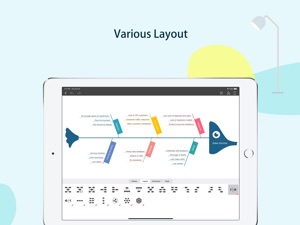
>Display contents in various layouts, such as mind maps, organizational charts, fishbone diagrams, timelines, etc.
Cloud Sync among Different Devices
>Create mind maps instantly on your mobile device and store them in the iCloud.
>Your mind maps will be automatically synchronized to iCloud.
Share Maps with Others Easily
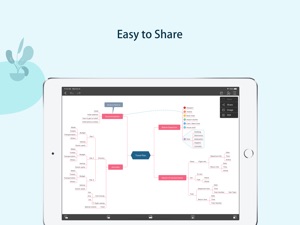
>One-click to share your works with others through SNS or just a web link.
Use MindMaster for different occasions:
Business
Mind maps are popular for project planning, problem solving, meeting management, and presentations. Use MindMaster to help brainstorming sessions, to generate new ideas, or even to map the organizational structure.
Education
MindMaster is a great tool to help students take notes in class, memorize new words, and boost creativity. Teachers can also use it to make lesson plans, do presentations, and collect research materials.
Personal
The mind map application can be used as notepads to write down ideas, to-do lists, or daily schedules.
Features of MindMaster:
>Add new topics, sub topics and floating topics in one tap
>Edit, cut, copy, paste and delete topics
>Undo and redo
>Drag and drop topics
>Zoom
>Expand and collapse branches
>Insert images
>Add callouts, boundaries, and summaries to topics
>Add relationship lines
>Apply predefined themes
>Switch layout to left map, right map, org chart map, fishbone diagram, timeline, circular map etc.
>Auto-layout topics and auto-expand canvas
>Drill a branch or topic
>Change different connector styles
>Use Rainbow color modes
>Switch to hand-drawn mode
>Save maps to the icloud
>Share with others through PDFs, images, and web links.
The free version of MindMaster offers limited functions for basic users only. To create mind maps with full functions, you need to subscribe the member service. There are two subscription options:
Mobile Version - $6.99 / 6 Months
Cross-platform Version (Mobile + Desktop + Online) -$28.99 / 6 Months
Cross-platform Version (Mobile + Desktop + Online) -$48.99 / 12 Months
- After confirming the purchase, payment will be made through your iTunes account.
- When the membership service is activated, the refund will not be supported.
- Member service will renew automatically 24 hours before the current subscription expires.
- Each renewal is valid for 6 months.
- No cancellation of the current subscription is allowed during activated subscription period. To cancel the renewal, please do it 24 hours before the current subscription expires.
- You can unsubscribe from Settings > iTunes & App Store in your Apple devices.
- You can find privacy policy and terms & conditions from the following links:
https://www.edrawsoft.com/mindmaster/privacy-policy.php
https://www.edrawsoft.com/mindmaster/terms-of-service.php
If you have any suggestions or questions, please feel free to contact us:
Email Support:support@edrawsoft.com
Twitter:Edraw @edrawsoft
FaceBook:Edraw Software
Website:https://www.edrawsoft.com/en/mindmaster/
What's New in Version 2.1.0
1. Add: File multi-page feature;
2. Add: File encryption feature;
3. Fixed some known issues.
Seller
Name
Edraw Software Co., Ltd
Information
Developer
Categories
Version
2.1.0
Size
49.8 MB
Game Center
No
VPP Device Licensing
Yes
Rating
Rated: 4+
Compatibility
iOS 11.0 or later
Devices
iPhone 5s, iPhone 6, iPhone 6 Plus, iPhone 6s, iPhone 6s Plus, iPhone SE, iPhone 7, iPhone 7 Plus, iPhone 8, iPhone 8 Plus, iPhone X, iPhone XR, iPhone XS, iPhone XS Max, iPhone 11, iPhone 11 Pro, iPhone 11 Pro Max, iPhone SE (2nd generation), iPad (5th Generation) Wi-Fi, iPad (5th Generation) Wi-Fi + Cellular, iPad (6th generation) Wi-Fi, iPad (6th generation) Wi-Fi + Cellular, iPad Pro, iPad Pro (Cellular), iPad Pro (9.7-inch), iPad Pro (9.7-inch) (Cellular), iPad Pro 12.9-inch (2nd generation), iPad Pro 12.9-inch (2nd generation) Wi-Fi + Cellular, iPad Pro (10.5-inch), iPad Pro (10.5-inch) Wi-Fi + Cellular, iPad Pro (11-inch), iPad Pro (11-inch) Wi-Fi + Cellular, iPad Pro 12.9-inch (3rd generation), iPad Pro 12.9-inch (3rd generation) Wi-Fi + Cellular, iPad Air, iPad Air (Cellular), iPad Air 2, iPad Air 2 (Cellular), iPad Air (3rd generation), iPad Air (3rd generation) Wi-Fi + Cellular, iPad mini Retina, iPad mini Retina (Cellular), iPad mini 3, iPad mini 3 (Cellular), iPad mini 4, iPad mini 4 (Cellular), iPad mini (5th Generation), iPad mini (5th Generation) Wi-Fi + Cellular, iPad (7th generation) Wi-Fi + Cellular, iPad Pro 11-inch (2nd generation), iPad Pro 11-inch (2nd generation) Wi-Fi + Cellular, iPad Pro 12.9-inch (4th generation), iPad Pro 12.9-inch (4th generation) Wi-Fi + Cellular, iPad Air (4th Generation) (Wi-Fi), iPad Air (4th Generation) (Wi-Fi + Cellular), iPad (8th generation) Wi-Fi, iPad (8th generation) Wi-Fi + Cellular, iPod touch (6th Generation), iPod touch (7th generation)
Languages
English, Chinese
App Store: Customer Ratings
Ratings & Reviews
5.0 of 5 (1 Rating)
App Store: Customer Reviews
No Entry