Updating


iPhone Screenshots


iPad Screenshots


Description
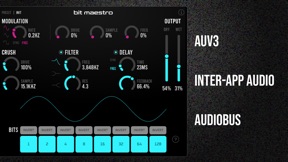
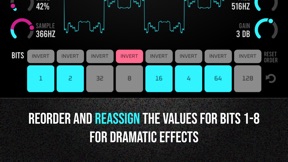
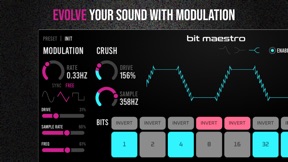
Bit Maestro is an AUv3 bit crusher that goes beyond regular bit rate reduction, allowing you to affect and manipulate your sound at the individual bit level. Taking inspiration from the legendary ‘OTO Biscuit’ it enables you to selectively mute or invert individual bits in your audio signal. As it does this it creates distortions in your waveform, introducing a wide range of harmonics. Bit Maestro pushes this concept even further, allowing you for the first time to even rearrange the order in which the bits are evaluated, reassigning their value and giving rise to waveform distortions not previously seen in any distortion module.
This sound can be further enhanced in a number of ways.
- Three filters are available (low pass, low shelf, high shelf) which can be used to tame or enhance the aggressiveness of the sound.
- A delay line to inject a different groove into a bar or provide a basis for interesting mod effects.
- A modulation panel to continually evolve your sound and introduce further aliasing effects.
The end result is a plugin that can introduce huge depth and power to your sound. One that offers you the nuanced control to design your perfect digital distortion, ranging from subtle warbling to huge crushing sounds that can transform any drum or bass line.
Supports:
- AUv3
- MIDI control
- Inter-app Audio
- Audiobus
What's New in Version 1.1.1
Version 1.1 - MIDI Update
- Exposed AU Parameters to hosts
- Added 'Music Effect' Audio Unit. Use this Audio Unit when you want to send MIDI messages. Assign MIDI CC/Notes to various controls by toggling the MIDI icon in the top right.
- Added optional gain limiter (can enable in this the settings menu)
- Added way to overlay the header menu (with presets/midi/settings options) when the view is in its most compact form.
- Made filter controls adjustable when filter is off
- Improved compatibility with Cubasis automation
- Added 5 new presets
- Tweaked app icon
- Fixed various graphics issues
v1.1.1
- Fixed bit board help menu
Information
Developer
Categories
Version
1.1.1
Size
26 MB
Game Center
No
VPP Device Licensing
Yes
Rating
Rated: 4+
Compatibility
iOS 11.0 or later
Devices
iPhone 5s, iPhone 6, iPhone 6 Plus, iPhone 6s, iPhone 6s Plus, iPhone SE, iPhone 7, iPhone 7 Plus, iPhone 8, iPhone 8 Plus, iPhone X, iPhone XR, iPhone XS, iPhone XS Max, iPhone 11, iPhone 11 Pro, iPhone 11 Pro Max, iPhone SE (2nd generation), iPhone 12, iPhone 12 Pro, iPhone 12 Pro Max, iPhone 12 mini, iPhone 13, iPhone 13 Pro, iPhone 13 Pro Max, iPhone 13 mini, iPhone SE (3rd generation), iPhone 14, iPhone 14 Plus, iPhone 14 Pro, iPhone 14 Pro Max, iPhone 15, iPhone 15 Plus, iPhone 15 Pro, iPhone 15 Pro Max, iPhone 16, iPhone 16 Plus, iPhone 16 Pro, iPhone 16 Pro Max, iPhone 16e, iPhone 17, iPhone 17Pro, iPhone 17ProMax, iPhone Air, iPad (5th Generation) Wi-Fi, iPad (5th Generation) Wi-Fi + Cellular, iPad (6th generation) Wi-Fi, iPad (6th generation) Wi-Fi + Cellular, iPad Pro, iPad Pro (Cellular), iPad Pro (9.7-inch), iPad Pro (9.7-inch) (Cellular), iPad Pro 12.9-inch (2nd generation), iPad Pro 12.9-inch (2nd generation) Wi-Fi + Cellular, iPad Pro (10.5-inch), iPad Pro (10.5-inch) Wi-Fi + Cellular, iPad Pro (11-inch), iPad Pro (11-inch) Wi-Fi + Cellular, iPad Pro 12.9-inch (3rd generation), iPad Pro 12.9-inch (3rd generation) Wi-Fi + Cellular, iPad Air, iPad Air (Cellular), iPad Air 2, iPad Air 2 (Cellular), iPad Air (3rd generation), iPad Air (3rd generation) Wi-Fi + Cellular, iPad mini Retina, iPad mini Retina (Cellular), iPad mini 3, iPad mini 3 (Cellular), iPad mini 4, iPad mini 4 (Cellular), iPad mini (5th Generation), iPad mini (5th Generation) Wi-Fi + Cellular, iPad (7th generation) Wi-Fi + Cellular, iPad Pro 11-inch (2nd generation), iPad Pro 11-inch (2nd generation) Wi-Fi + Cellular, iPad Pro 12.9-inch (4th generation), iPad Pro 12.9-inch (4th generation) Wi-Fi + Cellular, iPad Air (4th Generation) (Wi-Fi), iPad Air (4th Generation) (Wi-Fi + Cellular), iPad (8th generation) Wi-Fi, iPad (8th generation) Wi-Fi + Cellular, iPad Pro 11-inch (3rd generation), iPad Pro 11-inch (3rd generation) Wi-Fi + Cellular, iPad Pro 12.9-inch (5th Generation), iPad Pro 12.9-inch (5th Generation) Wi-Fi + Cellular, iPad (9th Generation), iPad (9th Generation) Wi-Fi + Cellular, iPad mini (6th Generation), iPad mini (6th Generation) Wi-Fi + Cellular, iPad Air (5th generation), iPad Air (5th generation) Wi-Fi + Cellular, iPad Pro 11-inch (4th generation), iPad Pro 11-inch (4th generation) Wi-Fi + Cellular, iPad Pro 12.9-inch (6th generation), iPad Pro 12.9-inch (6th generation) Wi-Fi + Cellular, iPad (10th generation), iPad (10th generation) Wi-Fi + Cellular, iPad Air 11-inch (M2) Wi-Fi, iPad Air 13-inch (M2) Wi-Fi, iPad Air 13-inch (M2) Wi-Fi + Cellular, iPad Pro 11-inch (M4) Wi-Fi, iPad Pro 11-inch (M4) Wi-Fi + Cellular, iPad Pro 13-inch (M4) Wi-Fi, iPad Pro 13-inch (M4) Wi-Fi + Cellular, iPad mini (A17 Pro) Wi-Fi, iPad mini (A17 Pro) Wi-Fi + Cellular, iPad (A16) Wi-Fi, iPad (A16) Wi-Fi + Cellular, iPad Air 11-inch (M3) Wi-Fi, iPad Air 11-inch (M3) Wi-Fi + Cellular, iPad Air 13-inch (M3) Wi-Fi, iPad Air 13-inch (M3) Wi-Fi + Cellular, iPad Pro11M5, iPad Pro11M5Cellular, iPad Pro13M5, iPad Pro13M5Cellular, iPod touch (6th Generation), iPod touch (7th generation)
Languages
English
App Store: Customer Ratings
Ratings & Reviews
0.0 of 5 (No rating)
App Store: Customer Reviews
No Entry