Updating


iPhone Screenshots



Description
Transform your iPhone or iPad into a fully featured Mac trackpad with gestures support.
This app was written by a single person and was featured by 9to5Mac, Redmond Pie, AppAdvice, MacMagazine and more.
REVIEWS
“I’ve tried many similar apps before, but none of them worked as well as El Trackpad. Besides not having any notable lag, the app lets the user perform the same gestures as you can do on Apple’s Magic Trackpad.”
— 9to5Mac
“What makes El Trackpad so impressive here is the fact that it appears to be lag-free and works identically to an actual Apple Magic Trackpad, which is super awesome.”
— Redmond Pie
“If you’ve ever used a Magic Trackpad or the built-in version on any MacBook model, you’ll be right at home with the app.”
— AppAdvice
“This app transforms the iPhone/iPad into a complete trackpad for Macs, with multi-touch support and everything.”
— MacMagazine
DESCRIPTION
Move the mouse cursor with the slide of a finger and smoothly navigate through your content with inertial scrolling. Pinch to zoom, rotate with your fingers and much more. Control your Mac in real-time with no lag.
El Trackpad works like magic and has the features and touch gestures that you expect from a touchpad for a Mac computer.
GET STARTED
- Download and Install El trackpad on your iOS/iPadOS device and on your Mac.
- Enable accessibility features on the Mac app when prompted. This is required to control the mouse cursor.
- Connect the devices via USB cable.
SUPPORTED GESTURES
- Tap to click: Tap with one finger to click
- Secondary click: Tap with two fingers to right click
- Smart zoom: Double-tap with two fingers to zoom in and out
- Scroll: Slide two fingers to scroll
- Zoom: Pinch with two fingers to zoom
- Rotate: Move two fingers around each other to rotate
- Three-finger drag: Use three fingers to drag items on the screen
- Look up: Tap with three fingers to look up a word
- Show desktop: Spread your thumb and four fingers to show the desktop
- Launchpad: Pinch with your whole hand to show Launchpad
- Mission Control: Swipe up with four fingers to open mission control
- App Exposé: Swipe down with four fingers to open App Exposé
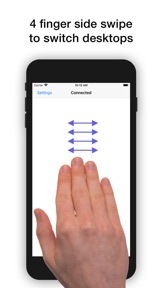
- Swipe between desktops: Swipe left or right with four fingers to move between full-screen apps or desktops
ADDITIONAL INFO
El Trackpad can be downloaded for free and offers a a 7-day free trial with full functionality. After that, gestures with 2 fingers or more will no longer be recognized. At any time, you may unlock the app forever with a one-time in-app purchase.
What's New in Version 1.0.7
Minor performance improvements and bug fixes.
Seller
Name
Hugo Lispector
Information
Developer
Categories
Version
1.0.7
Size
15.4 MB
Game Center
No
VPP Device Licensing
Yes
Rating
Rated: 4+
Compatibility
iOS 10.0 or later
Devices
iPhone 5, iPhone 5c, iPhone 5s, iPhone 6, iPhone 6 Plus, iPhone 6s, iPhone 6s Plus, iPhone SE, iPhone 7, iPhone 7 Plus, iPhone 8, iPhone 8 Plus, iPhone X, iPhone XR, iPhone XS, iPhone XS Max, iPhone 11, iPhone 11 Pro, iPhone 11 Pro Max, iPhone SE (2nd generation), iPhone 12, iPhone 12 Pro, iPhone 12 Pro Max, iPhone 12 mini, iPad (4th Generation) (Wi-Fi), iPad (4th Generation) (4G), iPad (5th Generation) Wi-Fi, iPad (5th Generation) Wi-Fi + Cellular, iPad (6th generation) Wi-Fi, iPad (6th generation) Wi-Fi + Cellular, iPad Pro, iPad Pro (Cellular), iPad Pro (9.7-inch), iPad Pro (9.7-inch) (Cellular), iPad Pro 12.9-inch (2nd generation), iPad Pro 12.9-inch (2nd generation) Wi-Fi + Cellular, iPad Pro (10.5-inch), iPad Pro (10.5-inch) Wi-Fi + Cellular, iPad Pro (11-inch), iPad Pro (11-inch) Wi-Fi + Cellular, iPad Pro 12.9-inch (3rd generation), iPad Pro 12.9-inch (3rd generation) Wi-Fi + Cellular, iPad Air, iPad Air (Cellular), iPad Air 2, iPad Air 2 (Cellular), iPad Air (3rd generation), iPad Air (3rd generation) Wi-Fi + Cellular, iPad mini Retina, iPad mini Retina (Cellular), iPad mini 3, iPad mini 3 (Cellular), iPad mini 4, iPad mini 4 (Cellular), iPad mini (5th Generation), iPad mini (5th Generation) Wi-Fi + Cellular, iPad (7th generation) Wi-Fi + Cellular, iPad Pro 11-inch (2nd generation), iPad Pro 11-inch (2nd generation) Wi-Fi + Cellular, iPad Pro 12.9-inch (4th generation), iPad Pro 12.9-inch (4th generation) Wi-Fi + Cellular, iPad Air (4th Generation) (Wi-Fi), iPad Air (4th Generation) (Wi-Fi + Cellular), iPad (8th generation) Wi-Fi, iPad (8th generation) Wi-Fi + Cellular, iPod touch (6th Generation), iPod touch (7th generation)
Languages
English
App Store: Customer Ratings
Ratings & Reviews
0.0 of 5 (No rating)
App Store: Customer Reviews
No Entry