Updating


iPhone Screenshots


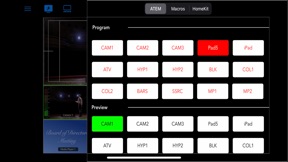

iPad Screenshots


Description
Introducing DirectorMonitor. The all in one solution for monitoring and controlling your BlackMagic Design ATEM Mini video switcher. Paired with the Accsoon SeeMo video capture terminal to view the ATEM's MultiView, Program / Preview out or any HDMI video Source.
Primary features include:
- Control of ATEM Mini's primary control buttons.
- Control of ATEM Mini's macro buttons.
- Viewing any 1080p video source using the Accssoon SeeMo video capture terminal
- The Video In is configured to recognize the ATEM Mini's MultiView to enable the following push button controls
- Tap the MultiView pane to select the current Preview
- Tapping the current Preview a second time selects it as the Program
- Tapping the Preview pane performs a Cut with the Program
- Tapping the Program pane performs an Auto transition with the Preview
- Tapping the upper half of the Media pane performs the same Preview and Program actions as the other sources
- Tap the lower left or the lower right of the Media pane to select the previous or next images of the Media pool, respectively.
- Tapping the Live Stream or Recording Panel toggle each feature on or off.
- DirectorMonitor give full access to turning HomeKit switch on and off
- Display the Video In source at full screen and access the ATEM, Macro and HomeKit Buttons from a Sliding Panel.
- Reorder and / or hide sections of the ATEM Control Buttons
- Fully compatible with Split View, Slide Over and Stage Manager to fulfill your Multitasking needs.
- Display any two panels in wide screen or a single pane if the App is setup to be more tall than wide.
The DirectorMonitor team is urgently completing the following features for release in the coming weeks.
- Customizable Control board for adding specific ATEM, Macro and HomeKit buttons in the order you wish. This also includes special purpose Action Buttons that perform multiple operations include ATEM, Macro, HomeKit, Media Pool Selection, Apple Shortcut functions as well as special Application commands. (initially iPad Only)
- Configure and select up to three ATEM Minis. Each may have its own Customizable Control Board.
- Display the Video In as a system wide Picture in Picture display to multitask with any iPad or iPhone App.
- Access The ATEM's Storage to preview videos directly on the iPad or iPhone. Also perform video management by deleting from storage or copying videos to the device's Files App.
- Configure up to four BlackMagic Design HyperDeck to control primary playback features in addition to video playback and video management.
Note for optimal results the additional hardware of an ATEM Mini video switcher and a Accsoon SeeMo video capture terminal are advised.
For details on the BlackMagic Design ATEM Mini video switchers
https://www.blackmagicdesign.com/products/atemmini
For details on the Accsoon SeeMo
https://accsoonusa.com/accsoon-seemob-ios-hdmi-adapter-black/
What's New in Version 1.10
Adding new features:
- You can now configure up to three ATEM Minis and switch between from the Context menu
- New Control Board Tab allows a custom configuration to layout ATEM Buttons and Macros and also HomeKit Buttons to suit your needs
- Each ATEM can have a HomeKit Home assigned and can either share or have its own designated Control Board
- Custom Actions, similar to Macros can also be added to the Control Board
- Include any number of ATEM Buttons, Macros and HomeKit Buttons
- Select specific images from the ATEM Media Pool
- Run Apple Shortcuts
- Custom Commands like Pauses or Select a different ATEM Mini
- Updated toolbar layout to improve usability on the iPhone (and the iPad too)
Seller
Name
Odeon Software Inc.
Information
Developer
Categories
Version
1.10
Size
153.4 MB
Game Center
No
VPP Device Licensing
Yes
Rating
Rated: 4+
Compatibility
iOS 15.0 or later
Devices
iPhone 5s, iPhone 6, iPhone 6 Plus, iPhone 6s, iPhone 6s Plus, iPhone SE, iPhone 7, iPhone 7 Plus, iPhone 8, iPhone 8 Plus, iPhone X, iPhone XR, iPhone XS, iPhone XS Max, iPhone 11, iPhone 11 Pro, iPhone 11 Pro Max, iPhone SE (2nd generation), iPhone 12, iPhone 12 Pro, iPhone 12 Pro Max, iPhone 12 mini, iPhone 13, iPhone 13 Pro, iPhone 13 Pro Max, iPhone 13 mini, iPhone SE (3rd generation), iPhone 14, iPhone 14 Plus, iPhone 14 Pro, iPhone 14 Pro Max, iPad (5th Generation) Wi-Fi, iPad (5th Generation) Wi-Fi + Cellular, iPad (6th generation) Wi-Fi, iPad (6th generation) Wi-Fi + Cellular, iPad Pro, iPad Pro (Cellular), iPad Pro (9.7-inch), iPad Pro (9.7-inch) (Cellular), iPad Pro 12.9-inch (2nd generation), iPad Pro 12.9-inch (2nd generation) Wi-Fi + Cellular, iPad Pro (10.5-inch), iPad Pro (10.5-inch) Wi-Fi + Cellular, iPad Pro (11-inch), iPad Pro (11-inch) Wi-Fi + Cellular, iPad Pro 12.9-inch (3rd generation), iPad Pro 12.9-inch (3rd generation) Wi-Fi + Cellular, iPad Air, iPad Air (Cellular), iPad Air 2, iPad Air 2 (Cellular), iPad Air (3rd generation), iPad Air (3rd generation) Wi-Fi + Cellular, iPad mini Retina, iPad mini Retina (Cellular), iPad mini 3, iPad mini 3 (Cellular), iPad mini 4, iPad mini 4 (Cellular), iPad mini (5th Generation), iPad mini (5th Generation) Wi-Fi + Cellular, iPad (7th generation) Wi-Fi + Cellular, iPad Pro 11-inch (2nd generation), iPad Pro 11-inch (2nd generation) Wi-Fi + Cellular, iPad Pro 12.9-inch (4th generation), iPad Pro 12.9-inch (4th generation) Wi-Fi + Cellular, iPad Air (4th Generation) (Wi-Fi), iPad Air (4th Generation) (Wi-Fi + Cellular), iPad (8th generation) Wi-Fi, iPad (8th generation) Wi-Fi + Cellular, iPad Pro 11-inch (3rd generation), iPad Pro 11-inch (3rd generation) Wi-Fi + Cellular, iPad Pro 12.9-inch (5th Generation), iPad Pro 12.9-inch (5th Generation) Wi-Fi + Cellular, iPad (9th Generation), iPad (9th Generation) Wi-Fi + Cellular, iPad mini (6th Generation), iPad mini (6th Generation) Wi-Fi + Cellular, iPad Air (5th generation), iPad Air (5th generation) Wi-Fi + Cellular, iPad Pro 11-inch (4th generation), iPad Pro 11-inch (4th generation) Wi-Fi + Cellular, iPad Pro 12.9-inch (6th generation), iPad Pro 12.9-inch (6th generation) Wi-Fi + Cellular, iPad (10th generation), iPad (10th generation) Wi-Fi + Cellular, iPod touch (6th Generation), iPod touch (7th generation)
Languages
English
App Store: Customer Ratings
Ratings & Reviews
0.0 of 5 (No rating)
App Store: Customer Reviews
No Entry