Updating


iPhone Screenshots



iPad Screenshots


Description
Features:
- Communicate with fellow Morse enthusiasts from far and near simply by tapping dots and dashes.
- Meet new friends in a number of public rooms (10 WPM or less, 15 WPM, 20 WPM or more, Test room and so on).
- Share and exchange ideas with your Inner Circle by creating private rooms.
- NEW! In private rooms, the owner can modify room details (room ID & name) and remove members.
- Text your friends privately with direct messages.
- NEW! 7 types of Morse keys to choose from (e.g. iambic).
- NEW! Support for external keyboard.
- Easily subscribe and unsubscribe to notifications by clicking the bell icon at the upper right corner.
- NEW! Learn and practice Morse code in real conversations (click on the question mark icon in any chat screen to see Morse representations and the most common Morse abbreviations).
- Auto-translate between Morse code, Morse representation and text while receiving or sending messages. You decide what to show and in which order in Settings.
- Try the app out as a guest or sign in with your Apple ID, Google account or Facebook account.
- Completely adjust the app according to your preferences:
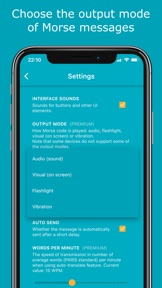
1. Choose the frequency and output mode of the Morse messages (audio, blinking light, flashlight, vibration or audio + blinking light).
2. Adjust the transmission speed when using auto-translate.
3. Change the theme (Cyan, Bright, Dark, Black).
4. Enable/disable auto-send, auto-translation and more.
- Absolutely no ads.
- NEW! Easily block annoying users.
- Blog posts and the info screen provide detailed instructions on how to use the app.
Morse Code
Morse code is a communication system that uses a series of short signals (also known as dots or dits) and long signals (also known as dashes or dahs) to transmit characters. The initial version of it was developed by Samuel F. B. Morse as a method to transmit natural language through the telegraph in the mid-19th century.
Morse Chat
Morse Chat is an app that allows users to communicate with others using Morse code. Once you sign in, you’ll see 3 big buttons which correspond to 3 main ways of chatting.
- Public Rooms. A number of rooms (10 WPM or less, 15 WPM, 20 WPM or more, Test room and so on) has been created to allow chatting with fellow Morse code enthusiasts. These rooms are open to everyone. Contact us if you have an idea for a new public room.
- Private Rooms. These can be created by premium users, and joined by any user (premium or not) who gets the room ID and password (case sensitive) or is invited by an existing room member.
- Direct Messages (DMs). These are private messages between two participants. Simply create a DM by searching the other user’s display name or call sign.
Download Morse Chat now and say “Hello” to the world in Morse code!
Privacy Policy: https://www.dong.digital/morsechat/privacy/
Terms of Use: https://www.dong.digital/morsechat/tos/
What's New in Version 2.0.2
- 7 types of Morse keys to choose from (e.g. iambic)
- In private rooms, now the owner can modify room details (room ID & name) and remove members
- Now you can block users
- Support for external keyboard
- Now you can delete your account
- Now the help sheet shows also the most common abbreviations
- Now you can choose audio + blinking light as output mode
- Settings to control what happens after pressing the reveal button (eye icon)
- Sound issue fix
- Other bug fixes and performance improvements
Seller
Name
Xiang Dong
Information
Developer
Categories
Version
2.0.2
Size
32.9 MB
Game Center
No
VPP Device Licensing
Yes
Rating
Rated: 4+
Compatibility
iOS 13.0 or later
Devices
iPhone 5s, iPhone 6, iPhone 6 Plus, iPhone 6s, iPhone 6s Plus, iPhone SE, iPhone 7, iPhone 7 Plus, iPhone 8, iPhone 8 Plus, iPhone X, iPhone XR, iPhone XS, iPhone XS Max, iPhone 11, iPhone 11 Pro, iPhone 11 Pro Max, iPhone SE (2nd generation), iPhone 12, iPhone 12 Pro, iPhone 12 Pro Max, iPhone 12 mini, iPhone 13, iPhone 13 Pro, iPhone 13 Pro Max, iPhone 13 mini, iPad (5th Generation) Wi-Fi, iPad (5th Generation) Wi-Fi + Cellular, iPad (6th generation) Wi-Fi, iPad (6th generation) Wi-Fi + Cellular, iPad Pro, iPad Pro (Cellular), iPad Pro (9.7-inch), iPad Pro (9.7-inch) (Cellular), iPad Pro 12.9-inch (2nd generation), iPad Pro 12.9-inch (2nd generation) Wi-Fi + Cellular, iPad Pro (10.5-inch), iPad Pro (10.5-inch) Wi-Fi + Cellular, iPad Pro (11-inch), iPad Pro (11-inch) Wi-Fi + Cellular, iPad Pro 12.9-inch (3rd generation), iPad Pro 12.9-inch (3rd generation) Wi-Fi + Cellular, iPad Air, iPad Air (Cellular), iPad Air 2, iPad Air 2 (Cellular), iPad Air (3rd generation), iPad Air (3rd generation) Wi-Fi + Cellular, iPad mini Retina, iPad mini Retina (Cellular), iPad mini 3, iPad mini 3 (Cellular), iPad mini 4, iPad mini 4 (Cellular), iPad mini (5th Generation), iPad mini (5th Generation) Wi-Fi + Cellular, iPad (7th generation) Wi-Fi + Cellular, iPad Pro 11-inch (2nd generation), iPad Pro 11-inch (2nd generation) Wi-Fi + Cellular, iPad Pro 12.9-inch (4th generation), iPad Pro 12.9-inch (4th generation) Wi-Fi + Cellular, iPad Air (4th Generation) (Wi-Fi), iPad Air (4th Generation) (Wi-Fi + Cellular), iPad (8th generation) Wi-Fi, iPad (8th generation) Wi-Fi + Cellular, iPad Pro 11-inch (3rd generation), iPad Pro 11-inch (3rd generation) Wi-Fi + Cellular, iPad Pro 12.9-inch (5th Generation), iPad Pro 12.9-inch (5th Generation) Wi-Fi + Cellular, iPad (9th Generation), iPad (9th Generation) Wi-Fi + Cellular, iPad mini (6th Generation), iPad mini (6th Generation) Wi-Fi + Cellular, iPod touch (6th Generation), iPod touch (7th generation)
Languages
English
App Store: Customer Ratings
Ratings & Reviews
5.0 of 5 (1 Rating)
App Store: Customer Reviews
No Entry