Updating


iPhone Screenshots


iPad Screenshots




Description
You need 200g of sugar but you don’t have a scale—just a measuring cup?
You need 1.5 tbsp of baking powder, but you only have a scale?
You need to know how many strawberries you can expect in a 250g container?
You need to cook for 7 people, but your recipe is for 2 servings?
You need to mark your recipe ingredients as you’re cooking?
You need to share your favorite recipes with friends?
We got you covered!
Cook Units is a measure converter for cooking ingredients designed with usability in a kitchen context. It features a growing set of 1,131+ ingredients with images, and a recipe manager. It works great in light or dark mode, portrait/landscape mode, and in iPad’s Split View/Slide Over layouts. The app can switch between 5 languages (English, French, Japanese, Italian, and Spanish) without changing the language of the device.
CONVERT QUANTITIES
Conversions of measures can be carried out between weight and volume (e.g. grams to/from cups) and displayed with fractions. Units of measurement automatically adjust to the order of magnitude of the quantities being measured. For example: 8 tbsp (tablespoons) will also show as ½ c (cup,) and 1,000 g (grams) will be displayed as 1 kg (kilogram.)
While calculations are exact between weight units or volume units and displayed with up to 2 decimals, they are approximated across weight/volume—depending on an average volumetric mass for the measured ingredient. Conversions also make reasonable approximations in order to display closest fractions, when applicable.
CREATE / SHARE / RECEIVE RECIPES
Ingredients are browsable as a cover flow, grid, or searchable tagged list.
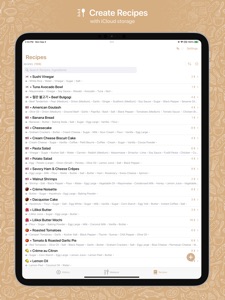
Measured ingredients can be assembled into a recipe with an associated number of servings. Recipes live in iCloud when your account is connected, and so they will appear on any device connected to the same account.
Recipes can be associated with notes, locked to avoid mishaps, and shared via Messages, email, AirDrop, etc. in (filtered) bulk or individually. You can also send them to yourself to create backups.
ENJOY COOKING!
Adjust the number of servings for your recipe and the quantities will automatically resize accordingly with appropriate measuring units.
Mark the ingredients in your recipes as you are cooking or shopping for groceries.
Just tap a recipe ingredient to see its equivalent measures in weight and volume on the fly.
Happy Cooking!
What's New in Version 1.5.4
- Fixed an issue where a newly created recipe was not showing right away in the Recipes tab.
Thank you for using Cook Units!
Seller
Name
Didier Burton
Information
Developer
Categories
Version
1.5.4
Size
93 MB
Game Center
No
VPP Device Licensing
Yes
Rating
Rated: 4+
Compatibility
iOS 16.0 or later
Devices
iPhone 5s, iPhone 6, iPhone 6 Plus, iPhone 6s, iPhone 6s Plus, iPhone SE, iPhone 7, iPhone 7 Plus, iPhone 8, iPhone 8 Plus, iPhone X, iPhone XR, iPhone XS, iPhone XS Max, iPhone 11, iPhone 11 Pro, iPhone 11 Pro Max, iPhone SE (2nd generation), iPhone 12, iPhone 12 Pro, iPhone 12 Pro Max, iPhone 12 mini, iPhone 13, iPhone 13 Pro, iPhone 13 Pro Max, iPhone 13 mini, iPhone SE (3rd generation), iPhone 14, iPhone 14 Plus, iPhone 14 Pro, iPhone 14 Pro Max, iPhone 15, iPhone 15 Plus, iPhone 15 Pro, iPhone 15 Pro Max, iPhone 16, iPhone 16Plus, iPhone 16Pro, iPhone 16ProMax, iPhone 16e, iPad (5th Generation) Wi-Fi, iPad (5th Generation) Wi-Fi + Cellular, iPad (6th generation) Wi-Fi, iPad (6th generation) Wi-Fi + Cellular, iPad Pro, iPad Pro (Cellular), iPad Pro (9.7-inch), iPad Pro (9.7-inch) (Cellular), iPad Pro 12.9-inch (2nd generation), iPad Pro 12.9-inch (2nd generation) Wi-Fi + Cellular, iPad Pro (10.5-inch), iPad Pro (10.5-inch) Wi-Fi + Cellular, iPad Pro (11-inch), iPad Pro (11-inch) Wi-Fi + Cellular, iPad Pro 12.9-inch (3rd generation), iPad Pro 12.9-inch (3rd generation) Wi-Fi + Cellular, iPad Air, iPad Air (Cellular), iPad Air 2, iPad Air 2 (Cellular), iPad Air (3rd generation), iPad Air (3rd generation) Wi-Fi + Cellular, iPad mini Retina, iPad mini Retina (Cellular), iPad mini 3, iPad mini 3 (Cellular), iPad mini 4, iPad mini 4 (Cellular), iPad mini (5th Generation), iPad mini (5th Generation) Wi-Fi + Cellular, iPad (7th generation) Wi-Fi + Cellular, iPad Pro 11-inch (2nd generation), iPad Pro 11-inch (2nd generation) Wi-Fi + Cellular, iPad Pro 12.9-inch (4th generation), iPad Pro 12.9-inch (4th generation) Wi-Fi + Cellular, iPad Air (4th Generation) (Wi-Fi), iPad Air (4th Generation) (Wi-Fi + Cellular), iPad (8th generation) Wi-Fi, iPad (8th generation) Wi-Fi + Cellular, iPad Pro 11-inch (3rd generation), iPad Pro 11-inch (3rd generation) Wi-Fi + Cellular, iPad Pro 12.9-inch (5th Generation), iPad Pro 12.9-inch (5th Generation) Wi-Fi + Cellular, iPad (9th Generation), iPad (9th Generation) Wi-Fi + Cellular, iPad mini (6th Generation), iPad mini (6th Generation) Wi-Fi + Cellular, iPad Air (5th generation), iPad Air (5th generation) Wi-Fi + Cellular, iPad Pro 11-inch (4th generation), iPad Pro 11-inch (4th generation) Wi-Fi + Cellular, iPad Pro 12.9-inch (6th generation), iPad Pro 12.9-inch (6th generation) Wi-Fi + Cellular, iPad (10th generation), iPad (10th generation) Wi-Fi + Cellular, iPad Air 11-inch (M2) Wi-Fi, iPad Air 13-inch (M2) Wi-Fi, iPad Air 13-inch (M2) Wi-Fi + Cellular, iPad Pro 11-inch (M4) Wi-Fi, iPad Pro 11-inch (M4) Wi-Fi + Cellular, iPad Pro 13-inch (M4) Wi-Fi, iPad Pro 13-inch (M4) Wi-Fi + Cellular, iPad MiniA17Pro, iPad MiniA17ProCellular, iPod touch (6th Generation), iPod touch (7th generation)
Languages
English, French, Italian, Japanese, Spanish
App Store: Customer Ratings
Ratings & Reviews
0.0 of 5 (No rating)
App Store: Customer Reviews
No Entry