AboutTermsPrivacyContact
 
Updating
ToonPAINT

ToonPAINT

Released: 2010-01-13
© 2011 Insatiable Genius, LLC
ToonPAINT - QR Code
Version 2.16
12+
Download on the App Store
Version 2.16
12+
Download on the App Store
Released: 2010-01-13
© 2011 Insatiable Genius, LLC

iPhone Screenshots

Screenshot
Screenshot
Screenshot
Screenshot
Screenshot

Description

Updated for latest iOS!
ToonPAINT allows you to easily create awesome looking cartoon-paintings with your own photos.
Even if you have never drawn or painted before, ToonPAINT sets you up for quick success by providing a "MagiSketch" that you can simply color-in. It's as easy as "paint-by-numbers", but using your own personal images. Unlike other photography apps, ToonPAINT is not just an image filter -- it's a smart-painting application that enables you to express your creativity and obtain compelling results without requiring you to take Art classes.
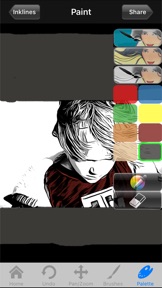
Simply import a photo, create an "automagic" sketch of the photo, color-in at your leisure, and you're done!
IMPORTANT -- You can CHANGE THE COLORS in the palette by DOUBLE-TAPPING on the color splats.
FEATURES:
---------
* IMPORT: Import pictures from your iPhone or iPod touch, or even take a snapshot with the iPhone's built-in camera.
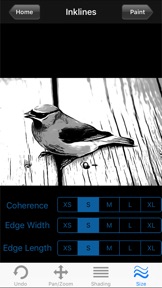
* MAGISKETCH: State-of-the-Art image processing algorithms process your input image to create a customizable sketch, fully automatically. You can create many exciting effects just by adjusting the basic and advanced MagiSketch settings.
* PAINTING: You can color-in the MagiSketch by painting with your finger to create amazing images within minutes.
* TOON COLOR: With our new optional ToonColor feature, you can take the hard part out of creating great looking color sketches and let the app do the heavy lifting.
* SESSIONS: Your current session is automatically saved when you load a new image, so you can continue it at a later time.
* UNDO/REDO: You can correct any painting mishaps by shaking the iPhone, or by accessing undo/redo via the "bomb" icon.
* NAVIGATION: While you paint, you can pinch-zoom and pan to give you the most control over your painting.
* HELP/HINTS: New to painting? We've got your back! When you first use ToonPAINT, help screens instruct you about the functionality of the app. For more advanced users, we provide in-app hints and tips.
* LANGUAGES: ToonPAINT now supports 10 different languages
We hope you enjoy using ToonPAINT as much as we enjoyed creating it for you!
Your Insatiable Genius team.
(Demo images under creative commons license, by Flickr users BodogGirl, Mickael Casol, and Izzard)

What's New in Version 2.16

Bug fixes and performance improvements.

Information

Categories

Version

2.16

Size

9.1 MB

Game Center

No

VPP Device Licensing

Yes

Rating

Rated 12+ for the following:
Infrequent/Mild Cartoon or Fantasy Violence
Infrequent/Mild Mature/Suggestive Themes
Infrequent/Mild Medical/Treatment Information

Compatibility

iOS 12.0 or later

Devices

iPhone 5s, iPhone 6, iPhone 6 Plus, iPhone 6s, iPhone 6s Plus, iPhone SE, iPhone 7, iPhone 7 Plus, iPhone 8, iPhone 8 Plus, iPhone X, iPhone XR, iPhone XS, iPhone XS Max, iPhone 11, iPhone 11 Pro, iPhone 11 Pro Max, iPhone SE (2nd generation), iPhone 12, iPhone 12 Pro, iPhone 12 Pro Max, iPhone 12 mini, iPad (5th Generation) Wi-Fi, iPad (5th Generation) Wi-Fi + Cellular, iPad (6th generation) Wi-Fi, iPad (6th generation) Wi-Fi + Cellular, iPad Pro, iPad Pro (Cellular), iPad Pro (9.7-inch), iPad Pro (9.7-inch) (Cellular), iPad Pro 12.9-inch (2nd generation), iPad Pro 12.9-inch (2nd generation) Wi-Fi + Cellular, iPad Pro (10.5-inch), iPad Pro (10.5-inch) Wi-Fi + Cellular, iPad Pro (11-inch), iPad Pro (11-inch) Wi-Fi + Cellular, iPad Pro 12.9-inch (3rd generation), iPad Pro 12.9-inch (3rd generation) Wi-Fi + Cellular, iPad Air, iPad Air (Cellular), iPad Air 2, iPad Air 2 (Cellular), iPad Air (3rd generation), iPad Air (3rd generation) Wi-Fi + Cellular, iPad mini Retina, iPad mini Retina (Cellular), iPad mini 3, iPad mini 3 (Cellular), iPad mini 4, iPad mini 4 (Cellular), iPad mini (5th Generation), iPad mini (5th Generation) Wi-Fi + Cellular, iPad (7th generation) Wi-Fi + Cellular, iPad Pro 11-inch (2nd generation), iPad Pro 11-inch (2nd generation) Wi-Fi + Cellular, iPad Pro 12.9-inch (4th generation), iPad Pro 12.9-inch (4th generation) Wi-Fi + Cellular, iPad Air (4th Generation) (Wi-Fi), iPad Air (4th Generation) (Wi-Fi + Cellular), iPad (8th generation) Wi-Fi, iPad (8th generation) Wi-Fi + Cellular, iPad Pro 11-inch (3rd generation), iPad Pro 11-inch (3rd generation) Wi-Fi + Cellular, iPad Pro 12.9-inch (5th Generation), iPad Pro 12.9-inch (5th Generation) Wi-Fi + Cellular, iPod touch (6th Generation), iPod touch (7th generation)
Languages

English, Chinese, French, German, Italian, Japanese, Korean, Portuguese, Spanish, Turkish

App Store: Customer Ratings

Ratings & Reviews

5.0 of 5 (1 Rating)

App Store: Customer Reviews

2012-05-03

It's freaking AWESOME!!!!

So much fun and your pictures looked wicked!
Shifty GP
Version 2.4.1
2012-01-02

More realistic than I'd hoped for.

Easy to use and accurate depiction of subject. Great fun.
Byronct
Version 2.3
2011-11-20

Neo

Loving it!! Gives my pictures so much life now! Plain black and white or color!!
Neo_Bue
Version 2.2.2
2011-11-13

Fun

Lots of fun
Get Hands On Events
Version 2.2.2
2011-05-30

Ms

???
Manchebe
Version 2.1.1
2011-04-13

Awesome

Great app. A must have
Masterec
Version 2.0
2011-04-03

Toonpaint rocks!

Easy to use. Able to turn random pics into super cool images in seconds. Way cool.
Cybersproet
Version 2.0