AboutTermsPrivacyContact
 
Updating
Yard Planner

Yard Planner

Released: 2011-06-01
© All Dreams Digital and Julie Moir Messervy Design Studio, Inc.
Yard Planner - QR Code
Version 3.6.2
4+
Download on the App Store
Version 3.6.2
4+
Download on the App Store
Released: 2011-06-01
© All Dreams Digital and Julie Moir Messervy Design Studio, Inc.

iPhone Screenshots

Screenshot
Screenshot
Screenshot
Screenshot
Screenshot

iPad Screenshots

Screenshot
Screenshot
Screenshot
Screenshot
Screenshot

Description

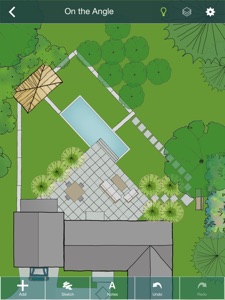
YARD PLANNER is a simple drag-and-drop 2D landscape design app with all the tools you need to mock up your property, create new designs, and share them with friends and family.
YARD PLANNER is ideal for homeowners who want to try out fresh ideas for their yard. Useful for landscape professionals to share designs with clients and contractors. Also perfect for children and adults alike to exercise their imagination and creativity!
Use YARD PLANNER to select and place over 800 beautiful hand-drawn elements including trees, gardens, pools, patios, hammocks, driveways, houses and sheds, solar panels, and just about anything you might want for your property–even parties and weddings!
Features include:
• Sample designs to inspire or get you started
• Simple drag-and-drop functionality
• 34 palettes (800+ hand-drawn elements) to create your landscape design layout
• Resize, Rotate, Undo/Redo, Duplicate, Flip, Group
• Rotate elements with “Snap to 90” or turn off to rotate more precisely
• Snap to grid (elements stick to a re-sizeable grid of guidelines, turn on/off in Settings)
• Rulers (visible at edges of design; zoom in to the single unit; user selects feet/meters; can be turned on/off)
• Choose from 15 different background colors
• Sketch Tool (allows users to draw garden beds and other free-form shapes with an eraser and brushes of different colors, widths and opacity)
• Map Tool (This highly accurate mapping tool based on Google Maps allows you to drop pins at the corners of your property and import the map image with measurements into the app as a background.)
• North arrow (appears with Map Tool)
• Site Analysis palettes to mark the locations of your site’s utilities and light and moisture conditions
• Notes (allows users to tag elements in their designs with typed comments or descriptions)
• Light/Dark mode (changes Note tags and North arrow from white to black for visibility against light backgrounds.)
• Animated Figures (a palette of animated elements—a person, dog, cat, bird, and car—that move through your design on a looped or repeating path, adjustable speed, play and stop animation)
• Import a Photo as a background (useful for importing a digital image of your property plan)
• Create different Layers of elements in your design. Add, delete, rename layers, make each layer visible/invisible, lock/unlock for editing, and reorder layer position.
• In-app step-by-step guide to creating your Property Plan.
• Designs automatically save to the app’s Saved Designs gallery
• Share designs on social media
• Email an editable design so friends can edit one another’s designs and email them back and forth
***As featured in The New York Times, Fox News, USA Today, Gardenista, and more.
“Home Outside allows you to create intricate and varied landscapes…And when you’re finished designing your yard or indulging in a little dreamscaping, you can email results to friend.” –Kate Murphy, The New York Times
“The app gives you drag and drop tools to create a garden design idiosyncratic to your garden [and] allows you to choose hardscape materials, design paths and patios, and arrange furniture in your outdoor space.” –Dalilah Arja, Gardenista
“I can’t imagine a designer who wouldn’t want to have this on their phone or tablet. I’ve tried this app … it’s a great tool for a ‘quickie’ design that you can show clients … and then refine as you like.” –Jane Berger, Garden Design Online

What's New in Version 3.6.2

Bugs fixes and improves

Seller

Name

Home Outside, Inc.

Information

Categories

Version

3.6.2

Size

798.7 MB

Game Center

No

VPP Device Licensing

Yes

Rating

Rated: 4+

Compatibility

iOS 14.0 or later

Devices

iPhone 5s, iPhone 6, iPhone 6 Plus, iPhone 6s, iPhone 6s Plus, iPhone SE, iPhone 7, iPhone 7 Plus, iPhone 8, iPhone 8 Plus, iPhone X, iPhone XR, iPhone XS, iPhone XS Max, iPhone 11, iPhone 11 Pro, iPhone 11 Pro Max, iPhone SE (2nd generation), iPhone 12, iPhone 12 Pro, iPhone 12 Pro Max, iPhone 12 mini, iPhone 13, iPhone 13 Pro, iPhone 13 Pro Max, iPhone 13 mini, iPhone SE (3rd generation), iPhone 14, iPhone 14 Plus, iPhone 14 Pro, iPhone 14 Pro Max, iPhone 15, iPhone 15 Plus, iPhone 15 Pro, iPhone 15 Pro Max, iPhone 16, iPhone 16 Plus, iPhone 16 Pro, iPhone 16 Pro Max, iPhone 16e, iPhone 17, iPhone 17 Pro, iPhone 17 Pro Max, iPhone Air, iPhone 17e, iPad (5th Generation) Wi-Fi, iPad (5th Generation) Wi-Fi + Cellular, iPad (6th generation) Wi-Fi, iPad (6th generation) Wi-Fi + Cellular, iPad Pro, iPad Pro (Cellular), iPad Pro (9.7-inch), iPad Pro (9.7-inch) (Cellular), iPad Pro 12.9-inch (2nd generation), iPad Pro 12.9-inch (2nd generation) Wi-Fi + Cellular, iPad Pro (10.5-inch), iPad Pro (10.5-inch) Wi-Fi + Cellular, iPad Pro (11-inch), iPad Pro (11-inch) Wi-Fi + Cellular, iPad Pro 12.9-inch (3rd generation), iPad Pro 12.9-inch (3rd generation) Wi-Fi + Cellular, iPad Air, iPad Air (Cellular), iPad Air 2, iPad Air 2 (Cellular), iPad Air (3rd generation), iPad Air (3rd generation) Wi-Fi + Cellular, iPad mini Retina, iPad mini Retina (Cellular), iPad mini 3, iPad mini 3 (Cellular), iPad mini 4, iPad mini 4 (Cellular), iPad mini (5th Generation), iPad mini (5th Generation) Wi-Fi + Cellular, iPad (7th generation) Wi-Fi + Cellular, iPad Pro 11-inch (2nd generation), iPad Pro 11-inch (2nd generation) Wi-Fi + Cellular, iPad Pro 12.9-inch (4th generation), iPad Pro 12.9-inch (4th generation) Wi-Fi + Cellular, iPad Air (4th Generation) (Wi-Fi), iPad Air (4th Generation) (Wi-Fi + Cellular), iPad (8th generation) Wi-Fi, iPad (8th generation) Wi-Fi + Cellular, iPad Pro 11-inch (3rd generation), iPad Pro 11-inch (3rd generation) Wi-Fi + Cellular, iPad Pro 12.9-inch (5th Generation), iPad Pro 12.9-inch (5th Generation) Wi-Fi + Cellular, iPad (9th Generation), iPad (9th Generation) Wi-Fi + Cellular, iPad mini (6th Generation), iPad mini (6th Generation) Wi-Fi + Cellular, iPad Air (5th generation), iPad Air (5th generation) Wi-Fi + Cellular, iPad Pro 11-inch (4th generation), iPad Pro 11-inch (4th generation) Wi-Fi + Cellular, iPad Pro 12.9-inch (6th generation), iPad Pro 12.9-inch (6th generation) Wi-Fi + Cellular, iPad (10th generation), iPad (10th generation) Wi-Fi + Cellular, iPad Air 11-inch (M2) Wi-Fi, iPad Air 13-inch (M2) Wi-Fi, iPad Air 13-inch (M2) Wi-Fi + Cellular, iPad Pro 11-inch (M4) Wi-Fi, iPad Pro 11-inch (M4) Wi-Fi + Cellular, iPad Pro 13-inch (M4) Wi-Fi, iPad Pro 13-inch (M4) Wi-Fi + Cellular, iPad mini (A17 Pro) Wi-Fi, iPad mini (A17 Pro) Wi-Fi + Cellular, iPad (A16) Wi-Fi, iPad (A16) Wi-Fi + Cellular, iPad Air 11-inch (M3) Wi-Fi, iPad Air 11-inch (M3) Wi-Fi + Cellular, iPad Air 13-inch (M3) Wi-Fi, iPad Air 13-inch (M3) Wi-Fi + Cellular, iPad Pro 11-inch (M5) Wi-Fi, iPad Pro 11-inch (M5) Wi-Fi + Cellular, iPad Pro 13-inch (M5) Wi-Fi, iPad Pro 13-inch (M5) Wi-Fi + Cellular, iPad Air 11-inch (M4) Wi-Fi, iPad Air 11-inch (M4) Wi-Fi + Cellular, iPad Air 13-inch (M4) Wi-Fi, iPad Air 13-inch (M4) Wi-Fi + Cellular, iPod touch (6th Generation), iPod touch (7th generation)

Languages

English

App Store: Customer Ratings

Ratings & Reviews

4.1 of 5 (7 Ratings)

App Store: Customer Reviews

2019-12-23

Don’t waste your money

No ability to customize the objects, can only rotate and re-size them. If you don’t have a geometric house then impossible to recreate a true space to design. If you want to create pretty pictures then great. If you want to design a real-life space then get another app. I wasted my money. DONT MAKE THE SAME MISTAKE
Idiots@thezoo
Version 3.2.2
2018-07-21

A great and easy to use app

Have been using this app for a few designs now. Really easy to use and enjoying the app.
Any possibility of more templates being added to the app for use in designs?
beatman chad
Version 3.1.14
2014-11-03

Not Impressed

I found this ok for some things, a quick illustrations perhaps, but very basic tools. You can rotate basic shapes (in toolbox) but not stretch them to fill an area; no option for straight lines, polygons, circles, etc. has some nice furniture tools, but I wish I could draw my own.
For a paid app I expected a bit more.
Tsidiki
Version 3.1.0