Description
This app is an ad-removed version of ibisPaint X. An additional in-app purchase for Premium Membership is required to unlock all features, in which case it is cheaper to download ibisPaint X and purchase the Premium Membership there instead.
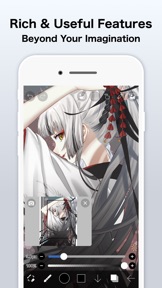
ibis Paint is a popular and versatile drawing app downloaded more than 500 million times in total as a series, which provides over 47000 brushes, over 27000 materials, over 2100 fonts, 84 filters, 46 screentones, 27 blending modes, recording drawing processes, stroke stabilization feature, various ruler features such as radial line rulers or symmetry rulers, clipping mask features.
*YouTube channel
Many tutorial videos on ibis Paint are uploaded to our YouTube channel.
Subscribe it!
https://youtube.com/ibisPaint
*Concept/Features
- A Highly functional and professional features surpassing that of desktop drawing apps.
- Smooth and comfortable drawing experience realized by OpenGL technology.
- Recording your drawing process as a video.
- SNS feature where you can learn drawing techniques from other users' drawing process videos.
*Features
ibis Paint has high functionality as a drawing app along with features of sharing drawing processes with other users.
[Brush Features]
- Smooth drawing at up to 120 fps.
- Over 47000 kinds of brushes including dip pens, felt tip pens, digital pens, air brushes, fan brushes, flat brushes, pencils, oil brushes, charcoal brushes, crayons and stamps.
[Layer Features]
- You can add layers as many as you need with no limit.
- Layer parameters that can be set to each layers individually such as layer opacity, alpha blending, adding, subtracting, and multiplying.
- A handy clipping feature for clipping images, etc.
- Various layer commands such as layer duplication, import from the photo library, horizontal inversion, vertical inversion, layer rotation, layer moving, and zooming in/out.
- A feature for setting layer names to distinguish different layers.
[Manga Features]
- Advanced text tool function featuring Vertical, Horizontal, Stroke, Font select, and Multiple text functions.
*About ibis Paint purchase plan
The following purchase plans are available for ibis Paint:
- ibis Paint X (free version)
- ibis Paint (paid version)
- Ad Removal Upgrade
- Premium Membership (Monthly plan / Yearly plan)
There is no difference in features other than the presence or absence of advertisements for the paid version and the free version.
If you purchase the Ad Removal Upgrade, the ads will not be displayed and there will be no difference from the paid version of ibis Paint.
In order to use more advanced functions, the following Premium Membership (Monthly plan / Yearly plan) contracts are required.
[Premium Membership]
A premium member can use the premium features. Only for the first time, a 7-day or 1-month free trial is available. Premium membership entitles you to the following features.
- 20GB of cloud storage capacity
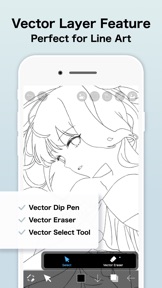
- Vector tool(*1)
- Premium Materials
- Premium Canvas Papers
- Premium Fonts
- Tone Curve filter
- Gradation Map filter
- Levels Adjustment filter
- Premium Adjustment Layers
- Surrounding Fill・Surrounding Eraser
- AI Disturbance
- Artwork folder feature
- Import original brush patterns
- Remove watermark from videos
- Plus many other features exclusive to Premium Membership!
(*1) You can try it for free for up to 1 hour per day.
* After you become a Premium Membership with a free trial, renewal fee will be charged automatically unless you cancel your Premium Membership at least 24 hours before the end of the free trial period.
* We will add premium features in future, please look out for them.
*Questions and support
Questions and bug reports in reviews will not be responded to, so please contact ibis Paint support.
https://ssl.ibis.ne.jp/en/support/Entry?svid=25
*ibisPaint's terms of service
https://ibispaint.com/agreement.jsp
What's New in Version 14.0.2
Thank you for using ibisPaint!
The summary of this update is as follows.
[New Features]
- Added support for Deco mini7W V2. (Available via Bluetooth connection)
[Improvements, Changes]
- When transforming shapes created with the symmetry ruler using the Translate Scale command, their appearance remains unchanged before and after confirming the transformation.
- Renamed the shortcut command from "Save Canvas as PNG" to "Open Save Image window".
- The Cancel button in the Transform Tool has been moved back to the bottom.
- An icon has been added to the Edit Canvas Size button in the Create New window.
- Improved the UI of the Rain Filter.
[Fixed Bugs and Problems]
- Fixed an issue where the playback of "Invert Color", "Clear White", "Flip Layer" and "Flip canvas" were incorrect with locked layers.
- Fixed an issue where the Wave adjustment layer was not flipped correctly with certain parameters when flipping horizontally or vertically.
- Fixed an issue where, when switching the artwork size between portrait and landscape orientation, the appearance of the Wave adjustment layer changed more than expected.
- Fixed an issue where dragging the canvas while closing some windows could prevent drawing on the canvas afterward.
- Fixed an issue where undoing "Reorder Frame" in an animation artwork could mistakenly undo "Change Current Frame".
- Fixed an issue where the scrollbar in a floating window would not fade out.
- Fixed a bug where the Tool Selection bar would scroll even when there was enough vertical space when it was positioned on the side of the screen.
- Fixed an issue where the brush "Chain 8 (Color)" was incorrectly displayed as "Chain 8 (Outline, Color)".
- Fixed an issue where the first image would be imported twice when another image import was initiated while an image import was already in progress.
- Fixed an issue where the Deco SE was not recognized correctly when connected.