Updating


iPhone Screenshots


iPad Screenshots


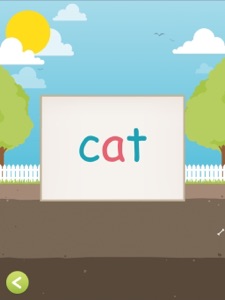
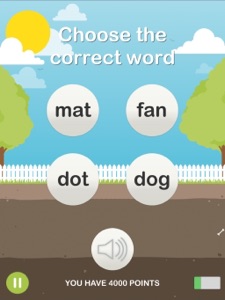


Description
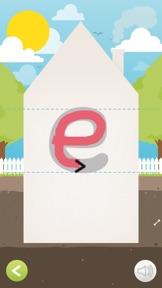
The purpose of Crack the Reading Code is to teach what is practical for reading:
- Shape
- Writing direction
- Sound.
These are the foundations of reading.
Children can then acquire the essential knowledge that letters represent sounds, fit together and make words that have meaning.
The content has been developed by experienced Danish teachers and special education teachers - A supplement to writing textbooks and reading education
Use the app for 10 minutes at home with your child or at school to add variety to the first daily reading practice.
Children in kindergarten who are curious about letters will also think it's exciting.
* THE SOUND OF THE LETTERS BEFORE THE NAMES.
Children often learn the names of the letters instead of the sound of the letters. This means that they must apprehend something that they cannot use for their further reading. Often, they will have to relearn it when they are shown sounds at school that they have to use to read.
Broadly speaking, they have no use for the letter names in the initial stages of reading.
Crack the Reading Code uses exclusively letter sounds.
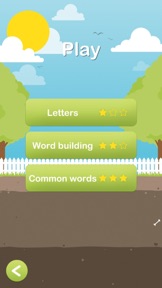
* THE 120 MOST USED WORDS AS WORD PICTURES.
Many of the 120 most used words are not spelled as they sound. Therefore, it is a big help to recognize these as word pictures.
Children won't be forced to sound it out here, but instead just recognize the word like they recognize their own name or that a big yellow M means McDonald's.
That is why these 120 are trained as word pictures in Crack the Reading Code.
Uppercase letters for the intermediate learner.
Many children first learn the 'big letters'. Of course, these must also be learned, but it should happen only when the child already recognizes the 'small letters.'
It is easier to relate to one shape per sound than two.
When they have learned the lowercase letters, they can already recognize the letters in the books they must read.
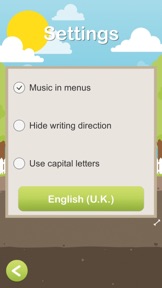
Switching between the 'lowercase' and 'uppercase' in 'Settings.'
Settings:
- Turn the music in the menus on/off
- Hide the text direction. Hiding the text direction increases the level of difficulty.
- Switch between uppercase and lowercase letters.
We recommend that you only change to 'big letters' when the 'small letters' have been successfully learned.
Target audience:
4 - 10 years (those who can't read or have a hard time doing so).
What's New in Version 1.7
Small bug fixes and improvements.
Information
Developer
Categories
Version
1.7
Size
168.7 MB
Game Center
No
VPP Device Licensing
Yes
Rating
Rated: 4+
Compatibility
iOS 9.0 or later
Devices
iPhone 4S, iPhone 5, iPhone 5c, iPhone 5s, iPhone 6, iPhone 6 Plus, iPhone 6s, iPhone 6s Plus, iPhone SE, iPhone 7, iPhone 7 Plus, iPhone 8, iPhone 8 Plus, iPhone X, iPhone XR, iPhone XS, iPhone XS Max, iPhone 11, iPhone 11 Pro, iPhone 11 Pro Max, iPhone SE (2nd generation), iPhone 12, iPhone 12 Pro, iPhone 12 Pro Max, iPhone 12 mini, iPhone 13, iPhone 13 Pro, iPhone 13 Pro Max, iPhone 13 mini, iPhone SE (3rd generation), iPhone 14, iPhone 14 Plus, iPhone 14 Pro, iPhone 14 Pro Max, iPhone 15, iPhone 15 Plus, iPhone 15 Pro, iPhone 15 Pro Max, iPad 2 (Wi-Fi), iPad 2 (3G), iPad (3rd Generation) (Wi-Fi), iPad (3rd Generation) (4G), iPad (4th Generation) (Wi-Fi), iPad (4th Generation) (4G), iPad (5th Generation) Wi-Fi, iPad (5th Generation) Wi-Fi + Cellular, iPad (6th generation) Wi-Fi, iPad (6th generation) Wi-Fi + Cellular, iPad Pro, iPad Pro (Cellular), iPad Pro (9.7-inch), iPad Pro (9.7-inch) (Cellular), iPad Pro 12.9-inch (2nd generation), iPad Pro 12.9-inch (2nd generation) Wi-Fi + Cellular, iPad Pro (10.5-inch), iPad Pro (10.5-inch) Wi-Fi + Cellular, iPad Pro (11-inch), iPad Pro (11-inch) Wi-Fi + Cellular, iPad Pro 12.9-inch (3rd generation), iPad Pro 12.9-inch (3rd generation) Wi-Fi + Cellular, iPad Air, iPad Air (Cellular), iPad Air 2, iPad Air 2 (Cellular), iPad Air (3rd generation), iPad Air (3rd generation) Wi-Fi + Cellular, iPad mini (Wi-Fi), iPad mini (4G), iPad mini Retina, iPad mini Retina (Cellular), iPad mini 3, iPad mini 3 (Cellular), iPad mini 4, iPad mini 4 (Cellular), iPad mini (5th Generation), iPad mini (5th Generation) Wi-Fi + Cellular, iPad (7th generation) Wi-Fi + Cellular, iPad Pro 11-inch (2nd generation), iPad Pro 11-inch (2nd generation) Wi-Fi + Cellular, iPad Pro 12.9-inch (4th generation), iPad Pro 12.9-inch (4th generation) Wi-Fi + Cellular, iPad Air (4th Generation) (Wi-Fi), iPad Air (4th Generation) (Wi-Fi + Cellular), iPad (8th generation) Wi-Fi, iPad (8th generation) Wi-Fi + Cellular, iPad Pro 11-inch (3rd generation), iPad Pro 11-inch (3rd generation) Wi-Fi + Cellular, iPad Pro 12.9-inch (5th Generation), iPad Pro 12.9-inch (5th Generation) Wi-Fi + Cellular, iPad (9th Generation), iPad (9th Generation) Wi-Fi + Cellular, iPad mini (6th Generation), iPad mini (6th Generation) Wi-Fi + Cellular, iPad Air (5th generation), iPad Air (5th generation) Wi-Fi + Cellular, iPad Pro 11-inch (4th generation), iPad Pro 11-inch (4th generation) Wi-Fi + Cellular, iPad Pro 12.9-inch (6th generation), iPad Pro 12.9-inch (6th generation) Wi-Fi + Cellular, iPad (10th generation), iPad (10th generation) Wi-Fi + Cellular, iPod touch (5th generation), iPod touch (6th Generation), iPod touch (7th generation)
Languages
English, Danish, Norwegian Bokmål, Swedish
App Store: Customer Ratings
Ratings & Reviews
0.0 of 5 (No rating)
App Store: Customer Reviews
No Entry