Updating

Holding Pattern Trainer
Released: 2011-08-16
© 2011-2024 Fleminger Media LLC


-1
#75 in Top Paid Apps > Navigation
±0
#16 in Top Paid iPad Apps > Navigation
±0
#91 in Top Grossing iPad Apps > Navigation
iPhone Screenshots



iPad Screenshots


Description
Save time and money on your instrument flight training by mastering IFR holding pattern entries at the comfort of your own mobile device.
Make IFR flight training easier!
Is the following scenario familiar? You receive a holding clearance from ATC, and only have a couple of minutes, sometimes only a few seconds, to choose the correct entry. By the time you've figured out what's going on, you've already passed the holding fix and don't know what to do next.
If this sounds familiar, then you need not to worry. Confusion during holding entries happens to practically almost every new instrument student. Even instrument-rated pilots occasionally have the same problem — when they don't get enough practice.
Holding Trainer solves this problem and as a result, cuts the time you have to spend on expensive flight and ground lessons. With Holding Trainer, you can practice on your own time and convenience, so that choosing the best holding entry in the air becomes a breeze.
Features:
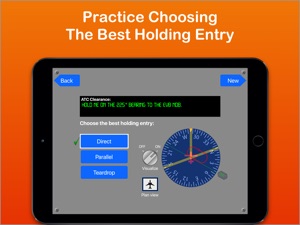
-Entry Trainer - Drills you on choosing the best holding entry. Practice until choosing holding entries becomes second nature and impress your flight instructor with your skills.
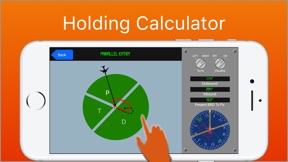
-Holding calculator. Solve and visualize any holding scenario by entering your current bearing to the fix and a outbound or inbound holding radial.
-Holding tutorial - learn how to choose the best holding entry quickly and easily.
Holding Trainer for iOS is a complete rewrite based on my popular Flash-based desktop Holding Trainer app available on pilotscafe.com.
***Don't get "stuck" next time you receive a holding pattern clearance!***
----------------------------------
For only a fraction of the cost of one ground lesson with your flight instructor, you can practice this important instrument skill at your own pace and save hundreds of Dollars on figuring out holding entries in the air.
This is a great tool for anyone training towards their instrument checkride, CFII, proficiency check, or simply trying to improve their holding patterns.
----------------------------------
What's New in Version 1.4.0
- Improved ATC instructions
- Removed setting to allow "TO" holdings over VORs
Information
Developer
Categories
Version
1.4.0
Size
10.2 MB
Game Center
No
VPP Device Licensing
Yes
Rating
Rated: 4+
Compatibility
iOS 11.0 or later
Devices
iPhone 5s, iPhone 6, iPhone 6 Plus, iPhone 6s, iPhone 6s Plus, iPhone SE, iPhone 7, iPhone 7 Plus, iPhone 8, iPhone 8 Plus, iPhone X, iPhone XR, iPhone XS, iPhone XS Max, iPhone 11, iPhone 11 Pro, iPhone 11 Pro Max, iPhone SE (2nd generation), iPhone 12, iPhone 12 Pro, iPhone 12 Pro Max, iPhone 12 mini, iPhone 13, iPhone 13 Pro, iPhone 13 Pro Max, iPhone 13 mini, iPhone SE (3rd generation), iPhone 14, iPhone 14 Plus, iPhone 14 Pro, iPhone 14 Pro Max, iPhone 15, iPhone 15 Plus, iPhone 15 Pro, iPhone 15 Pro Max, iPhone 16, iPhone 16 Plus, iPhone 16 Pro, iPhone 16 Pro Max, iPhone 16e, iPhone 17, iPhone 17 Pro, iPhone 17 Pro Max, iPhone Air, iPhone 17e, iPad (5th Generation) Wi-Fi, iPad (5th Generation) Wi-Fi + Cellular, iPad (6th generation) Wi-Fi, iPad (6th generation) Wi-Fi + Cellular, iPad Pro, iPad Pro (Cellular), iPad Pro (9.7-inch), iPad Pro (9.7-inch) (Cellular), iPad Pro 12.9-inch (2nd generation), iPad Pro 12.9-inch (2nd generation) Wi-Fi + Cellular, iPad Pro (10.5-inch), iPad Pro (10.5-inch) Wi-Fi + Cellular, iPad Pro (11-inch), iPad Pro (11-inch) Wi-Fi + Cellular, iPad Pro 12.9-inch (3rd generation), iPad Pro 12.9-inch (3rd generation) Wi-Fi + Cellular, iPad Air, iPad Air (Cellular), iPad Air 2, iPad Air 2 (Cellular), iPad Air (3rd generation), iPad Air (3rd generation) Wi-Fi + Cellular, iPad mini Retina, iPad mini Retina (Cellular), iPad mini 3, iPad mini 3 (Cellular), iPad mini 4, iPad mini 4 (Cellular), iPad mini (5th Generation), iPad mini (5th Generation) Wi-Fi + Cellular, iPad (7th generation) Wi-Fi + Cellular, iPad Pro 11-inch (2nd generation), iPad Pro 11-inch (2nd generation) Wi-Fi + Cellular, iPad Pro 12.9-inch (4th generation), iPad Pro 12.9-inch (4th generation) Wi-Fi + Cellular, iPad Air (4th Generation) (Wi-Fi), iPad Air (4th Generation) (Wi-Fi + Cellular), iPad (8th generation) Wi-Fi, iPad (8th generation) Wi-Fi + Cellular, iPad Pro 11-inch (3rd generation), iPad Pro 11-inch (3rd generation) Wi-Fi + Cellular, iPad Pro 12.9-inch (5th Generation), iPad Pro 12.9-inch (5th Generation) Wi-Fi + Cellular, iPad (9th Generation), iPad (9th Generation) Wi-Fi + Cellular, iPad mini (6th Generation), iPad mini (6th Generation) Wi-Fi + Cellular, iPad Air (5th generation), iPad Air (5th generation) Wi-Fi + Cellular, iPad Pro 11-inch (4th generation), iPad Pro 11-inch (4th generation) Wi-Fi + Cellular, iPad Pro 12.9-inch (6th generation), iPad Pro 12.9-inch (6th generation) Wi-Fi + Cellular, iPad (10th generation), iPad (10th generation) Wi-Fi + Cellular, iPad Air 11-inch (M2) Wi-Fi, iPad Air 13-inch (M2) Wi-Fi, iPad Air 13-inch (M2) Wi-Fi + Cellular, iPad Pro 11-inch (M4) Wi-Fi, iPad Pro 11-inch (M4) Wi-Fi + Cellular, iPad Pro 13-inch (M4) Wi-Fi, iPad Pro 13-inch (M4) Wi-Fi + Cellular, iPad mini (A17 Pro) Wi-Fi, iPad mini (A17 Pro) Wi-Fi + Cellular, iPad (A16) Wi-Fi, iPad (A16) Wi-Fi + Cellular, iPad Air 11-inch (M3) Wi-Fi, iPad Air 11-inch (M3) Wi-Fi + Cellular, iPad Air 13-inch (M3) Wi-Fi, iPad Air 13-inch (M3) Wi-Fi + Cellular, iPad Pro 11-inch (M5) Wi-Fi, iPad Pro 11-inch (M5) Wi-Fi + Cellular, iPad Pro 13-inch (M5) Wi-Fi, iPad Pro 13-inch (M5) Wi-Fi + Cellular, iPad Air 11-inch (M4) Wi-Fi, iPad Air 11-inch (M4) Wi-Fi + Cellular, iPad Air 13-inch (M4) Wi-Fi, iPad Air 13-inch (M4) Wi-Fi + Cellular, iPod touch (6th Generation), iPod touch (7th generation)
Languages
English
App Store: Customer Ratings
Ratings & Reviews
4.0 of 5 (1 Rating)
App Store: Customer Reviews
No Entry