Updating


iPhone Screenshots



Description
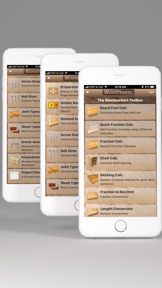
WoodMaster is a very handy tool for Woodworkers. A LOADED Woodworking app for Woodworkers. Woodworking apps are few and far between and as being Woodworkers ourselves, we wanted an app for Woodworkers that did much more than simple board foot calculations! Welcome to WoodMaster!
Both beginners and advanced Woodworkers will find WoodMaster packed with many time-saving features! Check the features list below and you will find a long list useful tools that only WoodMaster includes in a singe app! WoodMaster will continue to grow with more tools being added to each new version release.
Features List:
Board Foot Calculator:
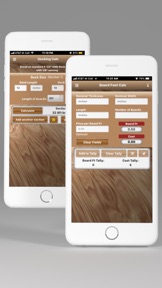
A board foot calculator that includes a Tally count and Tally cost. Using the Tally feature, you could enter varying sizes of wood stock in groups. For example, enter all 2x4's, add it to the Tally, then 2x6's, add it to the Tally, etc. You can basically use the Tally feature to estimate the cost of an entire woodworking project.
Shelf Calculator
Woodworking Shelf Calculator:
Installing shelves for a cabinet, bookcase shelves, etc.? This will calculate spacing between the shelves evenly. Supports inches or millimeters and gives you the exact position of every shelf.
Decking Calculator (NEW!)
Calculates the number of deck boards required for a given deck section. Up to 3 deck sections supported. Based on standard 5.5 inch deck boards.
Fraction Calculator (Sliderule version):
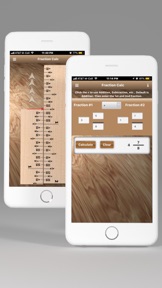
Very cool method of adding and subtracting fractions without entering any numbers.
Fraction Calculator (Numeric):
Add fractions including whole numbers.
Fraction to Decimal & Millimeter Converter
Length Conversions:
Most common conversions for Woodworking
Proportional Calculator:
Turn big woodworking projects into little woodworking projects or little woodworking projects into big woodworking projects while maintaining exact proportions. Very handy for enlarging or reducing woodworking dimensions proportionally.
Golden Ratio:
Calculates the Golden Ratio for any given size to find the most pleasing proportion for your Woodworking projects!
Nominal to Actual Size:
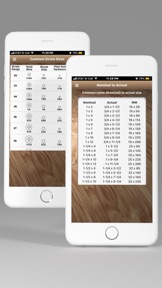
Shows the exact measurements of wood based on it's nominal size. Also includes millimeter size.
Screw Size Chart:
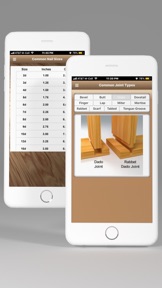
Handy reference chart that includes Gauge, Head-Bore, Shank and Pilot hole sizes for hardwood and software.
Nail Size Chart
Handy reference chart for typical nail sizes.
Joint Types:
Very handy visual reference for the most common types of joints used in woodworking.
Wood Types:
Very hand visual reference for different types of wood. If you have a sample, send it to us and we'll add it to the list.
Knock-down Sawhorse:
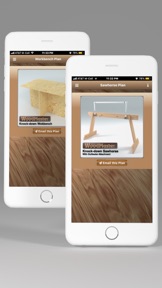
Plans for building a quick knock-down Sawhorse from a 2x4 and a 1x4. Includes an Outfeeder Attachment plan as well. You can have the WoodMaster app send these plans to your Email address in PDF format.
Knockdown Workbench:
Plans for building a quick knock-down Workbench from a single 4x8 sheet of plywood. You can have the WoodMaster app send these plans to your Email address in PDF format.
Woodworking Project Planner PDF file:
A very handy blank Woodworking Project Planner Form. WoodMaster can Email you a Project Planner form that you can print out and use for your next project. The Project Planner form is set up with the most typical information for creating a woodworking project. If you have other planner form ideas, send them to us and we'll include them in a future version. You can have the WoodMaster app send this Project Planner to your Email address in PDF format.
(Please note that this is not an interactive form (like a database) but a simple form that you can print out and fill in for your projects. We do plan to build an interactive Project Planner that you can fill out right in the app and then send it to your Email address. Stay tuned!)
We hope that you find WoodMaster as valuable and time-saving as we have!
What's New in Version 1.85.2
This update from Apple will improve the functionality of this app. No new features are included.
Updated to support the latest iOS versions.
Minor tweaks.
Seller
Name
John Lullie
Information
Developer
Categories
Version
1.85.2
Size
6 MB
Game Center
No
VPP Device Licensing
Yes
Rating
Rated: 4+
Compatibility
iOS 11.0 or later
Devices
iPhone 5s, iPhone 6, iPhone 6 Plus, iPhone 6s, iPhone 6s Plus, iPhone SE, iPhone 7, iPhone 7 Plus, iPhone 8, iPhone 8 Plus, iPhone X, iPhone XR, iPhone XS, iPhone XS Max, iPhone 11, iPhone 11 Pro, iPhone 11 Pro Max, iPhone SE (2nd generation), iPhone 12, iPhone 12 Pro, iPhone 12 Pro Max, iPhone 12 mini, iPhone 13, iPhone 13 Pro, iPhone 13 Pro Max, iPhone 13 mini, iPhone SE (3rd generation), iPhone 14, iPhone 14 Plus, iPhone 14 Pro, iPhone 14 Pro Max, iPhone 15, iPhone 15 Plus, iPhone 15 Pro, iPhone 15 Pro Max, iPhone 16, iPhone 16 Plus, iPhone 16 Pro, iPhone 16 Pro Max, iPhone 16e, iPhone 17, iPhone 17 Pro, iPhone 17 Pro Max, iPhone Air, iPhone 17e, iPad (5th Generation) Wi-Fi, iPad (5th Generation) Wi-Fi + Cellular, iPad (6th generation) Wi-Fi, iPad (6th generation) Wi-Fi + Cellular, iPad Pro, iPad Pro (Cellular), iPad Pro (9.7-inch), iPad Pro (9.7-inch) (Cellular), iPad Pro 12.9-inch (2nd generation), iPad Pro 12.9-inch (2nd generation) Wi-Fi + Cellular, iPad Pro (10.5-inch), iPad Pro (10.5-inch) Wi-Fi + Cellular, iPad Pro (11-inch), iPad Pro (11-inch) Wi-Fi + Cellular, iPad Pro 12.9-inch (3rd generation), iPad Pro 12.9-inch (3rd generation) Wi-Fi + Cellular, iPad Air, iPad Air (Cellular), iPad Air 2, iPad Air 2 (Cellular), iPad Air (3rd generation), iPad Air (3rd generation) Wi-Fi + Cellular, iPad mini Retina, iPad mini Retina (Cellular), iPad mini 3, iPad mini 3 (Cellular), iPad mini 4, iPad mini 4 (Cellular), iPad mini (5th Generation), iPad mini (5th Generation) Wi-Fi + Cellular, iPad (7th generation) Wi-Fi + Cellular, iPad Pro 11-inch (2nd generation), iPad Pro 11-inch (2nd generation) Wi-Fi + Cellular, iPad Pro 12.9-inch (4th generation), iPad Pro 12.9-inch (4th generation) Wi-Fi + Cellular, iPad Air (4th Generation) (Wi-Fi), iPad Air (4th Generation) (Wi-Fi + Cellular), iPad (8th generation) Wi-Fi, iPad (8th generation) Wi-Fi + Cellular, iPad Pro 11-inch (3rd generation), iPad Pro 11-inch (3rd generation) Wi-Fi + Cellular, iPad Pro 12.9-inch (5th Generation), iPad Pro 12.9-inch (5th Generation) Wi-Fi + Cellular, iPad (9th Generation), iPad (9th Generation) Wi-Fi + Cellular, iPad mini (6th Generation), iPad mini (6th Generation) Wi-Fi + Cellular, iPad Air (5th generation), iPad Air (5th generation) Wi-Fi + Cellular, iPad Pro 11-inch (4th generation), iPad Pro 11-inch (4th generation) Wi-Fi + Cellular, iPad Pro 12.9-inch (6th generation), iPad Pro 12.9-inch (6th generation) Wi-Fi + Cellular, iPad (10th generation), iPad (10th generation) Wi-Fi + Cellular, iPad Air 11-inch (M2) Wi-Fi, iPad Air 13-inch (M2) Wi-Fi, iPad Air 13-inch (M2) Wi-Fi + Cellular, iPad Pro 11-inch (M4) Wi-Fi, iPad Pro 11-inch (M4) Wi-Fi + Cellular, iPad Pro 13-inch (M4) Wi-Fi, iPad Pro 13-inch (M4) Wi-Fi + Cellular, iPad mini (A17 Pro) Wi-Fi, iPad mini (A17 Pro) Wi-Fi + Cellular, iPad (A16) Wi-Fi, iPad (A16) Wi-Fi + Cellular, iPad Air 11-inch (M3) Wi-Fi, iPad Air 11-inch (M3) Wi-Fi + Cellular, iPad Air 13-inch (M3) Wi-Fi, iPad Air 13-inch (M3) Wi-Fi + Cellular, iPad Pro 11-inch (M5) Wi-Fi, iPad Pro 11-inch (M5) Wi-Fi + Cellular, iPad Pro 13-inch (M5) Wi-Fi, iPad Pro 13-inch (M5) Wi-Fi + Cellular, iPad Air11M4, iPad Air11M4Cellular, iPad Air13M4, iPad Air13M4Cellular, iPod touch (6th Generation), iPod touch (7th generation)
Languages
English
App Store: Customer Ratings
Ratings & Reviews
0.0 of 5 (No rating)
App Store: Customer Reviews
No Entry