Updating


iPhone Screenshots



iPad Screenshots


Description
"midi keyboard" is the first MIDI EXPANDER for professional musicians or students.
With “midi Keyboard” you will have:
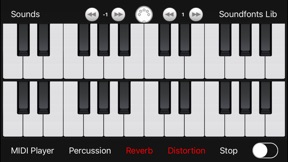
- two independent GM/GS MIDI keyboards each one with 9 octaves (multitouch , with independent octaves for each keyboard)
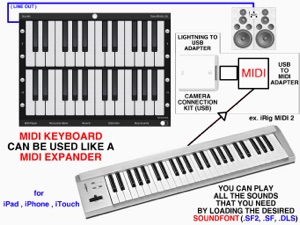
- ability to connect an external MIDI keyboard to use "midi keyboard" like a real MIDI EXPANDER (the external keyboard can be used as the first or third keyboard available)
- MIDI Player for playing MIDI files ( .mid or .midi - with the ability to save MIDI files within the portable device and choose the desired instrument in real time to play the MIDI file)
- reverb and distortion sound effects (they can be used together, with each generated sound)
- sustain pedal
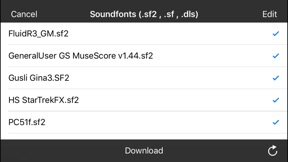
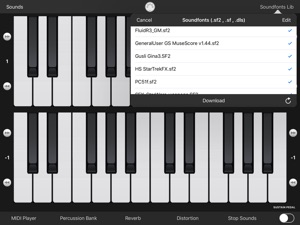
- soundfonts archive (you will be able to import and save all the soundfonts you want and switch in real time from one sound to another one)
- percussion bank
To generate the sounds "midi Keyboard" uses the GM/GS soundfonts (files with extension .sf2 / .sf / .dls ).
The application is compatible with all the existing soundfonts, you can:
- load and use the soundfonts files in real time
- store in the local "midi Keyboard" archive an infinite number of professional soundfonts, free downloadable from the web (the soundfonts can be also purchased from third parties)
Examples of free soundfonts that can be downloaded from the web are: FluidR3_GM.sf2 , PC51f.sf2 , Unison.SF2 , GeneralUser GS MuseScore v1.44.sf2 , TimGM6mb.sf2, etc...
"midi Keyboard" also gives you the ability to store, read and listen your MIDI files (.mid or .midi) using the integrated MIDI Player of "midi keyboard".
During the playback of MIDI files you can play a piece of song using the two independent keyboards of "midi Keyboard" and/or an external MIDI keyboard (multitouch keyboards sounds + external keyboard sounds + MIDI Player sounds, all together).
During a live music performance you can also set the MIDI files as background music with the ability to change the MIDI sounds in realtime.
Choose Your preferred sounds and play "midi Keyboard" using the two multitouch keyboards of "midi Keyboard" and/or using an external MIDI keyboard connected with "midi keyboard" MIDI EXPANDER.
Features:
- 2 independent MIDI keyboards each one with 9 octaves (multitouch, with independent octaves for each keyboard)
- drivers to connect an external MIDI keyboard (using "USB to MIDI adapter" + "Camera Connection Kit" or “Apple lightning to USB adapter” or other commercial MIDI adapter compatible with iOS CoreMIDI like for example “iRig MIDI 2”, iRig Keys, etc…)
- archive of soundfonts GM/GS
- an infinite number of sounds (loadable from the chosen soundfonts)
- GENERAL MIDI sounds list
- archive of MIDI files
- MIDI player (can be used as background music for live performances)
- sustain pedal
- percussions
- reverb
- distortion
- 128 MIDI sounds + MIDI percussion included in the application
- soundfonts and MIDI file remote sharing (cloud)
- MIDI EXPANDER (external MIDI keyboard drivers)
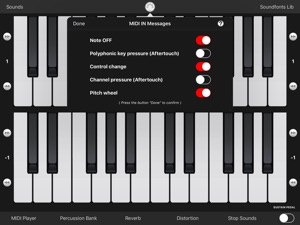
- MIDI IN messages filters:
* Note ON
* Note OFF
* Polyphonic key pressure (Aftertouch)
* Control change
* Channel pressure (Aftertouch)
* Pitch wheel
App type:
- UNIVERSAL APP (you pay it only once and it runs on all Your devices)
What's New in Version 2.0
This app has been updated by Apple to display the Apple Watch app icon.
- Minor bugs fixed
Seller
Name
Gianluca Natalini
Information
Developer
Categories
Version
2.0
Size
16.6 MB
Game Center
No
VPP Device Licensing
Yes
Rating
Rated: 4+
Compatibility
iOS 10.0 or later
Devices
iPhone 5, iPhone 5c, iPhone 5s, iPhone 6, iPhone 6 Plus, iPhone 6s, iPhone 6s Plus, iPhone SE, iPhone 7, iPhone 7 Plus, iPhone 8, iPhone 8 Plus, iPhone X, iPhone XR, iPhone XS, iPhone XS Max, iPhone 11, iPhone 11 Pro, iPhone 11 Pro Max, iPhone SE (2nd generation), iPhone 12, iPhone 12 Pro, iPhone 12 Pro Max, iPhone 12 mini, iPhone 13, iPhone 13 Pro, iPhone 13 Pro Max, iPhone 13 mini, iPhone SE (3rd generation), iPad (4th Generation) (Wi-Fi), iPad (4th Generation) (4G), iPad (5th Generation) Wi-Fi, iPad (5th Generation) Wi-Fi + Cellular, iPad (6th generation) Wi-Fi, iPad (6th generation) Wi-Fi + Cellular, iPad Pro, iPad Pro (Cellular), iPad Pro (9.7-inch), iPad Pro (9.7-inch) (Cellular), iPad Pro 12.9-inch (2nd generation), iPad Pro 12.9-inch (2nd generation) Wi-Fi + Cellular, iPad Pro (10.5-inch), iPad Pro (10.5-inch) Wi-Fi + Cellular, iPad Pro (11-inch), iPad Pro (11-inch) Wi-Fi + Cellular, iPad Pro 12.9-inch (3rd generation), iPad Pro 12.9-inch (3rd generation) Wi-Fi + Cellular, iPad Air, iPad Air (Cellular), iPad Air 2, iPad Air 2 (Cellular), iPad Air (3rd generation), iPad Air (3rd generation) Wi-Fi + Cellular, iPad mini Retina, iPad mini Retina (Cellular), iPad mini 3, iPad mini 3 (Cellular), iPad mini 4, iPad mini 4 (Cellular), iPad mini (5th Generation), iPad mini (5th Generation) Wi-Fi + Cellular, iPad (7th generation) Wi-Fi + Cellular, iPad Pro 11-inch (2nd generation), iPad Pro 11-inch (2nd generation) Wi-Fi + Cellular, iPad Pro 12.9-inch (4th generation), iPad Pro 12.9-inch (4th generation) Wi-Fi + Cellular, iPad Air (4th Generation) (Wi-Fi), iPad Air (4th Generation) (Wi-Fi + Cellular), iPad (8th generation) Wi-Fi, iPad (8th generation) Wi-Fi + Cellular, iPad Pro 11-inch (3rd generation), iPad Pro 11-inch (3rd generation) Wi-Fi + Cellular, iPad Pro 12.9-inch (5th Generation), iPad Pro 12.9-inch (5th Generation) Wi-Fi + Cellular, iPad (9th Generation), iPad (9th Generation) Wi-Fi + Cellular, iPad mini (6th Generation), iPad mini (6th Generation) Wi-Fi + Cellular, iPad Air (5th generation), iPad Air (5th generation) Wi-Fi + Cellular, iPod touch (6th Generation), iPod touch (7th generation)
Languages
English
App Store: Customer Ratings
Ratings & Reviews
0.0 of 5 (No rating)
App Store: Customer Reviews
No Entry