AboutTermsPrivacyContact
 
Updating
Microsoft PowerPoint

Microsoft PowerPoint

Released: 2014-03-27
© 2023 Microsoft Corporation.
Microsoft PowerPoint - QR Code
Version 2.80.1
4+
Download on the App Store
Version 2.80.1
4+
Download on the App Store
Released: 2014-03-27
© 2023 Microsoft Corporation.

iPhone Screenshots

Screenshot
Screenshot
Screenshot
Screenshot
Screenshot

iPad Screenshots

Screenshot
Screenshot
Screenshot
Screenshot
Screenshot

Description

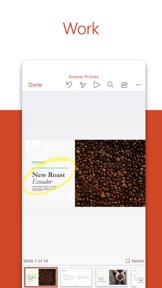
The PowerPoint app gives you access to the familiar slideshow maker tool you already know. Create, edit, view, present, or share presentations quickly and easily from anywhere.
Need to access your PowerPoint files quickly while on the go? PowerPoint provides a quick view of your recent slides and presentations for easy access on any device.
Worried about multiple file versions when you work on PowerPoint mobile? Syncing is seamless across devices via OneDrive.
PowerPoint lets you make a lasting impression with powerful and customizable slides and presentations that make you stand out. Create slideshows and present with confidence from anywhere.
Making a delightful and impactful presentation has never been easier. PowerPoint gives you templates to work from and automatic design ideas for your presentations.
Master your presentation with Presenter Coach, a new AI tool designed to help with public speaking. Practice your presentation and get real-time suggestions to adjust your pacing, avoid “umms” and speak confidently. Requires an active Microsoft 365 subscription.
Customize your presentations on the go, collaborating with others in real time. Sync your PowerPoint documents via OneDrive, share with coworkers and create amazing presentations as a team.
Get the complete Microsoft Office experience when you sign in with your Microsoft 365 subscription. Create, edit and share presentations with ease when you download Microsoft PowerPoint today.
Present with confidence
• Never miss a beat with PowerPoint on the go. You can make new presentations or continue working on existing ones.
• PowerPoint syncs your presentations to OneDrive, so you can start a presentation on your PC, then edit using PowerPoint mobile.
• A new Presenter Coach designed to provide feedback and assistance for your presentations.
Customizable Slideshow Maker
• With the powerful and highly customizable experience in PowerPoint, creating presentations that will make an impression and help you stand out is easy.
• Create a slideshow from a template or make a presentation from scratch.
Collaborate on Presentations
• PowerPoint makes it easy to collaborate with others.
• With 1-click sharing, quickly invite others to edit, view, or provide feedback on your slides.
• Easily manage permissions and see who’s working on your presentation.
• Stay on top of changes and feedback with integrated comments within the slides.
• Compare changes to see how your presentation has evolved over time.
Download Microsoft PowerPoint now and get the best way to create, edit and share slideshows and presentations from your iPhone or iPad.
To create or edit documents, sign in with a free Microsoft account on devices with a screen size smaller than 10.1 inches.
Unlock the full Microsoft Office experience with a qualifying Microsoft 365 subscription for your phone, tablet, PC, and Mac.
Monthly Microsoft 365 subscriptions purchased from the app will be charged to your App Store account and will automatically renew within 24 hours prior to the end of the current subscription period unless auto-renewal is disabled beforehand. You can manage your subscriptions in your App Store account settings.
This app is provided by either Microsoft or a third-party app publisher and is subject to a separate privacy statement and terms and conditions. Data provided through the use of this store and this app may be accessible to Microsoft or the third-party app publisher, as applicable, and transferred to, stored, and processed in the United States or any other country where Microsoft or the app publisher and their affiliates or service providers maintain facilities.
Please refer to the Microsoft Software License Terms for Microsoft 365. See “License Agreement” link under Information. By installing the app, you agree to these terms and conditions.

What's New in Version 2.80.1

• Bug fixes

Seller

Name

Microsoft Corporation

Information

Categories

Version

2.80.1

Size

270.4 MB

Game Center

No

VPP Device Licensing

Yes

Rating

Rated: 4+

Compatibility

iOS 16.0 or later

Devices

iPhone 5s, iPhone 6, iPhone 6 Plus, iPhone 6s, iPhone 6s Plus, iPhone SE, iPhone 7, iPhone 7 Plus, iPhone 8, iPhone 8 Plus, iPhone X, iPhone XR, iPhone XS, iPhone XS Max, iPhone 11, iPhone 11 Pro, iPhone 11 Pro Max, iPhone SE (2nd generation), iPhone 12, iPhone 12 Pro, iPhone 12 Pro Max, iPhone 12 mini, iPhone 13, iPhone 13 Pro, iPhone 13 Pro Max, iPhone 13 mini, iPhone SE (3rd generation), iPhone 14, iPhone 14 Plus, iPhone 14 Pro, iPhone 14 Pro Max, iPhone 15, iPhone 15 Plus, iPhone 15 Pro, iPhone 15 Pro Max, iPad (5th Generation) Wi-Fi, iPad (5th Generation) Wi-Fi + Cellular, iPad (6th generation) Wi-Fi, iPad (6th generation) Wi-Fi + Cellular, iPad Pro, iPad Pro (Cellular), iPad Pro (9.7-inch), iPad Pro (9.7-inch) (Cellular), iPad Pro 12.9-inch (2nd generation), iPad Pro 12.9-inch (2nd generation) Wi-Fi + Cellular, iPad Pro (10.5-inch), iPad Pro (10.5-inch) Wi-Fi + Cellular, iPad Pro (11-inch), iPad Pro (11-inch) Wi-Fi + Cellular, iPad Pro 12.9-inch (3rd generation), iPad Pro 12.9-inch (3rd generation) Wi-Fi + Cellular, iPad Air, iPad Air (Cellular), iPad Air 2, iPad Air 2 (Cellular), iPad Air (3rd generation), iPad Air (3rd generation) Wi-Fi + Cellular, iPad mini Retina, iPad mini Retina (Cellular), iPad mini 3, iPad mini 3 (Cellular), iPad mini 4, iPad mini 4 (Cellular), iPad mini (5th Generation), iPad mini (5th Generation) Wi-Fi + Cellular, iPad (7th generation) Wi-Fi + Cellular, iPad Pro 11-inch (2nd generation), iPad Pro 11-inch (2nd generation) Wi-Fi + Cellular, iPad Pro 12.9-inch (4th generation), iPad Pro 12.9-inch (4th generation) Wi-Fi + Cellular, iPad Air (4th Generation) (Wi-Fi), iPad Air (4th Generation) (Wi-Fi + Cellular), iPad (8th generation) Wi-Fi, iPad (8th generation) Wi-Fi + Cellular, iPad Pro 11-inch (3rd generation), iPad Pro 11-inch (3rd generation) Wi-Fi + Cellular, iPad Pro 12.9-inch (5th Generation), iPad Pro 12.9-inch (5th Generation) Wi-Fi + Cellular, iPad (9th Generation), iPad (9th Generation) Wi-Fi + Cellular, iPad mini (6th Generation), iPad mini (6th Generation) Wi-Fi + Cellular, iPad Air (5th generation), iPad Air (5th generation) Wi-Fi + Cellular, iPad Pro 11-inch (4th generation), iPad Pro 11-inch (4th generation) Wi-Fi + Cellular, iPad Pro 12.9-inch (6th generation), iPad Pro 12.9-inch (6th generation) Wi-Fi + Cellular, iPad (10th generation), iPad (10th generation) Wi-Fi + Cellular, iPod touch (6th Generation), iPod touch (7th generation), Apple Watch Series 4

Languages

English, Arabic, Catalan, Chinese, Croatian, Czech, Danish, Dutch, Finnish, French, German, Greek, Hebrew, Hindi, Hungarian, Indonesian, Italian, Japanese, Korean, Malay, Norwegian Bokmål, Polish, Portuguese, Romanian, Russian, Slovak, Spanish, Swedish, Thai, Turkish, Ukrainian, Vietnamese

App Store: Customer Ratings

Ratings & Reviews

4.6 of 5 (15,036 Ratings)

App Store: Customer Reviews

2023-11-01

PowerPoint

It was great I loved it I could everything on my phone instead of my pc I had everything I need
RebaMPH
Version 2.78.2
2023-09-21

It’s pretty good

This app was very easy for me to learn on how to use and has helped me with A LOT of my school presentations although I would like it if you were to add something like monthly slide animations.
Sheesh your g
Version 2.77
2023-09-15

BAD APP

AHOSHDMWHXMS(SJFJ
DaAboosha
Version 2.77
2023-09-09

Missing features

1) No slide master.
2) Can’t add images from the files app.
Nushssiaram
Version 2.76
2023-08-04

Bad

I can’t access files
Sine2000
Version 2.75
2023-06-20

The best

PowerPoint is a good app for school or work presentations so sometimes there is a tiny problem with it because sometimes when I open the app the PowerPoint doesn’t open to the Home Page so this is a review from someone
Immortalmaisha
Version 2.74
2023-06-02

My review

I like Powerpoint but sometimes it is quite difficult to organise
Kabo P
Version 2.73
2023-05-30

Review

It has its days when it’s glitchy but ya it’s ok so far
Asisnap
Version 2.73
2023-04-19

Rubbish

The worst app ever
🚌👴🏻🤌🏼👴🏻🤔👴🏻🤔🍻
Version 2.72
2023-03-07

Awesome!!!!

It's Awesome!!
NeilKemp
Version 2.70.1
2023-02-23

PowerPoint

I love the app ✊🏽😂
Onni😘
Version 2.70.1
2023-02-18

Write sermons

I’m enjoy using the PowerPoint apps because I get the same functionality as the PC capabilities. I am using to prepare sermons
Edwin Mkhabele
Version 2.70.1
2023-02-16

its amazing

This app really helps me in school and has everything you need on it.
It’s hard to get at first but you will get the hang of it.
10/10 would recommend ✅
_.[myname<33]._
Version 2.70.1
2022-11-07

Wtf why is it so bad?

my god i was typing my presintation which i had been working on for hours then my screen froze and it deleted my work.
Actually I went back and it was all back which is good sorry for the bad review I was so mad it was just minor bug in the the end
damomabany
Version 2.66
2022-10-15

RECORDING BUTTON FEATURE

There should be a recording button on mobiles as well so that it’s easy to do presentations on phones. My computer died and I am struggling to use PowerPoint conveniently because I can’t record on a phone.
Adding that feature will be highly appreciated. Thanks.
Sbahlee
Version 2.66
2022-10-15

Perfect

Thank you for relieving my stress.
Zamsh Zamar
Version 2.66
2022-10-05

BAD!

There is no use for this app because you have to pay… They should’ve rather just made you pay before downloading the app. Other than this I am thankful there is a 1 month trial but for children like me who don’t have apple pay it won’t let me do the one-month trial since I don’t have banking details. DONT DOWNLOAD THIS APP
snybsgbgsbs
Version 2.65
2022-08-14

PowerPoint App

This app has helped me tremendously at school! It has a vast range of different assets and it’s very clear and straightforward. Thank you so much to all the developers!
#SchoolGirl
Version 2.63.2
2022-08-10

It is such a good app

It helps me in school and is just amazing
dudemessi10
Version 2.63.2
2022-07-17

Its bad

It is very confusing and you can do the same thing on google slides with better quality and easier to use
dont get powerpoint
Version 2.63.1
2022-06-13

Okay

Very good to me
simple servent
Version 2.62
2022-06-09

PowerPoint Review

It is a good app but every time I close it, it logs me out.
jack hl
Version 2.61
2022-06-08

Great app!!!

Great app!!!
Darryl Wood
Version 2.61
2022-06-01

Very good

Very happy with the mobile app, the problem is the monthly billing!!!
MOSA1406
Version 2.61
2022-05-24

Troubleshoot

I’m having trouble making a PowerPoint presentation
its_tmz
Version 2.61
2022-05-15

It’s okay 👌

I like power point but it’s kind of difficult to type in the text box and I don’t really understand how to make your page with a background but it’s a great app bye 👋
whyyyyyyyyyyyyyyyyyyy😩
Version 2.61
2022-05-11

Wow this is amazing

I really enjoy making presentations to get good marks and get what I want
funnky runky
Version 2.61
2022-02-15

Pdf conversion

Please make saving/exporting to pdf on iPad borderless
Emilie Irene
Version 2.58
2022-02-07

Good app

This app is really helpful and good
👍👍👏
Felindelc
Version 2.57
2022-01-06

Pathetic

Just opened the app and within 4 seconds I’m asked to rate the app. For that reason I rate it 1 cause I can’t choose 0
Lewis LR
Version 2.56
2021-12-23

Great app

Amazing when u need to work on a project or more big help
Workofgods
Version 2.56
2021-12-15

Great App

Thank you Microsoft for such an amazing platform for work and school work.
The Bouoleverd
Version 2.56
2021-09-12

Powerpoint on ipad pro shutting down all the time

Even though I have downloaded the new Microsoft office software for the iPad, PowerPoint presentations keep shutting down while I am working on them and once that has happened it is impossible to get them open and stay open.It happens irrespective of the size of the presentation and irrespective of whether it is a new document or an old document that is we opened and worked on. The same documents do not shut down when working on a PC or Mac, it is only on the iPad that this happens.
It is extremely frustrating and there is no online advice that works including upgrading software, restarting ones iPad etc. If one wants to select a photo from the photo album to include in a PowerPoint presentation, one has to go to the Photos app and drag a photo across or copy and paste something, it does not work to attempt to import a photo while using the PowerPoint app because it takes way too long for the collection of photos from which one might select a photo to manifest.
Whereas other software and other hardware allows for cropping of pictures according to non-geometric shapes, that cannot be done on the iPad and this is also quite frustrating.
The suggested configuration of one’s presentation that pops up repeatedly is also an irritation. It would be great if one could import a whole lot of photos from an album and have then populate the presentation one photo per page automatically but this involves a huge amount of effort and towing and frowing and even then, it does not work which means that one has to physically drag up to for example several hundred photos individually into presentations
paolofromct
Version 2.52
2021-08-02

This is an amazing app

This app is really amazing and useful and when need since I am in school I have a great chance of improving and making PowerPoints in a few mins
Joshuamasih
Version 2.51
2021-07-17

Great

Nothing compares
mapuane
Version 2.51
2021-06-08

Best for presentations

I recommend this app if you are going to be doing presentations for school/work
CountedSauceGaming
Version 2.49.1
2021-05-27

Issue with opening app

Cant open on my ipad. Please 🙏🏽 help
Ricky Pinzolo
Version 2.49.1
2021-05-26

NO Palm Rejection!

Drawing or writing with the Apple Pencil in this application is an absolute pain. There is absolutely no palm rejection and trying to write on an element with the pencil, wresting your palm on the screen before writing moves the element or brings up the copy/paste dialogue, which also does NOT go away when you continue to write. On top of all this, the actual writing experience is terrible and it is impossible to write neatly. The whole thing needs to change.
matbishopsa
Version 2.49.1
2021-05-24

Excellent integration

Thank you Microsoft for making it possible to work with Mac and Ios. The integration has made it possible for me to serve my community better. It flows seamlessly with icloud and dropbox and between mac and Ios. Much effort went into this and it is brilliant!
Patrick Norris D
Version 2.49.1
2021-05-23

👁👅👁

yep 10/10.
I made a presentation on why my mom should let me get a pet snake.
she said no-
but it looked cool
Dragon_swagger1905
Version 2.49.1
2021-05-14

I love power point

It’s the best app ever
Letlotlo20121212
Version 2.49.1
2021-05-10

It keeps closing

When I open this on presentation my PowerPoint instantly closes
Adog Mcmoney
Version 2.49
2021-04-24

Very inconvenient.

I’ve looked everywhere for a solution for an issue I have with PowerPoint and couldn’t find anything. I can’t seem to copy text from notes and paste them into a text box on PowerPoint. I have an iPhone 12 and I’m running iOS 14.5. This ultimately made me decide to use another app instead of PowerPoint. Unfortunately so. I hope this gets fixed because it’s a major issue and it’s annoying as hell. I wasted so much valuable time to type out paragraphs of text where the copy/paste function could have saved me a lot of time.
Ventrilokill
Version 2.48
2021-03-26

Power Point

This is a wonderful app I use it all the time in school!!
Thanks Guys!!
Patrick Watties
Version 2.47
2021-03-11

There are glitches

When ever I try to add a picture there’s like a glitch where it says I can’t add anything not even words, so please just maybe check it out and it would really help because it is my first time using it but I’m used to it right now,
eenn7
Version 2.46
2021-01-27

It’s great and nothing else

I love using power point on my iPad now
????gem????
Version 2.45
2020-10-28

Fine I guess

Like the orange it sickening I hate the lay out and it can get confusing. Okay what i like about it how u can make a back round but over all 2 star for me
💯👍🏻me bru hi
Version 2.42
2020-08-25

Trash

I had this app and it refuses to play the slides. Waste of my time!
🧡anime weeb🧡
Version 2.40
2020-08-17

Missing Symbols

Love the App really do! Just one problem though not all the symbols show on documents especially when I’m viewing another document through this app I am finding it hard to read what it says because the symbols are missing!
But overall great app very convenient🙂
LiswaCele
Version 2.40
2020-08-03

Good app use it for school a lot .

Enjoy
qxincywww
Version 2.39
2020-07-21

Audio

Hi may you please help to record my slides and where do i see the voice audio please help and reply
Mogirl pale
Version 2.39
2020-06-10

Not loading any presentations.

I’m not sure what’s happening, but’s it’s failing to upload. When ever I want to load a ‘blank presentation’ or any other presentation for that matter, it never loads up.
Ruby Jinx
Version 2.37
2020-06-08

Slideshow Audio

You can’t hear the audio that is added when you play the slideshow. Very frustrating
Wits Student
Version 2.37
2020-06-08

Oh man this is great

This is really good I do my school work in lockdown because of this it is really good
ether i hate it or i love it
Version 2.37
2020-06-01

Okay...

Microsoft needs to work on their integration to devices that run an operating system other than windows. Half of the time I see glitches. In general it’s okay. Though great for work I feel that it doesn’t go very nicely on apple devices. Or mobiles for that matter. 😕
EdgyBlock
Version 2.37
2020-05-27

Great couldn’t think how to make better

Best app ever !!!!!!!!!!!!
jamica reddy
Version 2.37
2020-05-07

Cannot share to needed app

I cannot share the file I need to share when I need too. Please work on that. But other than that a really good app.
tamato cheese
Version 2.36.1
2020-04-20

Amazing

This has helped me a lot with online schooling, thanks.
Kay-Hope1357
Version 2.36
2020-04-14

Very nice but why do we have to pay

Guys why do us as workers have to pay just to edit and create files we already have enough things to pay for. Please guys fix
why 😦😦😫😫😫😫😫😫😫😫
Version 2.36
2020-02-05

Millie B

This app is so amazing
I was able to do my s I’ll work on my phone and the fact that it is portable and I don’t have to carry my laptop with me is so handy
millie bobby B
Version 2.33
2020-01-20

Broken context menu

Since 2.30 the context menu no longer appears when selecting text. I’ve logged this in the MS forum but being told “it works on my ipad” even though quite a few others are having the same problem. It’s not working on either of my (brand new) iPads.
This is an app that I’ve relied on for years since it came out on the iPad but now it is basically useless for anything other than viewing PowerPoint docs.
Another issue that’s cropped up in the latest version is that I can’t even create a new document. Every time I try the app crashes.
The MS QA process is clearly not working so well at the moment.
zaynesta
Version 2.33
2020-01-01

Great App

I really enjoy using this app and the pencil functionality is just as great.
Zmadik
Version 2.32.1
2019-10-11

Ms word awesome

Ms word app is easy to use and yet saves so much time.
What an awesome application
RSFC
Version 2.29
2019-08-13

So slow and constantly refreshing on iOS

This is so bad
this is not worj
Version 2.28
2019-04-16

Can you add more features

Great app but I need something like a 3D movie setting or something like a text box in this version please help holiday_quack🦆🦆🦆 would appreciate it other wise I have no choice to delete this app please try harder
Holiday_quack🦆🦆🦆 OUT!,!!
Nicky nicks says Chubby
Version 2.24
2019-02-22

Brilliant

It works really well. It isn’t slow which is very convenient cos sometimes I’m in a hurry and I need to access my slides
Chiwiki
Version 2.22
2018-06-10

Very Limited

With PowerPoint as an app; you can’t make pictures a background or create text boxes. Even if it is an option that I haven’t been able to figure out: it should be easier to use
kearin green
Version 2.13
2018-06-05

Love it

It is very fun. And if you want to make a funny slide show it’s really fun 😆
Emma Symes
Version 2.13
2018-01-24

Audio???

So it seems as though the audio of videos embedded into PowerPoint for iPad does not work! Everything else is top notch, how come this obvious oversight, or is it intentional I wonder...?
ReeceZA
Version 2.9
2017-11-17

Very useful

I love using the app on the iPad as it feels the same as using it on my PC
Dankaria
Version 2.7
2017-11-06

Not my thing

I absolutely hate PowerPoint on the iPad, everything is slow and it takes about 10 years to type something. I'd choose using PowerPoint the on pc any day.
Glitter Shimmer
Version 2.6