AboutTermsPrivacyContact
 
Updating
HemocyTap

HemocyTap

Released: 2013-03-20
© 2017 Raul Garcia
HemocyTap - QR Code
Version 3.2.1
4+
Download on the App Store
Version 3.2.1
4+
Download on the App Store
Released: 2013-03-20
© 2017 Raul Garcia

iPhone Screenshots

Screenshot
Screenshot
Screenshot
Screenshot
Screenshot

Description

HemocyTap is the perfect companion to count cells using a hemocytometer. Count live & dead cells, calculate the cell density, viability & new culture volume, save and send your data via email and plot the evolution over time!
Do your thumbs get tired after tally-counting cells?
Do you feel stupid when you miss the button of the calculator and you have to start all over again?
Do you wish you could have all your counts in a .csv file without typing them yourself? And have it sent instantaneously via email?
Keep reading.
HemocyTap is your hemocytometer app! This is what it can do to make your life easier:
Counting:
•use two tally counters, one for live cells and one for dead cells
•each makes a different sound so that you know you pressed the correct one
•keeps track of all the cells you have counted in each square
•change the square you’re counting just as you change the square you see in the microscope
•set the number of squares you want to count by default – they will appear highlighted
•choose to count the big squares or the small squares inside the central square
•*NEW!* Long tap to unselect a square to count
Calculating:
•calculates the average of your counts for you
•gives you the volume you need to add to obtain the desired cell density when subculturing
•displays cell viability and live cell number
•you only have to provide the original volume of your culture, the desired cell density and the dilution
•*NEW!* Choose μL or mL units
•*NEW!* Supports decimal dilutions
Exporting:
•Email instantaneously your counts in csv files
•Single counts or bulk experiment data
•Export to other iOS devices with HemocyTap: share counts with lab colleagues or keep it as a backup in case you accidentally delete your file.
Viewing and analysing:
•Features a plot option to keep track of how well your culture is performing
•Move counts between folders
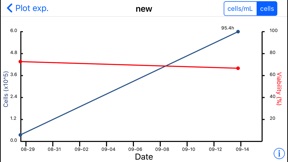
•Plots your viability and live cells over time!
•Keep track of cell doubling times between counts
•Access previous counts and check the latest cell numbers of your culture and delete any unwanted counts
Other new features:
•*NEW!* Now supports iOS 11
•*NEW!* Timer to keep track of other lab tasks
Disclaimer: This app is intended purely for educational purposes. Do not use it for medical diagnosis.

What's New in Version 3.2.1

This app has been updated by Apple to display the Apple Watch app icon.
Fixed counts not clearing when pressing the 'Clear' button.

Seller

Name

Raul Garcia

URL

Information

Developer

Categories

Version

3.2.1

Size

5.9 MB

Game Center

No

VPP Device Licensing

Yes

Rating

Rated: 4+

Compatibility

iOS 11.0 or later

Devices

iPhone 5s, iPhone 6, iPhone 6 Plus, iPhone 6s, iPhone 6s Plus, iPhone SE, iPhone 7, iPhone 7 Plus, iPhone 8, iPhone 8 Plus, iPhone X, iPhone XR, iPhone XS, iPhone XS Max, iPhone 11, iPhone 11 Pro, iPhone 11 Pro Max, iPhone SE (2nd generation), iPhone 12, iPhone 12 Pro, iPhone 12 Pro Max, iPhone 12 mini, iPhone 13, iPhone 13 Pro, iPhone 13 Pro Max, iPhone 13 mini, iPhone SE (3rd generation), iPhone 14, iPhone 14 Plus, iPhone 14 Pro, iPhone 14 Pro Max, iPhone 15, iPhone 15 Plus, iPhone 15 Pro, iPhone 15 Pro Max, iPad (5th Generation) Wi-Fi, iPad (5th Generation) Wi-Fi + Cellular, iPad (6th generation) Wi-Fi, iPad (6th generation) Wi-Fi + Cellular, iPad Pro, iPad Pro (Cellular), iPad Pro (9.7-inch), iPad Pro (9.7-inch) (Cellular), iPad Pro 12.9-inch (2nd generation), iPad Pro 12.9-inch (2nd generation) Wi-Fi + Cellular, iPad Pro (10.5-inch), iPad Pro (10.5-inch) Wi-Fi + Cellular, iPad Pro (11-inch), iPad Pro (11-inch) Wi-Fi + Cellular, iPad Pro 12.9-inch (3rd generation), iPad Pro 12.9-inch (3rd generation) Wi-Fi + Cellular, iPad Air, iPad Air (Cellular), iPad Air 2, iPad Air 2 (Cellular), iPad Air (3rd generation), iPad Air (3rd generation) Wi-Fi + Cellular, iPad mini Retina, iPad mini Retina (Cellular), iPad mini 3, iPad mini 3 (Cellular), iPad mini 4, iPad mini 4 (Cellular), iPad mini (5th Generation), iPad mini (5th Generation) Wi-Fi + Cellular, iPad (7th generation) Wi-Fi + Cellular, iPad Pro 11-inch (2nd generation), iPad Pro 11-inch (2nd generation) Wi-Fi + Cellular, iPad Pro 12.9-inch (4th generation), iPad Pro 12.9-inch (4th generation) Wi-Fi + Cellular, iPad Air (4th Generation) (Wi-Fi), iPad Air (4th Generation) (Wi-Fi + Cellular), iPad (8th generation) Wi-Fi, iPad (8th generation) Wi-Fi + Cellular, iPad Pro 11-inch (3rd generation), iPad Pro 11-inch (3rd generation) Wi-Fi + Cellular, iPad Pro 12.9-inch (5th Generation), iPad Pro 12.9-inch (5th Generation) Wi-Fi + Cellular, iPad (9th Generation), iPad (9th Generation) Wi-Fi + Cellular, iPad mini (6th Generation), iPad mini (6th Generation) Wi-Fi + Cellular, iPad Air (5th generation), iPad Air (5th generation) Wi-Fi + Cellular, iPad Pro 11-inch (4th generation), iPad Pro 11-inch (4th generation) Wi-Fi + Cellular, iPad Pro 12.9-inch (6th generation), iPad Pro 12.9-inch (6th generation) Wi-Fi + Cellular, iPad (10th generation), iPad (10th generation) Wi-Fi + Cellular, iPod touch (6th Generation), iPod touch (7th generation)

Languages

English

App Store: Customer Ratings

Ratings & Reviews

5.0 of 5 (1 Rating)

App Store: Customer Reviews

2020-11-24

Useful, easy to use, reliable!

I absolutely adore this app. It’s made my life so much easier. I don’t have to look away from the microscope to write down numbers, I don’t have to stop anything to do calculations. It calculates the number of live cells and viability for you, you add in your own dilution factor, it will even calculates any further dilutions you’d like to make to get to a specific density based on how much you have. And it allows you to add sample names. So happy I found this.
ilani1993mo
Version 3.2.1