Updating

PDF Export - PDF Editor & Scan
Released: 2013-04-25
© 2020 LiveBird Technologies Pvt. Ltd


iPhone Screenshots


iPad Screenshots




Description
An Efficient PDF Converter App for all your Needs
PDF Export is a comprehensive app with PDF tools that will help you view, edit, convert and capture documents. You can encapsulate PDF files into a single file; scan images and other content on the file, and even convert the PDF into image format and vice versa. You can merge multiple files into one PDF document and edit them with a custom watermark of your brand / company logo.
The app is quite accessible and user-friendly to all users owing to its cloud sharing function, file manager features with multiple options for private storage and sharing with stakeholders.
Rest assured, you can convert multiple format documents like docx, .xlsx, .pptx, and others to PDF, directly from your iPhone and iPad. Convert webpages, photos, and clipboard content to PDF too!
# PDF Tools #
## Document Scanner
Advanced Scanner with document edge detection. Apply filters in black, white, and grayscale
## PDF Converter
Convert MS Office Documents, iWorks Documents, Images (JPG, PNG, GIF and others), Open Office Documents, Plain Text and RTF (Rich Text Format) into PDF
## Web to PDF
The web browser converter converts any webpage into PDF File
## Text Recognition - OCR
Capture image with camera, converting the image into a text document
## Merge PDF
Select multiple PDF files and merge them into a single PDF
## Split PDF
Split PDF by selecting the number of pages or range in each individual PDF file
## PDF to JPG
Convert PDF file to JPEG, sourcing the pages from a PDF file.
## Send FAX
The FAX service dispatches PDF files as fax to the intended party.
# PDF to Text
Convert PDF files into Text files, capturing the content as is, into the .txt file format.
# Add Page No.
Add page numbers to PDF file pages, starting from any page, in the font style and colour, you need.
## Add Watermark
Add text and images as watermarks to the PDF. A watermark can be a text snippet in diverse font styles, font sizes, and page positions (top, bottom or centre). One can also add images as watermarks, especially company logos to PDF documents.
## Rotate PDF
Rotate any PDF page in any angle of your choosing - 90 or 180 degrees.
## Unlock PDF
Remove the password protection from the PDF file to transform it into a password-free PDF.
## Edit PDF
Rearrange and shuffle PDF pages, or add new pages to an existing PDF File through this feature.
## Secure PDF.
Set a strong password to lock the PDF and secure it from access by unintended users.
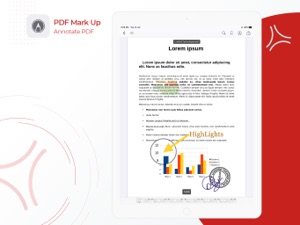
## Mark Up
Add annotations to the PDF file with the tool along with a signature, as required.
## Advance PDF Viewer
The inbuilt PDF Viewer within the PDF export view is a powerful PDF viewer and processor that entails multiple features. It provides multiple viewing and saving options for PDF files.
The tool offers users the ability to search filenames as well as terms used within content of the PDF files.
Users can annotate PDF files and bookmark them based on topics of interest.
They can view thumbnails of the documents for viewing the content within a document without opening them.
## Drag and Drop
This feature is quite handy on the iPad. Transform the PDF Export app into a multi-screen app between two apps - Eg. PDF Export App and Any Misc. App (Mail app, for instance).
## Cloud Sharing
The PDF Export app facilitates cloud sharing options to diverse cloud providers, aiding users to store data in the form of images and files on the cloud securely.
## Quick Option
The PDF Export App provides quick options for users by leveraging 3D Touch technology on their smartphones. Additionally, the app provides quick spotlight search to access scanning options for varied documents.
## Supports Orientations
Portrait and Landscape in iPhone & iPad that allow best reading experience.
What's New in Version 9.0.1
-Big Update--
## Advanced Scanner
- Auto Detect and Auto Capture
- Remove Distortions
- Mark up into Images
- PDF Page Size & Margins option
## PDF MarkUp (PDF Annotations)
- Add Annotations
- Add Signature
## PDF Viewer
- Professional PDF Viewer
- Search into PDF
- Bookmarks
## Text Recognition (OCR)
Recognize text from captured documents Convert document images to Text file.
## Secure PDF
- Add Password into Existing PDF.
Seller
Name
LiveBird Technologies Private Limited
Information
Categories
Version
9.0.1
Size
68.6 MB
Game Center
No
VPP Device Licensing
Yes
Rating
Rated: 4+
Compatibility
iOS 11.0 or later
Devices
iPhone 5s, iPhone 6, iPhone 6 Plus, iPhone 6s, iPhone 6s Plus, iPhone SE, iPhone 7, iPhone 7 Plus, iPhone 8, iPhone 8 Plus, iPhone X, iPhone XR, iPhone XS, iPhone XS Max, iPhone 11, iPhone 11 Pro, iPhone 11 Pro Max, iPhone SE (2nd generation), iPad (5th Generation) Wi-Fi, iPad (5th Generation) Wi-Fi + Cellular, iPad (6th generation) Wi-Fi, iPad (6th generation) Wi-Fi + Cellular, iPad Pro, iPad Pro (Cellular), iPad Pro (9.7-inch), iPad Pro (9.7-inch) (Cellular), iPad Pro 12.9-inch (2nd generation), iPad Pro 12.9-inch (2nd generation) Wi-Fi + Cellular, iPad Pro (10.5-inch), iPad Pro (10.5-inch) Wi-Fi + Cellular, iPad Pro (11-inch), iPad Pro (11-inch) Wi-Fi + Cellular, iPad Pro 12.9-inch (3rd generation), iPad Pro 12.9-inch (3rd generation) Wi-Fi + Cellular, iPad Air, iPad Air (Cellular), iPad Air 2, iPad Air 2 (Cellular), iPad Air (3rd generation), iPad Air (3rd generation) Wi-Fi + Cellular, iPad mini Retina, iPad mini Retina (Cellular), iPad mini 3, iPad mini 3 (Cellular), iPad mini 4, iPad mini 4 (Cellular), iPad mini (5th Generation), iPad mini (5th Generation) Wi-Fi + Cellular, iPad (7th generation) Wi-Fi, iPad Pro 11-inch (2nd generation), iPad Pro 11-inch (2nd generation) Wi-Fi + Cellular, iPad Pro 12.9-inch (4th generation), iPad Pro 12.9-inch (4th generation) Wi-Fi + Cellular, iPod touch (6th Generation), iPod touch (7th generation)
Languages
English, Arabic, Chinese, Danish, Dutch, Finnish, French, German, Hebrew, Hindi, Hungarian, Indonesian, Italian, Japanese, Korean, Portuguese, Russian, Spanish, Swedish
App Store: Customer Ratings
Ratings & Reviews
4.5 of 5 (21 Ratings)
App Store: Customer Reviews
No Entry