Updating


iPhone Screenshots


iPad Screenshots

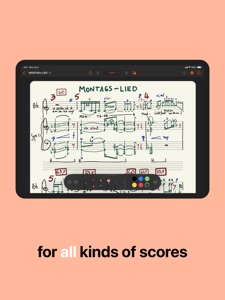


Description
If you are trying some counterpoint exercises, or notating a melody that's been ringing in your head all day, or sketching your next solo, MusicPad has got you covered.
• MusicPad let's you create unlimited notepad files with unlimited sheet music pages in which to write your music.
• Near-zero latency response with Apple's industry standard PencilKit frameworks.
• It offers Apple's tools: like pens, markers, highlighters and pencils plus eraser, selector and ruler.
• Each page can be made to hide or show its staves making it a great place for writing or drawing along with your scores, or for creating a title page for your music.
• When you are finished writing it's easy to export your full document as a PDF or share the entire notepad file with friends and colleagues.
• MusicPad is tightly integrated with your file system, so it is a snap to organize, share and sync your files across devices.
• MusicPad allows the following gestures for positioning your page on the screen:
- 1-finger for moving the page around
- 2-fingers for zooming in and out
- 2-fingers for swiping forwards or backwards through multiple pages
• You have control over the gesture interaction with your page positioning and you can easily turn off all gestures if you want to make quick markings with your fingers or if you just want your page to be fixed in place.
MusicPad is compatible with all devices that run iOS 16.2 or iPadOS 16.2 or later.
NOTE: Using your fingers for drawing is now supported (as of version 1.1) but we strongly recommend an Apple Pencil as your main precision input device.
FREE APP
The free app allows you to create unlimited MusicPad files with up to two pages each.
MusicPad files can be shared across multiple devices using iCloud (collaboration not yet supported).
All tools are available for you to scribble with.
UNLOCK ALL FEATURES
If you are happy with MusicPad and you want to support further developments you can unlock all features with a one-time purchase that will enable you to:
• Create unlimited pages per document,
• Hide staves and page numbers,
• Export your document as a PDF,
• Remove unlock buttons.
What's New in Version 1.2
IMPROVED:
– Blazing-fast navigation: pages can now be turned at fast speeds. This works both with the toolbar controls as well as with a 2-finger swipe gesture.
– Zooming experience has been greatly improved.
FIXED:
– Zoom and page position are now correctly saved (and loaded).
– General memory consumption.
Seller
Name
Juan Andres Verdaguer
Information
Developer
Categories
Version
1.2
Size
1.4 MB
Game Center
No
VPP Device Licensing
Yes
Rating
Rated: 4+
Compatibility
iOS 16.2 or later
Devices
iPhone 5s, iPhone 6, iPhone 6 Plus, iPhone 6s, iPhone 6s Plus, iPhone SE, iPhone 7, iPhone 7 Plus, iPhone 8, iPhone 8 Plus, iPhone X, iPhone XR, iPhone XS, iPhone XS Max, iPhone 11, iPhone 11 Pro, iPhone 11 Pro Max, iPhone SE (2nd generation), iPhone 12, iPhone 12 Pro, iPhone 12 Pro Max, iPhone 12 mini, iPhone 13, iPhone 13 Pro, iPhone 13 Pro Max, iPhone 13 mini, iPhone SE (3rd generation), iPhone 14, iPhone 14 Plus, iPhone 14 Pro, iPhone 14 Pro Max, iPad (5th Generation) Wi-Fi, iPad (5th Generation) Wi-Fi + Cellular, iPad (6th generation) Wi-Fi, iPad (6th generation) Wi-Fi + Cellular, iPad Pro, iPad Pro (Cellular), iPad Pro (9.7-inch), iPad Pro (9.7-inch) (Cellular), iPad Pro 12.9-inch (2nd generation), iPad Pro 12.9-inch (2nd generation) Wi-Fi + Cellular, iPad Pro (10.5-inch), iPad Pro (10.5-inch) Wi-Fi + Cellular, iPad Pro (11-inch), iPad Pro (11-inch) Wi-Fi + Cellular, iPad Pro 12.9-inch (3rd generation), iPad Pro 12.9-inch (3rd generation) Wi-Fi + Cellular, iPad Air, iPad Air (Cellular), iPad Air 2, iPad Air 2 (Cellular), iPad Air (3rd generation), iPad Air (3rd generation) Wi-Fi + Cellular, iPad mini Retina, iPad mini Retina (Cellular), iPad mini 3, iPad mini 3 (Cellular), iPad mini 4, iPad mini 4 (Cellular), iPad mini (5th Generation), iPad mini (5th Generation) Wi-Fi + Cellular, iPad (7th generation) Wi-Fi + Cellular, iPad Pro 11-inch (2nd generation), iPad Pro 11-inch (2nd generation) Wi-Fi + Cellular, iPad Pro 12.9-inch (4th generation), iPad Pro 12.9-inch (4th generation) Wi-Fi + Cellular, iPad Air (4th Generation) (Wi-Fi), iPad Air (4th Generation) (Wi-Fi + Cellular), iPad (8th generation) Wi-Fi, iPad (8th generation) Wi-Fi + Cellular, iPad Pro 11-inch (3rd generation), iPad Pro 11-inch (3rd generation) Wi-Fi + Cellular, iPad Pro 12.9-inch (5th Generation), iPad Pro 12.9-inch (5th Generation) Wi-Fi + Cellular, iPad (9th Generation), iPad (9th Generation) Wi-Fi + Cellular, iPad mini (6th Generation), iPad mini (6th Generation) Wi-Fi + Cellular, iPad Air (5th generation), iPad Air (5th generation) Wi-Fi + Cellular, iPad Pro 11-inch (4th generation), iPad Pro 11-inch (4th generation) Wi-Fi + Cellular, iPad Pro 12.9-inch (6th generation), iPad Pro 12.9-inch (6th generation) Wi-Fi + Cellular, iPad (10th generation), iPad (10th generation) Wi-Fi + Cellular, iPod touch (6th Generation), iPod touch (7th generation)
Languages
English
App Store: Customer Ratings
Ratings & Reviews
0.0 of 5 (No rating)
App Store: Customer Reviews
No Entry