Updating


iPhone Screenshots


Description
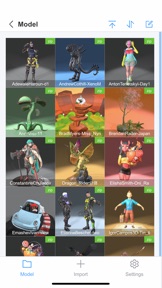
ModelPlay supports 3D model classification and viewing, 3D model import and export, and users can personalize each 3D model and save the settings. When using ModelPlay, users don't need to have professional 3D knowledge, just through simple operation, you can get very stunning 3D effects.
-3D Model Import and Export
Supports import and export of many common 3D format files such as GLB, FBX, OBJ, STL, PLY, 3MF, and so on.
-3D Model Categorization
Categorize 3D models through folders, support both list and grid display, sorting and editing, and setting image size.
-3D Model Lighting Settings
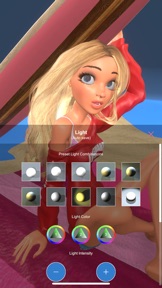
Support to set the lighting of the scene where the 3D model is located: support preset lighting combination settings, light color, light intensity, light shadow settings, ambient light color settings, and halo intensity settings. You can create colorful lighting effects through multiple combination settings.
3D Model Background Settings
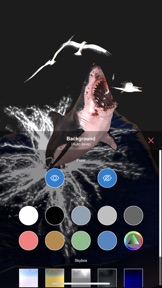
Supports setting the background of the scene where the 3D model is located: supports solid color background and sky box background. You can set “whether to show the ground” to get different scene atmosphere effects.
3D Model Material Settings
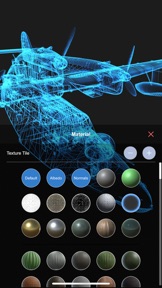
Support to set the material of 3D model: support default texture material, line material, metal material, transparent material and other material switching. Support to view the original material and texture.
-3D Model Animation Settings
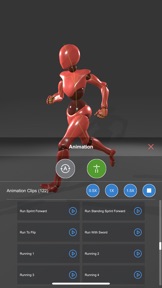
Support 3D model skeleton display, support animation play and pause, support auto rotate, support dynamic skeleton, support multiple animation clips switch play.
-3D Model Position Setting
Support 3D model position offset and rotation setting. Support camera view angle setting, you can set different optimal display view angles for different 3D models.
-3D Model Mesh Settings
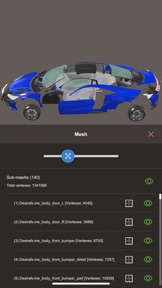
Count the number of sub-mesh and mesh vertices of the 3D model, support whether the sub-mesh is visible or not setting, support component separation, and support putting the sub-mesh as the center.
-3D Model Cover Settings
The 3D model cover will be automatically generated when the 3D model is opened for the first time, support to modify the cover.
Note: Updates and Feedback
ModelPlay will make continuous updates to provide more 3D setting effects in the subsequent releases. Feel free to provide suggestions to ModelPlay via comments!
What's New in Version 1.3.4
1. Optimized the smoothness effect for certain 3D models;
2. Upgraded the 3D model demo download functionality;
Seller
Name
俊卿 吴
Information
Developer
Categories
Version
1.3.4
Size
265.7 MB
Game Center
No
VPP Device Licensing
Yes
Rating
Rated: 4+
Compatibility
iOS 12.0 or later
Devices
iPhone 5s, iPhone 6, iPhone 6 Plus, iPhone 6s, iPhone 6s Plus, iPhone SE, iPhone 7, iPhone 7 Plus, iPhone 8, iPhone 8 Plus, iPhone X, iPhone XR, iPhone XS, iPhone XS Max, iPhone 11, iPhone 11 Pro, iPhone 11 Pro Max, iPhone SE (2nd generation), iPhone 12, iPhone 12 Pro, iPhone 12 Pro Max, iPhone 12 mini, iPhone 13, iPhone 13 Pro, iPhone 13 Pro Max, iPhone 13 mini, iPhone SE (3rd generation), iPhone 14, iPhone 14 Plus, iPhone 14 Pro, iPhone 14 Pro Max, iPhone 15, iPhone 15 Plus, iPhone 15 Pro, iPhone 15 Pro Max, iPhone 16, iPhone 16 Plus, iPhone 16 Pro, iPhone 16 Pro Max, iPhone 16e, iPhone 17, iPhone 17Pro, iPhone 17ProMax, iPhone Air, iPad (5th Generation) Wi-Fi, iPad (5th Generation) Wi-Fi + Cellular, iPad (6th generation) Wi-Fi, iPad (6th generation) Wi-Fi + Cellular, iPad Pro, iPad Pro (Cellular), iPad Pro (9.7-inch), iPad Pro (9.7-inch) (Cellular), iPad Pro 12.9-inch (2nd generation), iPad Pro 12.9-inch (2nd generation) Wi-Fi + Cellular, iPad Pro (10.5-inch), iPad Pro (10.5-inch) Wi-Fi + Cellular, iPad Pro (11-inch), iPad Pro (11-inch) Wi-Fi + Cellular, iPad Pro 12.9-inch (3rd generation), iPad Pro 12.9-inch (3rd generation) Wi-Fi + Cellular, iPad Air, iPad Air (Cellular), iPad Air 2, iPad Air 2 (Cellular), iPad Air (3rd generation), iPad Air (3rd generation) Wi-Fi + Cellular, iPad mini Retina, iPad mini Retina (Cellular), iPad mini 3, iPad mini 3 (Cellular), iPad mini 4, iPad mini 4 (Cellular), iPad mini (5th Generation), iPad mini (5th Generation) Wi-Fi + Cellular, iPad (7th generation) Wi-Fi + Cellular, iPad Pro 11-inch (2nd generation), iPad Pro 11-inch (2nd generation) Wi-Fi + Cellular, iPad Pro 12.9-inch (4th generation), iPad Pro 12.9-inch (4th generation) Wi-Fi + Cellular, iPad Air (4th Generation) (Wi-Fi), iPad Air (4th Generation) (Wi-Fi + Cellular), iPad (8th generation) Wi-Fi, iPad (8th generation) Wi-Fi + Cellular, iPad Pro 11-inch (3rd generation), iPad Pro 11-inch (3rd generation) Wi-Fi + Cellular, iPad Pro 12.9-inch (5th Generation), iPad Pro 12.9-inch (5th Generation) Wi-Fi + Cellular, iPad (9th Generation), iPad (9th Generation) Wi-Fi + Cellular, iPad mini (6th Generation), iPad mini (6th Generation) Wi-Fi + Cellular, iPad Air (5th generation), iPad Air (5th generation) Wi-Fi + Cellular, iPad Pro 11-inch (4th generation), iPad Pro 11-inch (4th generation) Wi-Fi + Cellular, iPad Pro 12.9-inch (6th generation), iPad Pro 12.9-inch (6th generation) Wi-Fi + Cellular, iPad (10th generation), iPad (10th generation) Wi-Fi + Cellular, iPad Air 11-inch (M2) Wi-Fi, iPad Air 13-inch (M2) Wi-Fi, iPad Air 13-inch (M2) Wi-Fi + Cellular, iPad Pro 11-inch (M4) Wi-Fi, iPad Pro 11-inch (M4) Wi-Fi + Cellular, iPad Pro 13-inch (M4) Wi-Fi, iPad Pro 13-inch (M4) Wi-Fi + Cellular, iPad mini (A17 Pro) Wi-Fi, iPad mini (A17 Pro) Wi-Fi + Cellular, iPad (A16) Wi-Fi, iPad (A16) Wi-Fi + Cellular, iPad Air 11-inch (M3) Wi-Fi, iPad Air 11-inch (M3) Wi-Fi + Cellular, iPad Air 13-inch (M3) Wi-Fi, iPad Air 13-inch (M3) Wi-Fi + Cellular, iPad Pro11M5, iPad Pro11M5Cellular, iPad Pro13M5, iPad Pro13M5Cellular, iPod touch (6th Generation), iPod touch (7th generation), Mac Desktop
Languages
English, Chinese, Czech, Dutch, Finnish, French, German, Indonesian, Italian, Japanese, Korean, Norwegian Bokmål, Polish, Portuguese, Russian, Spanish, Swedish, Turkish, Vietnamese
App Store: Customer Ratings
Ratings & Reviews
0.0 of 5 (No rating)
App Store: Customer Reviews
No Entry