Updating


iPhone Screenshots




iPad Screenshots


Description
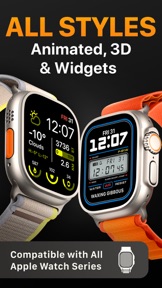
Get the full potential of your Apple Watch with our Watch Faces Club app. Explore a huge collection of designer watch faces that fit all straps! Stay on trend and update your watch faces every day. Share your watch faces with friends and other users! We are constantly improving our app to always be the best watch faces app for Apple Watch! Welcome to the Watch Faces Club!
EXCLUSIVE FEATURES
1. The LARGEST selection of watch faces!
2. UNIQUE watch face designs. Suitable for everyone, all straps and for every day!
2. Static, animated and watch faces with complications!
3. CREATE your own watch faces and SHARE them with others!
4. NEW watch faces every day!
COMPLICATIONS
WEATHER COMPLICATIONS
These complications can show the current weather and the weather forecast for several days ahead.
HEALTH COMPLICATIONS
These complications can show your activity such as steps, heart rate, distance traveled, calories burned, and more.
CALENDAR COMPLICATIONS
These complications show the calendar and highlight today's date.
DATE COMPLICATIONS
These complications can show today's date or the day of the week.
BATTERY COMPLICATIONS
These complications show the current battery charge of your Apple Watch.
IMPORTANT
- In order for the animated watch faces to work properly, you must disable the "Always On" feature on your Apple Watch.
- Complications updated every 15 minutes due to Apple Watch limitations.
- To display your activity (steps, heart rate, calories burned, and more) on the watch faces, you must grant access to the Health app. The watch faces use the data from the HealthKit to display it and only that.
- To properly display the weather forecast on the watch faces, you must grant access to your geolocation. We do not share your data with third parties or use it for our own purposes.
- Watch faces with complications are available on Apple Watch Series 4, Series 5, Series 6, Series 6, Series 7, Series 8, Series 9, SE, SE 2, ULTRA and ULTRA 2.
- Our app uses HealthKit to display activity data (steps, heart rate, distance traveled and calories burned)
INFO
Terms of Use: https://watch-faces-club.tilda.ws/tou
Privacy Policy: https://watch-faces-club.tilda.ws/privacy-policy
EULA: https://watch-faces-club.tilda.ws/eula
CONNECT
Support: help.watchfacesclub@gmail.com
What's New in Version 1.1.2
- Widgets with time countdown added
Information
Developer
Categories
Version
1.1.2
Size
135.6 MB
Game Center
No
VPP Device Licensing
Yes
Rating
Rated: 4+
Compatibility
iOS 14.0 or later
Devices
iPhone 5s, iPhone 6, iPhone 6 Plus, iPhone 6s, iPhone 6s Plus, iPhone SE, iPhone 7, iPhone 7 Plus, iPhone 8, iPhone 8 Plus, iPhone X, iPhone XR, iPhone XS, iPhone XS Max, iPhone 11, iPhone 11 Pro, iPhone 11 Pro Max, iPhone SE (2nd generation), iPhone 12, iPhone 12 Pro, iPhone 12 Pro Max, iPhone 12 mini, iPhone 13, iPhone 13 Pro, iPhone 13 Pro Max, iPhone 13 mini, iPhone SE (3rd generation), iPhone 14, iPhone 14 Plus, iPhone 14 Pro, iPhone 14 Pro Max, iPhone 15, iPhone 15 Plus, iPhone 15 Pro, iPhone 15 Pro Max, iPad (5th Generation) Wi-Fi, iPad (5th Generation) Wi-Fi + Cellular, iPad (6th generation) Wi-Fi, iPad (6th generation) Wi-Fi + Cellular, iPad Pro, iPad Pro (Cellular), iPad Pro (9.7-inch), iPad Pro (9.7-inch) (Cellular), iPad Pro 12.9-inch (2nd generation), iPad Pro 12.9-inch (2nd generation) Wi-Fi + Cellular, iPad Pro (10.5-inch), iPad Pro (10.5-inch) Wi-Fi + Cellular, iPad Pro (11-inch), iPad Pro (11-inch) Wi-Fi + Cellular, iPad Pro 12.9-inch (3rd generation), iPad Pro 12.9-inch (3rd generation) Wi-Fi + Cellular, iPad Air, iPad Air (Cellular), iPad Air 2, iPad Air 2 (Cellular), iPad Air (3rd generation), iPad Air (3rd generation) Wi-Fi + Cellular, iPad mini Retina, iPad mini Retina (Cellular), iPad mini 3, iPad mini 3 (Cellular), iPad mini 4, iPad mini 4 (Cellular), iPad mini (5th Generation), iPad mini (5th Generation) Wi-Fi + Cellular, iPad (7th generation) Wi-Fi + Cellular, iPad Pro 11-inch (2nd generation), iPad Pro 11-inch (2nd generation) Wi-Fi + Cellular, iPad Pro 12.9-inch (4th generation), iPad Pro 12.9-inch (4th generation) Wi-Fi + Cellular, iPad Air (4th Generation) (Wi-Fi), iPad Air (4th Generation) (Wi-Fi + Cellular), iPad (8th generation) Wi-Fi, iPad (8th generation) Wi-Fi + Cellular, iPad Pro 11-inch (3rd generation), iPad Pro 11-inch (3rd generation) Wi-Fi + Cellular, iPad Pro 12.9-inch (5th Generation), iPad Pro 12.9-inch (5th Generation) Wi-Fi + Cellular, iPad (9th Generation), iPad (9th Generation) Wi-Fi + Cellular, iPad mini (6th Generation), iPad mini (6th Generation) Wi-Fi + Cellular, iPad Air (5th generation), iPad Air (5th generation) Wi-Fi + Cellular, iPad Pro 11-inch (4th generation), iPad Pro 11-inch (4th generation) Wi-Fi + Cellular, iPad Pro 12.9-inch (6th generation), iPad Pro 12.9-inch (6th generation) Wi-Fi + Cellular, iPad (10th generation), iPad (10th generation) Wi-Fi + Cellular, iPad Air 11-inch (M2) Wi-Fi, iPad Air 13-inch (M2) Wi-Fi, iPad Air 13-inch (M2) Wi-Fi + Cellular, iPad Pro 11-inch (M4) Wi-Fi, iPad Pro 11-inch (M4) Wi-Fi + Cellular, iPad Pro 13-inch (M4) Wi-Fi, iPad Pro 13-inch (M4) Wi-Fi + Cellular, iPod touch (6th Generation), iPod touch (7th generation), Apple Watch Series 4
Languages
English, Arabic, Chinese, French, German, Italian, Japanese, Korean, Portuguese, Russian, Spanish
App Store: Customer Ratings
Ratings & Reviews
3.0 of 5 (4 Ratings)
App Store: Customer Reviews
No Entry