Updating

Matterport Capture
Released: 2015-09-09
©2013-2020 Matterport, Inc. All rights reserved.


iPhone Screenshots
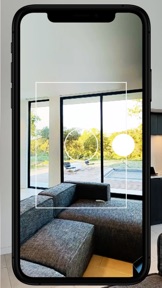

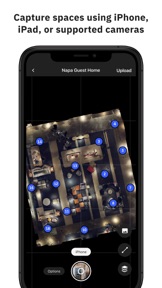
iPad Screenshots


Description
Create cloud-based 3D models of real spaces to experience and share.
The Matterport 3D Capture System provides a full end-to-end solution to quickly and consistently capture and create dimensionally-accurate and visually-realistic digital twins of your space.
Key App Features:
• Scan with your iPhone or iPad camera
• Scan with your Matterport Pro 2 3D, Pro2 Lite 3D, Pro 3D Camera
• Scan with your Leica BLK360 Lidar scanner
• Scan with your Insta360 ONE X or Ricoh Theta Z1 or Theta V 360 camera
• Manage the capture process as you move to different locations within a space
• Upload your captured data to your account within the Matterport Cloud, where it is processed into a high-fidelity 3D model.
The Matterport Capture App is the first step in creating your own digital twin:
Step 1 – Capture: use this application to quickly capture depth data and imagery of a space. You can use your iPhone or iPad camera, or use a connected 360° camera.
Capture directly with supported iOS devices:
• iPhone 6S and newer
• iPad Air 2 and newer
Supported external cameras:
• Matterport Pro2 3D, Pro2 Lite 3D and Pro 3D
• Leica BLK360
• Ricoh Theta Z1
• Ricoh Theta V
• Insta360 ONE X
Spaces captured by iPhones, iPads, and 360 cameras leverage Matterport's Cortex AI to synthesize depth data.
Step 2 – Upload and View: The captured data is then uploaded to the Matterport cloud for processing. Users can log into My.Matterport.com to view their processed 3D models.
Step 3 – Experience and Share: Experience and share 3D models through the visually stunning Matterport 3D Showcase or launch Workshop to customize, measure or annotate the models.
Requirements:
• You *must* be signed in to your Matterport account to enable captures with the iPhone camera, Theta Z1, Theta V or ONE X (requires an additional download).
• Insta360 ONE X: you *must* be running production firmware 1.18.16 or higher. Use the ONE X app or download from www.insta360.com/download/insta360-onex to update.
iOS Device Limitations:
• We support all iOS devices that can upgrade to iOS 12.
• Older iOS devices with only 1GB of RAM (iPad Air, mini 2, mini 3; iPhone 6, 6 Plus, 5S; iPod Touch (6th)) are best with a Matterport Pro (1st Gen) 3D Camera. Pro 2 camera performance may be slow. These devices do not support the ONE X, Theta Z1, Theta V, or BLK360 cameras.
• Scanning with a Leica BLK360 requires iOS devices with 3GB or more of RAM (iPad Pro 11", 12.9"; iPad mini 5; iPhone 7 Plus, 8 Plus, iPhone X, iPhone 11 variants).
• 360 Cameras (Theta Z1, Theta V, ONE X) require iOS devices with 2GB or more of RAM (e.g. iPad Air 2, mini 4 or later; iPhone 6S, SE or later).
Known issues:
• The Ricoh Theta S and Theta SC can connect and enable the scan button, but will hang at 'transferring'. These cameras do not fully support v.2.1 of the Open Spherical Camera (OSC) spec and are unsupported.
Reminders:
• Automatic application updates are a separate iOS setting from operating system updates. See the “iTunes & App Store” section in iOS settings.
• Please send questions, comments, bug reports to capture-beta@matterport.com
• You can join Capture beta programs at matterport.com/beta.
What's New in Version 4.0.2
• Fixed: a significant source of crashes in 4.0.0, 4.0.1 [Issue #1 at the 'known issues' link below]
• Fixed: sporadic very long alignment times for a 3D Scan. Sometimes this was preceded by or followed by a crash. [Issue #2 at the link below]
• Fixed: the 'minimap' (the 2D top-down preview of the scans) is blank after opening a scan job, sometimes with a message that says 'updating map'. In this new version, we will inspect every scan and update it if necessary the first time a job is opened. This only needs to happen once per scan job. For very large jobs it may take several minutes to check everything. You can dismiss this inspection if inconvenient, but the next time you open the scan job it will start again until completed. This step is focused on what you see within Capture; it does not alter the underlying scan data and does NOT need or imply the need to upload again. [Issue #3 at the link below]
• Fixed: 'spray' or 'scratches' appear on previously scanned areas of the minimap (e.g. black pixels). [Issue #4 at the link below]
• Fixed: blurry sections of an iPhone or iPad Capture that appear as if one or more shots in the rotation were missed. [Issue #5 at the link below]
We will update major known issues here:
https://support.matterport.com/hc/en-us/articles/360049043393#general-issues-0-0
Seller
Name
Matterport Inc
Information
Developer
Categories
Version
4.0.2
Size
246.2 MB
Game Center
No
VPP Device Licensing
Yes
Rating
Rated: 4+
Compatibility
iOS 12.0 or later
Devices
iPhone 5s, iPhone 6, iPhone 6 Plus, iPhone 6s, iPhone 6s Plus, iPhone SE, iPhone 7, iPhone 7 Plus, iPhone 8, iPhone 8 Plus, iPhone X, iPhone XR, iPhone XS, iPhone XS Max, iPhone 11, iPhone 11 Pro, iPhone 11 Pro Max, iPhone SE (2nd generation), iPad (5th Generation) Wi-Fi, iPad (5th Generation) Wi-Fi + Cellular, iPad (6th generation) Wi-Fi, iPad (6th generation) Wi-Fi + Cellular, iPad Pro, iPad Pro (Cellular), iPad Pro (9.7-inch), iPad Pro (9.7-inch) (Cellular), iPad Pro 12.9-inch (2nd generation), iPad Pro 12.9-inch (2nd generation) Wi-Fi + Cellular, iPad Pro (10.5-inch), iPad Pro (10.5-inch) Wi-Fi + Cellular, iPad Pro (11-inch), iPad Pro (11-inch) Wi-Fi + Cellular, iPad Pro 12.9-inch (3rd generation), iPad Pro 12.9-inch (3rd generation) Wi-Fi + Cellular, iPad Air, iPad Air (Cellular), iPad Air 2, iPad Air 2 (Cellular), iPad Air (3rd generation), iPad Air (3rd generation) Wi-Fi + Cellular, iPad mini Retina, iPad mini Retina (Cellular), iPad mini 3, iPad mini 3 (Cellular), iPad mini 4, iPad mini 4 (Cellular), iPad mini (5th Generation), iPad mini (5th Generation) Wi-Fi + Cellular, iPad (7th generation) Wi-Fi, iPad Pro 11-inch (2nd generation), iPad Pro 11-inch (2nd generation) Wi-Fi + Cellular, iPad Pro 12.9-inch (4th generation), iPad Pro 12.9-inch (4th generation) Wi-Fi + Cellular, iPad Air4, iPad Air4Cellular, iPad EighthGen, iPad EighthGenCellular, iPod touch (6th Generation), iPod touch (7th generation)
Languages
English, French, German, Spanish
App Store: Customer Ratings
Ratings & Reviews
5.0 of 5 (2 Ratings)
App Store: Customer Reviews
No Entry