Updating


iPhone Screenshots




iPad Screenshots



Description
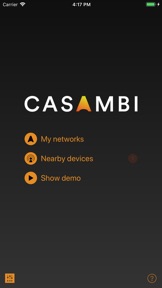
The Casambi app is the easiest and most natural way to control your lights. With the app you can control both Casambi enabled lighting fixtures and Philips Hue bulbs. The first time use has been made easy and intuitive. With one tap you are ready to control your lights.
Controlling all your lamps from one view:
With Casambi app you can control all your lighting fixtures with one view. It is possible to control your lights individually or as a group. For example you can create a group of your kitchen, office or shop lights and turn them all off / on with just one tap. Or you can dim the living room lights to pleasant light level for a movie.
Control your lights from a photo:
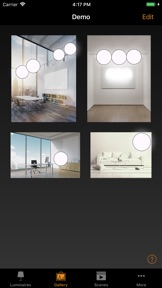
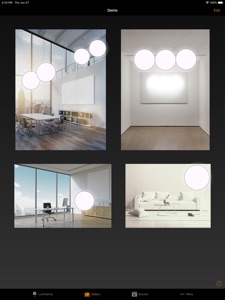
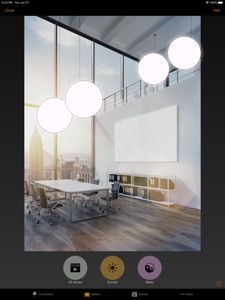
The Gallery in Casambi app is the most natural way of controlling your lights. Take a picture of your room(s) and place the lamp controls over the lighting fixtures in the picture. Now you can control your lighting fixtures visually right from the picture.
Create scenes for different lighting situations:
You can create different scenes for different occasions. Set the lights just right for dining, office environments or shop promotions and save the settings in a scene. Now you can change the lighting with one tap for different occasions for example a dinner party or a meeting with a customer.
Share your network and allow other devices to control your lights:
Casambi has four different levels for sharing and access control. You can decide if your network is open to everyone or if other users need a password to access your network. If you have several users and devices using the same network, all the changes made with one device will be automatically updated to the other devices with Casambi cloud service.
What's New in Version 3.2.7
Version 3.2.7 Build 546 (25 Aug, 2020)
New features
* Application settings of FW update channels for Casambi Support.
* Support of customization for custom sliders as a button group.
* Support of customization for board temperature and overheating data reports.
* Support of adding template unit by fixture ID in demo network
Bug fixes:
* Fix to the issue with editor of scenes activating device lights not according to the current configuration.
* Fixt to siteco theme toolbar background is black instead of white.
* Generic stability improvement.
Information
Developer
Categories
Version
3.2.7
Size
48 MB
Game Center
No
VPP Device Licensing
Yes
Rating
Rated: 4+
Compatibility
iOS 10.0 or later
Devices
iPhone 5, iPhone 5c, iPhone 5s, iPhone 6, iPhone 6 Plus, iPhone 6s, iPhone 6s Plus, iPhone SE, iPhone 7, iPhone 7 Plus, iPhone 8, iPhone 8 Plus, iPhone X, iPhone XR, iPhone XS, iPhone XS Max, iPhone 11, iPhone 11 Pro, iPhone 11 Pro Max, iPhone SE (2nd generation), iPhone 12, iPhone 12 Pro, iPhone 12 Pro Max, iPhone 12 mini, iPad (4th Generation) (Wi-Fi), iPad (4th Generation) (4G), iPad (5th Generation) Wi-Fi, iPad (5th Generation) Wi-Fi + Cellular, iPad (6th generation) Wi-Fi, iPad (6th generation) Wi-Fi + Cellular, iPad Pro, iPad Pro (Cellular), iPad Pro (9.7-inch), iPad Pro (9.7-inch) (Cellular), iPad Pro 12.9-inch (2nd generation), iPad Pro 12.9-inch (2nd generation) Wi-Fi + Cellular, iPad Pro (10.5-inch), iPad Pro (10.5-inch) Wi-Fi + Cellular, iPad Pro (11-inch), iPad Pro (11-inch) Wi-Fi + Cellular, iPad Pro 12.9-inch (3rd generation), iPad Pro 12.9-inch (3rd generation) Wi-Fi + Cellular, iPad Air, iPad Air (Cellular), iPad Air 2, iPad Air 2 (Cellular), iPad Air (3rd generation), iPad Air (3rd generation) Wi-Fi + Cellular, iPad mini Retina, iPad mini Retina (Cellular), iPad mini 3, iPad mini 3 (Cellular), iPad mini 4, iPad mini 4 (Cellular), iPad mini (5th Generation), iPad mini (5th Generation) Wi-Fi + Cellular, iPad (7th generation) Wi-Fi, iPad Pro 11-inch (2nd generation), iPad Pro 11-inch (2nd generation) Wi-Fi + Cellular, iPad Pro 12.9-inch (4th generation), iPad Pro 12.9-inch (4th generation) Wi-Fi + Cellular, iPad Air (4th Generation) (Wi-Fi), iPad Air (4th Generation) (Wi-Fi + Cellular), iPad (8th generation) Wi-Fi, iPad (8th generation) Wi-Fi + Cellular, iPod touch (6th Generation), iPod touch (7th generation), Apple Watch Series 4
Languages
English, Chinese, Czech, Danish, Dutch, Finnish, French, German, Italian, Japanese, Norwegian, Polish, Portuguese, Russian, Spanish, Swedish, Thai, Vietnamese
App Store: Customer Ratings
Ratings & Reviews
5.0 of 5 (1 Rating)
App Store: Customer Reviews
No Entry