Updating


iPhone Screenshots







iPad Screenshots




Description
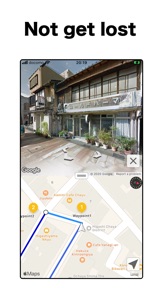
StreetWatcher navigates by Street View where you want to go without getting lost.
Simple navigation that is ideal for walking and bicycle, and has the following three features.
● Safe on the day.
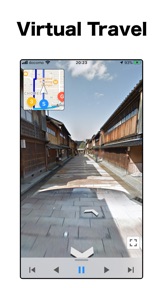
With the automatic play of Street View, you can rest assured on the day if you check the route, whether it is a safe road, a walking course that you can enjoy, or the slope when riding a bicycle.
● Not get lost anymore.
Not get lost because you’ll be able to see in Street View where you’ll be turning along the route. It is also recommended for route confirmation.
● Fun.
Enjoy great view, townscape, and World Heritage sites with 120 Street View automatic play contents.
Watching the automatic play while listening to your favorite BGM is fun, and if you are accompanied by a room runner or fitness bike, the exercise will be even more fun than usual.
Please use StreetWatcher as your navigation.
=== Other features ===
● Create a route.
・ Select the route type from walking, bicycle or car.
・ Up to 23 waypoints can be specified, and nearby search places can be added to the route.
・ The travel time, travel distance, address and memo of the route can be confirmed.
・ Easy to edit, replace and delete each point on the route.
● Favorite routes.
・ Save your route along with your notes. Routes can be saved for offline use.
・ Organize your favorite routes by category with drag & drop.
・ Categories can be customized to your liking.
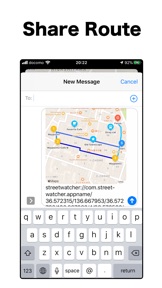
● Share routes.
・ Share the created route with your favorite service.
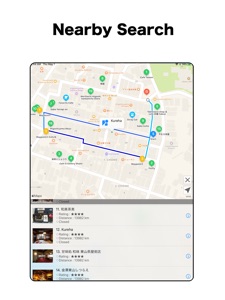
● Nearby search.
・ Street view and information of places searched nearby are displayed.
・ Nearby search items can be customized to your liking.
● Place note.
・ You can register the Place note with a favorite route.
● Supported Widget.
・ Street view can be displayed.
● Supported Apple Watch.
・ Easy navigation feature that allows you to see the direction of your destination.
● Supported Quick Action.
・ You can display the route to your home by using go home.
● Supported dark mode.
・ Compatible with eye-friendly dark mode.
● Supported iPad multitasking.
・ You can use StreetWatcher while doing research.
● Supported GPX file.
・ You can check The root of the GPX file.
=== About premium ===
It is Premium that you can use StreetWatcher more enjoyably and conveniently.
The following premium features can be used by subscription.
① Street View automatic play contents
You can enjoy great view, townscapes and world heritage sites with automatic play of street view.
Currently 120 spots are recorded, and content will be added in the future.
② Street View logger
You can save the place you took a walk in Street View as a route and play it automatically.
You can enjoy automatic play of Street View in places where routes cannot be obtained, such as indoors and unexplored areas.
③ Nearby Search(Premium)
You can quickly check if there is a desired place nearby with more detailed information (business hours, price estimates, ratings, images of places).
④ Hide ad
Hide ads that were displayed in the free version.
● Restoring when changing mobile models and deleting applications.
You can restore purchased paid version for free. Please press the restore button with the same Apple ID as you purchased when logging into the iPhone / iPad terminal App Store.
● Confirmation and Cancellation
Confirmation / Cancellation can be done from 'Settings application' > 'iTunes & App Store' > 'Apple ID' > 'View AppleID' > 'Subscriptions'.
● About Suscription
When automatic renewal is not canceled more than 24 hours prior to the period end date, the contract term is automatically renewed.
Account will be charged for renewal within 24-hours prior to the end of the current period.
● Notes
· When you charge, you can not cancel by other methods than the above.
· We do not accept cancellation for the current month.
· It will be charged through the App Store account.
● Terms of Service & Privacy Policy
http://street-watcher-app.strikingly.com/blog/privacy-policy
What's New in Version 7.0
● Added support for widgets.
・ You can display the last street view displayed on the map in the widget.
・ If you want to quickly check the street view displayed to check the route mark from the widget and look back, or if you want to put the scenery of street view on the home screen, please use it in your favorite style.
● Added the following Street View automatic play contents.
Great View
・ Dohány Street Synagogue (Hungary)
・ Skógafoss (Iceland)
Town Scape
・Zaanse Schans (Netherlands)
World Heritage
・ Baalbek (Lebanon)
・ Preobrazhenskaya Church (Russia)
● Fixed bug.
Seller
Name
Takashi Suemitsu
Information
Developer
Categories
Version
7.0
Size
65.1 MB
Game Center
No
VPP Device Licensing
Yes
Rating
Rated: 4+
Compatibility
iOS 12.0 or later
Devices
iPhone 5s, iPhone 6, iPhone 6 Plus, iPhone 6s, iPhone 6s Plus, iPhone SE, iPhone 7, iPhone 7 Plus, iPhone 8, iPhone 8 Plus, iPhone X, iPhone XR, iPhone XS, iPhone XS Max, iPhone 11, iPhone 11 Pro, iPhone 11 Pro Max, iPhone SE (2nd generation), iPhone 12, iPhone 12 Pro, iPhone 12 Pro Max, iPhone 12 mini, iPad (5th Generation) Wi-Fi, iPad (5th Generation) Wi-Fi + Cellular, iPad (6th generation) Wi-Fi, iPad (6th generation) Wi-Fi + Cellular, iPad Pro, iPad Pro (Cellular), iPad Pro (9.7-inch), iPad Pro (9.7-inch) (Cellular), iPad Pro 12.9-inch (2nd generation), iPad Pro 12.9-inch (2nd generation) Wi-Fi + Cellular, iPad Pro (10.5-inch), iPad Pro (10.5-inch) Wi-Fi + Cellular, iPad Pro (11-inch), iPad Pro (11-inch) Wi-Fi + Cellular, iPad Pro 12.9-inch (3rd generation), iPad Pro 12.9-inch (3rd generation) Wi-Fi + Cellular, iPad Air, iPad Air (Cellular), iPad Air 2, iPad Air 2 (Cellular), iPad Air (3rd generation), iPad Air (3rd generation) Wi-Fi + Cellular, iPad mini Retina, iPad mini Retina (Cellular), iPad mini 3, iPad mini 3 (Cellular), iPad mini 4, iPad mini 4 (Cellular), iPad mini (5th Generation), iPad mini (5th Generation) Wi-Fi + Cellular, iPad (7th generation) Wi-Fi, iPad Pro 11-inch (2nd generation), iPad Pro 11-inch (2nd generation) Wi-Fi + Cellular, iPad Pro 12.9-inch (4th generation), iPad Pro 12.9-inch (4th generation) Wi-Fi + Cellular, iPad Air (4th Generation) (Wi-Fi), iPad Air (4th Generation) (Wi-Fi + Cellular), iPad (8th generation) Wi-Fi, iPad (8th generation) Wi-Fi + Cellular, iPod touch (6th Generation), iPod touch (7th generation), Apple Watch Series 4
Languages
English, Japanese
App Store: Customer Ratings
Ratings & Reviews
0.0 of 5 (No rating)
App Store: Customer Reviews
No Entry