AboutTermsPrivacyContact
 
Updating
GoodReader PDF Editor & Viewer

GoodReader PDF Editor & Viewer

Released: 2014-05-07
© Good.iWare, Inc., 2009-2025. All rights reserved.
GoodReader PDF Editor & Viewer - QR Code
Version 5.19.1220
4+
Download on the App Store
Version 5.19.1220
4+
Download on the App Store
Released: 2014-05-07
© Good.iWare, Inc., 2009-2025. All rights reserved.

iPhone Screenshots

Screenshot
Screenshot
Screenshot

iPad Screenshots

Screenshot
Screenshot
Screenshot

Description

First released in 2009, GoodReader® is truly a veteran of the App Store.
In the modern app business, it's not easy to stay relevant that long. We're proud to say that after 13 years and counting, we've been delivering wonderful updates with extraordinary new features. And we're going to keep doing that!
GoodReader is a perfect combination of document-reading and file-managing capabilities. It's your one-stop shop for all your document needs on your iOS device.
Use the app once, and you'll be hooked. Soon you'll be wondering how you ever managed to work without it.
-= File Reading =-
PDF, TXT, MS Office, iWork, HTML, pictures, music & audio-books, videos. This is what you can view in GoodReader, plus you can also annotate PDF files and edit TXT files.
-= PDF Reading and Annotating =-
PDF files is where GoodReader truly shines. Reading experience is so superior, it's hard to describe. To rephrase one of our customers' review, "try it, and you'll see." While you're at it, give our PDF Reflow feature a try. You'll be surprised how much better PDF reading goes when you don't have to scroll left/right all the time, for every single line of text.
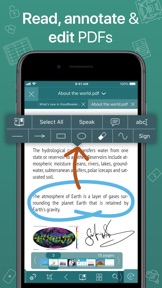
Annotating PDFs is another star feature of our app. Adding notes and drawings, highlighting text, and then sharing your annotated files or annotation summaries will be your main productivity and collaboration asset.
-= File Management =-
While reading files is a big part of GoodReader, it's not all it can do. It can also serve as a central hub for all your files, even those that can't be opened by GoodReader itself. It's like bringing your personal computer experience to your mobile device — easily managing huge collections of files and folders will make you forget you don't have your laptop around.
-= Connecting =-
Dropbox, OneDrive, Google Drive, Box.com, WebDAV, SMB, AFP, FTP, SFTP — these are all accessible from inside GoodReader. Download, upload, and sync (*) individual files or huge folder collections.
-= Security =-
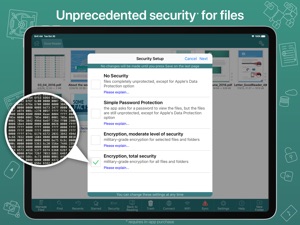
With GoodReader, your data security steps up to the level previously only dreamt of. With Pro Pack® (*), our new set of professional-level super-features, you'll get AES-256, a military-grade encryption, for all your data, at a price of a cup of coffee! And it's completely independent from the built-in Apple's Data Protection, so even if a hacker steals and unlocks your device, your data will still be protected by another strong layer of security, our own.
-= Split-Screen =-
This wonderful feature allows you to split (*) an iPad screen in half, to read two files side-by-side. And even two different parts of the same file!
(*): This feature requires a subscription to Pro Pack®, sold separately from inside the app as an in-app purchase.

What's New in Version 5.19.1220

• New way of adding OneDrive shares.
• Fixed a Widgets bug.

Seller

Name

Good.iWare, Inc.

Information

Version

5.19.1220

Size

51.4 MB

Game Center

No

VPP Device Licensing

Yes

Rating

Rated: 4+

Compatibility

iOS 14.0 or later

Devices

iPhone 5s, iPhone 6, iPhone 6 Plus, iPhone 6s, iPhone 6s Plus, iPhone SE, iPhone 7, iPhone 7 Plus, iPhone 8, iPhone 8 Plus, iPhone X, iPhone XR, iPhone XS, iPhone XS Max, iPhone 11, iPhone 11 Pro, iPhone 11 Pro Max, iPhone SE (2nd generation), iPhone 12, iPhone 12 Pro, iPhone 12 Pro Max, iPhone 12 mini, iPhone 13, iPhone 13 Pro, iPhone 13 Pro Max, iPhone 13 mini, iPhone SE (3rd generation), iPhone 14, iPhone 14 Plus, iPhone 14 Pro, iPhone 14 Pro Max, iPhone 15, iPhone 15 Plus, iPhone 15 Pro, iPhone 15 Pro Max, iPhone 16, iPhone 16 Plus, iPhone 16 Pro, iPhone 16 Pro Max, iPhone 16e, iPhone 17, iPhone 17 Pro, iPhone 17 Pro Max, iPhone Air, iPhone 17e, iPad (5th Generation) Wi-Fi, iPad (5th Generation) Wi-Fi + Cellular, iPad (6th generation) Wi-Fi, iPad (6th generation) Wi-Fi + Cellular, iPad Pro, iPad Pro (Cellular), iPad Pro (9.7-inch), iPad Pro (9.7-inch) (Cellular), iPad Pro 12.9-inch (2nd generation), iPad Pro 12.9-inch (2nd generation) Wi-Fi + Cellular, iPad Pro (10.5-inch), iPad Pro (10.5-inch) Wi-Fi + Cellular, iPad Pro (11-inch), iPad Pro (11-inch) Wi-Fi + Cellular, iPad Pro 12.9-inch (3rd generation), iPad Pro 12.9-inch (3rd generation) Wi-Fi + Cellular, iPad Air, iPad Air (Cellular), iPad Air 2, iPad Air 2 (Cellular), iPad Air (3rd generation), iPad Air (3rd generation) Wi-Fi + Cellular, iPad mini Retina, iPad mini Retina (Cellular), iPad mini 3, iPad mini 3 (Cellular), iPad mini 4, iPad mini 4 (Cellular), iPad mini (5th Generation), iPad mini (5th Generation) Wi-Fi + Cellular, iPad (7th generation) Wi-Fi + Cellular, iPad Pro 11-inch (2nd generation), iPad Pro 11-inch (2nd generation) Wi-Fi + Cellular, iPad Pro 12.9-inch (4th generation), iPad Pro 12.9-inch (4th generation) Wi-Fi + Cellular, iPad Air (4th Generation) (Wi-Fi), iPad Air (4th Generation) (Wi-Fi + Cellular), iPad (8th generation) Wi-Fi, iPad (8th generation) Wi-Fi + Cellular, iPad Pro 11-inch (3rd generation), iPad Pro 11-inch (3rd generation) Wi-Fi + Cellular, iPad Pro 12.9-inch (5th Generation), iPad Pro 12.9-inch (5th Generation) Wi-Fi + Cellular, iPad (9th Generation), iPad (9th Generation) Wi-Fi + Cellular, iPad mini (6th Generation), iPad mini (6th Generation) Wi-Fi + Cellular, iPad Air (5th generation), iPad Air (5th generation) Wi-Fi + Cellular, iPad Pro 11-inch (4th generation), iPad Pro 11-inch (4th generation) Wi-Fi + Cellular, iPad Pro 12.9-inch (6th generation), iPad Pro 12.9-inch (6th generation) Wi-Fi + Cellular, iPad (10th generation), iPad (10th generation) Wi-Fi + Cellular, iPad Air 11-inch (M2) Wi-Fi, iPad Air 13-inch (M2) Wi-Fi, iPad Air 13-inch (M2) Wi-Fi + Cellular, iPad Pro 11-inch (M4) Wi-Fi, iPad Pro 11-inch (M4) Wi-Fi + Cellular, iPad Pro 13-inch (M4) Wi-Fi, iPad Pro 13-inch (M4) Wi-Fi + Cellular, iPad mini (A17 Pro) Wi-Fi, iPad mini (A17 Pro) Wi-Fi + Cellular, iPad (A16) Wi-Fi, iPad (A16) Wi-Fi + Cellular, iPad Air 11-inch (M3) Wi-Fi, iPad Air 11-inch (M3) Wi-Fi + Cellular, iPad Air 13-inch (M3) Wi-Fi, iPad Air 13-inch (M3) Wi-Fi + Cellular, iPad Pro 11-inch (M5) Wi-Fi, iPad Pro 11-inch (M5) Wi-Fi + Cellular, iPad Pro 13-inch (M5) Wi-Fi, iPad Pro 13-inch (M5) Wi-Fi + Cellular, iPad Air 11-inch (M4) Wi-Fi, iPad Air 11-inch (M4) Wi-Fi + Cellular, iPad Air 13-inch (M4) Wi-Fi, iPad Air 13-inch (M4) Wi-Fi + Cellular, iPod touch (6th Generation), iPod touch (7th generation)

Languages

English

App Store: Customer Ratings

Ratings & Reviews

4.7 of 5 (293 Ratings)

App Store: Customer Reviews

2023-09-15

App Support.

Support responded immediately and with solution to a very serious app crash.
The GoodReader app is the most important app on my ecosystem which has allowed me to unlock my iPad device in a way similar to a laptop. I will always support this app and remain consistently impressed by it.
Thank you GoodReader team!
Spy 333
Version 5.15.1188
2022-07-09

Good Reader is just fabulous

I have been using the GOOD READER APP for quite a number of years now and I am very happy it’s so user friendly and I have everything at my fingertips
Tinkerbell562
Version 5.13.1177
2022-04-25

Love version 5

Absolute must have for iPhone
Mattytat0220
Version 5.11.1165
2022-04-09

Goodreader

Excellent for collecting & managing diverse documents, books, papers. One can carry a veritable library on one’s iPad.
...ellipsis
Version 5.11.1165
2021-05-16

Great PDF Reader

GoodReader has proven invaluable as a PDF reader during my D&D sessions.
Smooth vertical scrolling in a 2-page view makes it feel like I’m reading the actual book.
Lodewykk
Version 5.8.1139
2020-12-25

Pretty much the perfect app

And I’ve been using it since 2010
dblumenau
Version 5.8.1135
2020-09-14

GoodReader Review

GoodReader is a magnificent app & in its category the very best of breed. It’s versatility & easy to use, among its many features, are far superior to any other similar app. Strongly recommended.
Eb Moolla
Version 5.7.1128
2020-07-03

new interface is terrible, was a great app

2020: i accidentally upgraded my spare phone to the current version. it is beyond awful! the interface has been designed by a kid with a brick. bad, bad, bad, bad, bad, bad, etc...
ugly, confusing, takes up more screen space. menu bar jumps from bottom to top of screen, no coherent concept of completing or exiting a function...
the developer seems to have lost the concept that icons can communicate a function that might have a long word to describe it, but a neat little icon could do the same, more elegantly, more easy to read, less screen space required...
0 points out of several million for UX
2019: ghastly green interface, weird ‘button’ shapes, confusing layout of tools, ugly, ugly design. no UI improvements anywhere...
earlier: handles PDFs really well & syncs with both local networks & cloud systems. a must have for any kind of work needing PDFs, images or work documents to sync & take on the road
batman o' de bo-kaap
Version 5.7.1126
2020-06-23

Best app ever

Cannot sing the praises of this app enough. It revolutionized the way I study. Addicted, yes, to an app, seriously! Just get it, try out all the functions. Download pdf’s and play around with it, see for yourself what this app can do. Extract pages, sign them, email, shuffle around organize into folders, etc etc etc. love love love.
Helen Lang
Version 5.7.1120
2020-04-26

Best PDF Reader

I have tried many pdf readers over the years. Nothing comes close to this app. It is elegant & it’s array of features is mind boggling. This is like a desktop app ported to iOS.
It has an 8 file limitation inherited from the OS where you cannot open more than 8 files simultaneously. It also does not support multitasking. There are ways that the developers could get around these issues. However, there does not appear to be a willingness to do this. I therefore use multiple pdf viewers to get around this. Competitors are catching up so there may be further options available in the near future.
Also noticed that Apple Pencil cannot be used to handwrite annotations. Would be a great feature. I use another app to achieve this.
SanTheMonk
Version 5.6.1117
2020-02-08

Great app, but plenty crashes

I’m loving the app. It really saves time for me, although it crashes ever so often when it gets to the end of the page when speaking content to me. This then causes numerous unintended breaks and restarts.
SultryNto
Version 5.3.1102
2020-01-08

GoodReader upgrade

Updated my iOS and now can’t use GoodReader. Can not find any way of upgrading GoodReader to access my documents.
Colin Miles
Version 5.3.1102
2019-05-16

Goodreader

The very best App I have ever used. Indispensible to me.
Jayocee
Version 5.1.3
2019-05-15

Good reader

This app is very good. Ideal for everything. If you are a business man or someone who writes on their device a lot it a good for you
Thank you GoodReader
aravie04
Version 5.1.3
2018-10-31

Version 5

What happened to the promised Version 5? As much as I enjoy Goodreader it is time to deliver on the promises.
oradba269
Version 4.13.0
2018-07-22

Great, but needs more control when zooming

I use this app all the time, especially for programming ebooks. The zoom/crop feature is brilliant, but I wish there was an option for a fixed aspect ratio when zooming. I know you can pinch zoom to curr.view, but this isn’t very accurate. Also I would like it if the app has an option to change the background color. Some PDFs are tall and narrow and can’t be cropped at the top and bottom. If the background could be set to white the document would appear to fill the screen and get rid of those annoying black side bars.
sffortytwo
Version 4.13.0
2018-07-04

Best app if your PC is windows driven.

One of the first and best apps to sync your computer work folders with your iPad. In my case all drawings, documents and correspondence is at hand whenever I visit a site. No need to walk with hard copies and easy to find correct drawing in any room that I inspect. Also easy to make cryptic notes on dwg. App still doesn’t recognize Apple Pencil so your hands mustn’t touch the screen - but you can live it.
Longtime_User SA
Version 4.13.0
2018-06-04

By far the best PDF app for academic use

I use Goodreader primarily for studying. And out of all the apps I’ve used, Goodreader is by far the best.
Latent blue
Version 4.13.0
2017-11-27

iPhone X

The app is not yet optimised for the iPhone X
dominator001
Version 4.12.1
2017-07-21

No more google drive support on the latest ios

No more google drive support on the latest ios
agrybear
Version 4.12.1
2017-06-16

Awesome program

I just wish I could access a dictionary during reading. I read a lot of old books and this feature would help me with archaic literature. I look forward to seeing this addition in Your app soon.
Regards Emile
Emile3
Version 4.12.1
2017-05-12

Essential app

The best app for all your document,video files.
Leavg
Version 4.12.1
2017-01-18

Been using it for years!

Great app, I use it for preaching and teaching. Continued updates, easy to use.
Bradleyskate
Version 4.12.1
2016-12-04

My go to PDF app

I use it for all my PDF reading and markup needs, especially when working through academic papers. Fantastic functionality and features. Well worth the price tag.
bruceviv
Version 4.12.1
2015-08-18

Great app

All in one app for all my everyday readings
Bauba
Version 4.11.0
2015-06-24

Great App

I use this app nearly every day. Does all I require as a reader and a editor
Nevillet
Version 4.11.0
2015-05-06

Goodreader helps a lot to make notes on pdf docs

I've been using it since I got my first iPad years back and am so glad I discovered it. Whenever I need to read big PDFs or want to highlight or make notes, Goodreader is my App of choice. Thanks, Karen
K-Satisfied
Version 4.11.0
2015-05-03

My go-to app

Since I bought my first iPhone (4), I have been using Goodreader for nearly everything related to reading and pdf's. There is nothing else out there that I think can compete. I am now using it on both my iPhone and iPad. A really great app! Keep up the good work.
Poensie
Version 4.11.0
2015-03-06

Brilliant

A must-have for PDF reading and note-taking.
Anastasia french to english
Version 4.9.1
2015-02-17

Dr

Brilliant software. Extensive application and options. Very user friendly.
david-i-tunes
Version 4.9.2
2014-12-21

Excellent document viewer and annotator

Great as a central app to read and annotate PDFs. Opens multiple PDFs at a time and allows quick switching between them. Best document handler for paperless meetings I've used.
Student00001
Version 4.7.0
2014-11-24

Waste of money

Absolutely disappointed in the app, wasted my money. Pity i cant demand a refund
Dare the truth
Version 4.7.0
2014-10-20

Best there is

The best app in its class. No other app gets close to the features or amount of files supported by GoodReader. Definitely worth the money.
WilhelmS7
Version 4.6.0
2014-07-14

The best iPad app

Goodreader is the most versatile app you can get for your iPad. Excellent PDF reader and editor, and all-round file management system. It downloads, uploads and syncs with your computer, Gmail, Dropbox, Google Drive, Ravelry and lots more using wifi. Never connect your iPad to your computer again to download files. You can also view pictures and videos and listen to music. A must have. Worth every cent.
Omnicrafter
Version 4.1.0
2014-07-10

Best app!!

Best app
Luzanne
Version 4.1.0
2014-05-28

Goodreader 4

Definitely worth it! I can now make notes by adding in new pages on my slides! And deleting slides I don't need which saves a lot with Printing! Best working app out there!
Student RH12
Version 4.0.1