AboutTermsPrivacyContact
 
Updating
FUJIFILM Camera Remote

FUJIFILM Camera Remote

Released: 2014-01-23
© FUJIFILM Corporation
FUJIFILM Camera Remote - QR Code
Version 4.6.0
4+
Download on the App Store
Version 4.6.0
4+
Download on the App Store
Released: 2014-01-23
© FUJIFILM Corporation

iPhone Screenshots

Screenshot
Screenshot
Screenshot
Screenshot
Screenshot

iPad Screenshots

Screenshot
Screenshot
Screenshot
Screenshot
Screenshot

Description

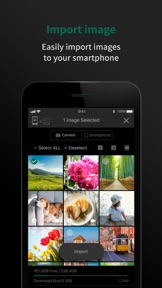
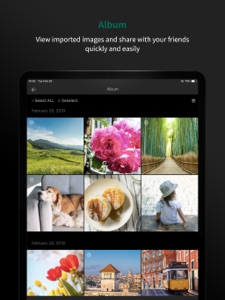
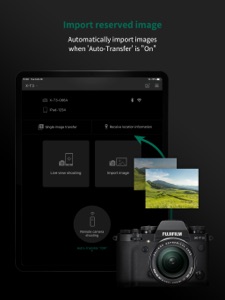
The FUJIFILM Camera Remote is an application provided by FUJIFILM that can operate wireless-equipped digital cameras by remote control to shoot images and to view images and movies in the camera and to transfer them to smartphones or tablets. And it also supports the cameras that offers Bluetooth® capability. Pair it with your smartphones or tablet devices, it synchronizes "date and time" and/or "location information" of your smartphone or tablet devices with the cameras that offers Bluetooth® capability. In advanced of shooting, to easily transfer pictures you have taken to the smartphones or tablet device via this application. Bluetooth wireless remote shutter release can be used for cameras that offers Bluetooth® capability. In addition, firmware update is now supported from your smartphone or tablet devices via Bluetooth without the need of a SD memory card.
[Features]
-This application provides the following functions:
1. Transferring images and movies to a Smartphone
2. Browsing the Camera from a Smartphone
3. Downloading Location Data from a Smartphone
4. Shooting Images by Remote Control(*)
5. Easily transfer pictures from the cameras that offers Bluetooth capability.
6. Synchronizing "date and time" and/or "location information" with the cameras that offers Bluetooth capability
7. Firmware update via a Smartphone to the cameras that offers Bluetooth capability.
8. Bluetooth wireless remote control camera shutter release is now supported for cameras that offers Bluetooth capability.
*How to change the setting depends on your camera.
[Supported cameras and supporting functions]
[Supporting functions: 1, 2, 3, 4, 5, 6, 7, 8]
FUJIFILM X-T4, X100V, X-T200, X-Pro3, X-A7, GFX100, X-T30, GFX 50R, X-T3, XF10, X-H1, X-E3
[Supporting functions: 1, 2, 3, 4, 5, 6, 8]
FinePix XP140
[Supporting functions: 1, 2, 3, 4, 5, 6]
FUJIFILM X-T100, X-A5
FinePix XP130
[Supporting functions: 1, 2, 3, 4]
FUJIFILM GFX 50S, X-T20, X100F, X-A10, X-A3, X-T2, X-Pro2, X-E2S, X70, X-T10, X-T1, X30, X100T, X-E2(firmware version 3.00 or later),
FinePix XP120, XP90, XP80, S9900W, S9950W
[Supporting functions: 1, 2, 3]
FUJIFILM X-E2(firmware version 1.00-2.10), XQ2, XQ1, X-A2, X-A1, X-M1
[Smartphone System Requirements]
iPhone/iPad/iPod touch: iOS 11.0 - 13.6.1
*iPad WiFi, iPod touch can not use the Geotagging.
*This application software doesn't guarantee the functions for all the iPhone, iPad and iPodtouch.
*iOS10:Ignore the message of "Security Recommendation" during Wi-Fi setting.
Please use your camera with the latest firmware when using the FUJIFILM Camera Remote App.
Please visit the FUJIFILM website for instructions and to download the latest firmware.
http://www.fujifilm.com/support/digital_cameras/software/
Please Visit FUJIFILM Web pages for more details and usage.
http://app.fujifilm-dsc.com/en/camera_remote/index.html
What's New in Version 4.6.0

Bug Fixes and performance improvements.
*Above feature varies depending on the camera you use.

Seller

Name

FUJIFILM Corporation

Information

Categories

Version

4.6.0

Size

50.6 MB

Game Center

No

VPP Device Licensing

Yes

Rating

Rated: 4+

Compatibility

iOS 11.0 or later

Devices

iPhone 5s, iPhone 6, iPhone 6 Plus, iPhone 6s, iPhone 6s Plus, iPhone SE, iPhone 7, iPhone 7 Plus, iPhone 8, iPhone 8 Plus, iPhone X, iPhone XR, iPhone XS, iPhone XS Max, iPhone 11, iPhone 11 Pro, iPhone 11 Pro Max, iPhone SE (2nd generation), iPhone 12, iPhone 12Mini, iPhone 12Pro, iPhone 12ProMax, iPad (5th Generation) Wi-Fi, iPad (5th Generation) Wi-Fi + Cellular, iPad (6th generation) Wi-Fi, iPad (6th generation) Wi-Fi + Cellular, iPad Pro, iPad Pro (Cellular), iPad Pro (9.7-inch), iPad Pro (9.7-inch) (Cellular), iPad Pro 12.9-inch (2nd generation), iPad Pro 12.9-inch (2nd generation) Wi-Fi + Cellular, iPad Pro (10.5-inch), iPad Pro (10.5-inch) Wi-Fi + Cellular, iPad Pro (11-inch), iPad Pro (11-inch) Wi-Fi + Cellular, iPad Pro 12.9-inch (3rd generation), iPad Pro 12.9-inch (3rd generation) Wi-Fi + Cellular, iPad Air, iPad Air (Cellular), iPad Air 2, iPad Air 2 (Cellular), iPad Air (3rd generation), iPad Air (3rd generation) Wi-Fi + Cellular, iPad mini Retina, iPad mini Retina (Cellular), iPad mini 3, iPad mini 3 (Cellular), iPad mini 4, iPad mini 4 (Cellular), iPad mini (5th Generation), iPad mini (5th Generation) Wi-Fi + Cellular, iPad (7th generation) Wi-Fi + Cellular, iPad Pro 11-inch (2nd generation), iPad Pro 11-inch (2nd generation) Wi-Fi + Cellular, iPad Pro 12.9-inch (4th generation), iPad Pro 12.9-inch (4th generation) Wi-Fi + Cellular, iPad Air (4th Generation) (Wi-Fi), iPad Air (4th Generation) (Wi-Fi + Cellular), iPad (8th generation) Wi-Fi, iPad (8th generation) Wi-Fi + Cellular, iPod touch (6th Generation), iPod touch (7th generation)

Languages

English, Chinese, French, German, Indonesian, Italian, Japanese, Korean, Portuguese, Russian, Spanish, Thai

App Store: Customer Ratings

Ratings & Reviews

1.5 of 5 (17 Ratings)

App Store: Customer Reviews

2020-10-01

So buggy

How can a camera soooo good, have such a bad app. Mine now no longer connects to my phone at all. Really sad.
Larajcorreia
Version 4.6.0
2020-09-20

This app ruins the experience of using a Fujifilm camera.

The app is so unstable as to be completely unusable much of the time and only barely tolerable at others. Live view does not work with iOS 14. Image transfer is unbelievably slow but you don’t need to worry about that because it only works 1% of the time. You cannot transfer raw images.
David Maartens
Version 4.5.1
2020-09-13

Works well

This app is great. It adds some functionality & works well, I’ve had no problems so far.
Ambuscher
Version 4.5.1
2020-06-26

Disconnect during transfer

This app is so buggy. I tried transferring 60 photos from my camera, and it completely disconnects halfway through the transfer.
Co199427
Version 4.5.1
2020-05-25

worst app ever

makes using the gfx50r unbearable at times.
Mynameisgrant
Version 4.5.0
2020-05-09

Mike

Does not work
purspass
Version 4.5.0
2020-02-02

Very unstable connection

Connecting to an iPhoneXs with this app is a hit and miss affair. Fujifilm you make excellent cameras, but this app is a disaster since I started or attempted to use it!
niki8679vr
Version 4.4.1
2020-01-25

App broken

Not working since Jan
natediggygawg
Version 4.4.0
2019-12-12

Disappointing

App worked beautifully between my X-pro2 and iPhone SE. Stops working when using my new iPhoneX. Reset everything, works once then stops completely. Very disappointing.
Katryn112
Version 4.4.0
2019-12-07

Doesn’t work at all

Unable in December 2019 to get this app and my XT3 to see each other. The camera can not connect to the phones wifi and nothing happens.
Thundercross_cgh
Version 4.4.0
2019-06-19

Needs work

Not the most fluid and intuitive app around.
Connection to IOS devices also lacks.
Great cameras, but the app isn’t complete yet.
Drefuss916
Version 4.0.2
2019-05-22

Good redesign

Much cleaner and feels more fluid now - as a camera shutter it's good.
A problem I encounter, the wifi connection seems to get jerky and the live screen preview on the app lags (in range, same room) which is quite difficult when trying to making small changes for the right moment to press the shutter.
I'm not sure if it's a software or hardware problem but would be great to resolve that issue.
Jahmmin'
Version 4.0.1
2019-05-11

Close, but not quite

Better Fujifilm, better. I like the changes, works better, still not entirely sure why you are forced to have location services switched on for it to work.
As a remote shutter it is ALMOST there. I am still limited by the maximum exposure time in T-mode. Would be great if there is a T-mode in the app allowing me to set exposures longer than 30seconds.
Close, but not quite
PE, South Africa
Version 4.0.1
2018-07-03

Can improve a lot

I love that I can use this as a remote (saves me a lot of money as camera remotes as with all cam gear is expensive) but it lacks a few features. One in particular would be the following:
If I lock the focus manually on the camera and I go in the remote/app it kicks out the focus and goes into continuous focus. It also kicks it any manual settings I have set on the camera (fstop, iso, etc) what I would like to do is set the iso, fstop, mode etc ON the camera, then go into MANUAL MODE on the app. It keeps those settings, then lets me lock focus and once the focus is locked, it stays locked, also like a manual focus. Would be great for video!
This is my 2c.
Spenelo
Version 3.2.0
2018-04-29

App won’t download

How can I rate and app if it won’t download?
fujifilmgirl
Version 3.1.0
2017-12-21

Still waiting for this to be what it should be as a Fuji product

I’ve had this app for almost a year now and I’ve waited diligently for any of the faults to be ironed out.
Still No raw support. With raw support in most all editing iOS apps it makes no sense to block this.
Changing modules still disconnects from the camera. This makes no sense at all :(
MaddyCake88
Version 3.0.0
2015-12-17

No Raw support

Where is the raw file support?
I'm using an XT-10 and as much as I love JPEGs, they are simply not part of my workflow... I need to be able to receive the raw files too.
This is a simple dev option to fix, even if there is no image preview, just let us get the files downloaded without having to use something else!?
Refined Ruffian
Version 1.2.0