Updating



iPhone Screenshots


iPad Screenshots



Description
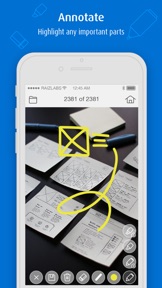
MirrorOp Presenter is the latest member of the MirrorOp family. As the successor of the popular WiFi-Doc app, MirrorOp Presenter adds more flexibility for presenters and teachers by including the built-in browser (for showing web pages) and live camera (for sharing non-digital contents like printed materials or even 3D real objects). MirrorOp Presenter also introduces new annotation tools that help presenters highlight presentation materials or write/draw any ideas that just pop up.
Key Features
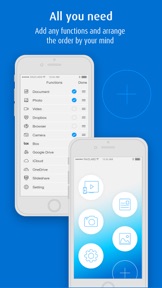
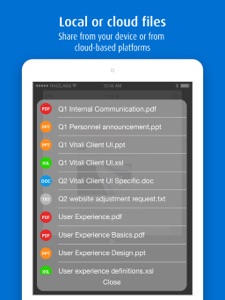
-Documents (Word, Excel, PowerPoint, PDF)
-Photos (JPG, PNG)
-Browser
-Live Camera
-Annotation tools
-Cloud
Requirements
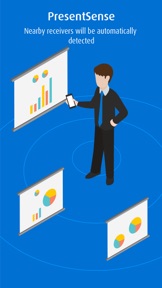
-MirrorOp Presenter is free to use with wePresent receiver devices (e.g. WiPG-1000/WiPG-1600/WiPG-2000/WiPG-1600W/WiCS-2100). For more info, please visit https://www.barco.com/wepresent or contact your local wePresent distributor.
-MirrorOp Presenter is free to use with CSC (ClickShare for Conference Rooms) and CSM (ClickShare for Meeting Rooms) receiver devices. Firmware update may be required. For more info, please contact your local ClickShare support team.
-For other (unauthorized) receiver devices which have downloaded the MirrorOp Receiver app, projection via MirrorOp Presenter will be stopped every 5 minutes unless users make an in-app purchase of the license key.
Setup with 3 easy steps
1.Install a receiver device.
2.Connect to the receiver device via WiFi.
3.Launch the MirrorOp Presenter app and start presentation.
EULA
https://www.barco.com/en/support/docs/TDE9701
Keywords
MirrorOp, wePresent, wePresent WiPG, Barco, ClickShare, ClickShare CSC, ClickShare CSM, screenshot, snapshot, projector, presentation, mobishow, sender, wireless sender, TV sender, remote display, WiFi-Doc, Office, Word, Excel, PowerPoint, PDF, photo, camera, document, teacher, annotation
What's New in Version 2.2.11
- New license mechanism.
- Remove license key purchasing function.
- Support “.number” file for document projection.
- Several bugs fix.
Information
Developer
Categories
Version
2.2.11
Size
149.1 MB
Game Center
No
VPP Device Licensing
Yes
Rating
Rated 17+ for the following:
Unrestricted Web Access
Compatibility
iOS 8.0 or later
Devices
iPhone 4S, iPhone 5, iPhone 5c, iPhone 5s, iPhone 6, iPhone 6 Plus, iPhone 6s, iPhone 6s Plus, iPhone SE, iPhone 7, iPhone 7 Plus, iPhone 8, iPhone 8 Plus, iPhone X, iPhone XR, iPhone XS, iPhone XS Max, iPhone 11, iPhone 11 Pro, iPhone 11 Pro Max, iPhone SE (2nd generation), iPad 2 (Wi-Fi), iPad 2 (3G), iPad (3rd Generation) (Wi-Fi), iPad (3rd Generation) (4G), iPad (4th Generation) (Wi-Fi), iPad (4th Generation) (4G), iPad (5th Generation) Wi-Fi, iPad (5th Generation) Wi-Fi + Cellular, iPad (6th generation) Wi-Fi, iPad (6th generation) Wi-Fi + Cellular, iPad Pro, iPad Pro (Cellular), iPad Pro (9.7-inch), iPad Pro (9.7-inch) (Cellular), iPad Pro 12.9-inch (2nd generation), iPad Pro 12.9-inch (2nd generation) Wi-Fi + Cellular, iPad Pro (10.5-inch), iPad Pro (10.5-inch) Wi-Fi + Cellular, iPad Pro (11-inch), iPad Pro (11-inch) Wi-Fi + Cellular, iPad Pro 12.9-inch (3rd generation), iPad Pro 12.9-inch (3rd generation) Wi-Fi + Cellular, iPad Air, iPad Air (Cellular), iPad Air 2, iPad Air 2 (Cellular), iPad Air (3rd generation), iPad Air (3rd generation) Wi-Fi + Cellular, iPad mini (Wi-Fi), iPad mini (4G), iPad mini Retina, iPad mini Retina (Cellular), iPad mini 3, iPad mini 3 (Cellular), iPad mini 4, iPad mini 4 (Cellular), iPad mini (5th Generation), iPad mini (5th Generation) Wi-Fi + Cellular, iPad (7th generation) Wi-Fi + Cellular, iPad Pro 11-inch (2nd generation), iPad Pro 11-inch (2nd generation) Wi-Fi + Cellular, iPad Pro 12.9-inch (4th generation), iPad Pro 12.9-inch (4th generation) Wi-Fi + Cellular, iPod touch (5th generation), iPod touch (6th Generation), iPod touch (7th generation)
Languages
English, Chinese, Indonesian, Japanese, Korean, Thai
App Store: Customer Ratings
Ratings & Reviews
1.5 of 5 (2 Ratings)
App Store: Customer Reviews
No Entry