Updating


iPhone Screenshots


iPad Screenshots




Description
A Quadcopter / Multirotor RC Drone simulator with First Person View (FPV), HUD, Return Home, Course Lock, Home Lock, Camera Gimbal, Acro mode, Acro 3D mode and more..
Now Google Cardboard VR is also supported for immersive flying and FPV experience.
Support for Controllers
Please note that this a simulator and Not a game. It is designed for RC enthusiasts to practice Flying skills.
Basic Tutorial for beginner is in the above description video.
Features:
1) Based on real physics Model of Quadcopter
2) Interactive selection of different cameras modes:
* Eye level Camera
* First Person View Camera
* Stabilized Gimbal Camera
* Follow Camera
You can walk around while flying, looking at the quad either by dragging the middle of screen or by enabling accelerometer button on the left side in the Eye level Camera Mode..
3) Return to Location (RTL)
When on the Quad will automatically Return and Land back in its Landing Position. It will Automatically switch on when the Quad goes out of range.
4) Position Hold
When ON the Quad will try to Hold its position when both control sticks are released.
5) Course Lock
When ON the Forward, Backward, Left and Right will remain same regardless of orientation of Quad. e.g. Moving Right stick Forward will always make the Quad go forward in East Direction even if its pointing towards north.
6) Home Lock
When ON the Forward will always be Away from you and Backwards will always be towards you regardless of Quads Orientation.
7) Heads up Display(HUD)
Displaying real-time Pitch, Roll, Heading, Altitude and Speed.
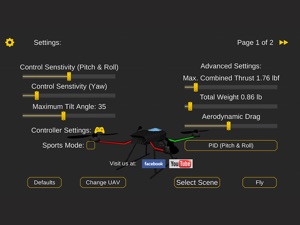
8) Adjustable Control sensitivity Settings
9) Auto Stabilizing adjustable
10) Altitude Hold Switch
If ON the quad will try to maintain the altitude when it was switched on.
11) Advanced Settings
If enabled users can change the Total Weight, Static / Dynamic thrust, PID setting and Aerodynamic Drag values.
12) Multiple Quad / Scene Selection / Some basic Challenges for Time Pass..
13) Multiple mode Input Support.
Now it supports mode1, mode2. mode3, mode4 and accelerometers. You can change via settings page
14) Camera rotation in FPV and Gimbal camera.
Click and Drag from center of screen on FPV or Gimbal camera. Double click in center to reset.
15) Dynamic Wind
Wind effect will reduce when behind the building.
16) Google cardboard Support for immersive virtual reality and FPV experience.
Make sure that you have a controller attached to the device because the only way you can control the quadcopter is by controller once the Cardboard VR is enabled. After enabling you have to gaze at the buttons on the UI and press the trigger button on the cardboard to click it. Once you are flying then pressing the trigger anywhere will open the settings page. You can also touch on screen anywhere to execute trigger event instead of pressing the trigger button.
17) Max Tilt Angle / Auto Stabilize Sensitivity Slider
In Normal Mode the slider changes the Maximum Tilt angle setting. This settings determines the maximum roll / pitch angle the quadcopter will tilt. In Sports Mode it changes the Auto Stabilize sensitivity. The higher the settings the more force is applied to stabilize the quadcopter.
18) Acro / Acro 3d mode for expert flying
Auto stabilize will not be applied in these modes. You need to be expert to fly in this mode.In 3D Mode is mode in which the Quadcopter can fly upside down also. The throttle sticks will produce reverse thrust when moved down from the center position.
Enjoy Flying..
Credits: Some Arteria content is in use.
What's New in Version 1.77
This app has been updated by Apple to display the Apple Watch app icon.
Added Dedicated Acro and Acro 3D mode
Added Support for Google Cardboard VR for immersive flying and FPV experience
Added Dynamic thrust settingsIts recommend to go to settings page and press defaults button if you are upgrading as some default values have been changed in this update
Seller
Name
Prabhjot Singh
Information
Developer
Categories
Version
1.77
Size
81.8 MB
Game Center
No
VPP Device Licensing
Yes
Rating
Rated: 4+
Compatibility
iOS 5.1.1 or later
Devices
iPhone 3GS, iPhone 4, iPhone 4S, iPhone 5, iPhone 5c, iPhone 5s, iPhone 6, iPhone 6 Plus, iPhone 6s, iPhone 6s Plus, iPhone SE, iPhone 7, iPhone 7 Plus, iPhone 8, iPhone 8 Plus, iPhone X, iPhone XR, iPhone XS, iPhone XS Max, iPhone 11, iPhone 11 Pro, iPhone 11 Pro Max, iPhone SE (2nd generation), iPhone 12, iPhone 12 Pro, iPhone 12 Pro Max, iPhone 12 mini, iPhone 13, iPhone 13 Pro, iPhone 13 Pro Max, iPhone 13 mini, iPhone SE (3rd generation), iPhone 14, iPhone 14 Plus, iPhone 14 Pro, iPhone 14 Pro Max, iPhone 15, iPhone 15 Plus, iPhone 15 Pro, iPhone 15 Pro Max, iPhone 16, iPhone 16Plus, iPhone 16Pro, iPhone 16ProMax, iPad (Wi-Fi), iPad (3G), iPad 2 (Wi-Fi), iPad 2 (3G), iPad (3rd Generation) (Wi-Fi), iPad (3rd Generation) (4G), iPad (4th Generation) (Wi-Fi), iPad (4th Generation) (4G), iPad (5th Generation) Wi-Fi, iPad (5th Generation) Wi-Fi + Cellular, iPad (6th generation) Wi-Fi, iPad (6th generation) Wi-Fi + Cellular, iPad Pro, iPad Pro (Cellular), iPad Pro (9.7-inch), iPad Pro (9.7-inch) (Cellular), iPad Pro 12.9-inch (2nd generation), iPad Pro 12.9-inch (2nd generation) Wi-Fi + Cellular, iPad Pro (10.5-inch), iPad Pro (10.5-inch) Wi-Fi + Cellular, iPad Pro (11-inch), iPad Pro (11-inch) Wi-Fi + Cellular, iPad Pro 12.9-inch (3rd generation), iPad Pro 12.9-inch (3rd generation) Wi-Fi + Cellular, iPad Air, iPad Air (Cellular), iPad Air 2, iPad Air 2 (Cellular), iPad Air (3rd generation), iPad Air (3rd generation) Wi-Fi + Cellular, iPad mini (Wi-Fi), iPad mini (4G), iPad mini Retina, iPad mini Retina (Cellular), iPad mini 3, iPad mini 3 (Cellular), iPad mini 4, iPad mini 4 (Cellular), iPad mini (5th Generation), iPad mini (5th Generation) Wi-Fi + Cellular, iPad (7th generation) Wi-Fi + Cellular, iPad Pro 11-inch (2nd generation), iPad Pro 11-inch (2nd generation) Wi-Fi + Cellular, iPad Pro 12.9-inch (4th generation), iPad Pro 12.9-inch (4th generation) Wi-Fi + Cellular, iPad Air (4th Generation) (Wi-Fi), iPad Air (4th Generation) (Wi-Fi + Cellular), iPad (8th generation) Wi-Fi, iPad (8th generation) Wi-Fi + Cellular, iPad Pro 11-inch (3rd generation), iPad Pro 11-inch (3rd generation) Wi-Fi + Cellular, iPad Pro 12.9-inch (5th Generation), iPad Pro 12.9-inch (5th Generation) Wi-Fi + Cellular, iPad (9th Generation), iPad (9th Generation) Wi-Fi + Cellular, iPad mini (6th Generation), iPad mini (6th Generation) Wi-Fi + Cellular, iPad Air (5th generation), iPad Air (5th generation) Wi-Fi + Cellular, iPad Pro 11-inch (4th generation), iPad Pro 11-inch (4th generation) Wi-Fi + Cellular, iPad Pro 12.9-inch (6th generation), iPad Pro 12.9-inch (6th generation) Wi-Fi + Cellular, iPad (10th generation), iPad (10th generation) Wi-Fi + Cellular, iPad Air 11-inch (M2) Wi-Fi, iPad Air 13-inch (M2) Wi-Fi, iPad Air 13-inch (M2) Wi-Fi + Cellular, iPad Pro 11-inch (M4) Wi-Fi, iPad Pro 11-inch (M4) Wi-Fi + Cellular, iPad Pro 13-inch (M4) Wi-Fi, iPad Pro 13-inch (M4) Wi-Fi + Cellular, iPad MiniA17Pro, iPad MiniA17ProCellular, iPod touch (3rd generation), iPod touch (4th generation), iPod touch (5th generation), iPod touch (6th Generation), iPod touch (7th generation)
Languages
English
App Store: Customer Ratings
Ratings & Reviews
0.0 of 5 (No rating)
App Store: Customer Reviews
No Entry