AboutTermsPrivacyContact
 
Updating
MyPrecip

MyPrecip

Released: 2014-08-21
© GarApps
MyPrecip - QR Code
Version 1.5.1
4+
Download on the App Store
Version 1.5.1
4+
Download on the App Store
Released: 2014-08-21
© GarApps

iPhone Screenshots

Screenshot
Screenshot
Screenshot
Screenshot
Screenshot

Description

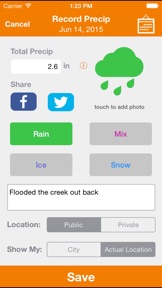
MyPrecip is a simple app where you can record all of your precipitation data.
- Record daily precip amounts for Rain, Snow, Ice, or a Mix in several units
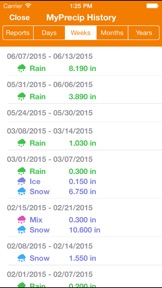
- View your precip history and stats broken down totals by days, weeks, months and years
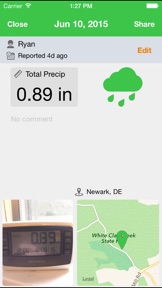
- Attach photos & share your recorded precips with your friends on Facebook or Twitter
- Enter your own recorded Precip totals, or allow the app to auto-fill the Precip total using data from Forecast.io (Notes: Requires location services to be enabled. Also, this is an estimate, values may not always be 100% accurate)
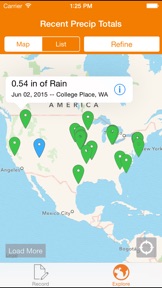
- View a map or list of record precip totals from users across the globe. Filter based on precip type and the time period
- No login required, but be sure your data is saved by signing up!

What's New in Version 1.5.1

History Unit Update
- Your default unit will be used when displaying the Week, Month, and Year totals
- Set your default unit by going into Settings. Note that the originally reported unit will always be displayed in Explore.
Bug Fix
- An issue with re-downloading your data upon logging in was fixed

Seller

Name

Ryan Garchinsky

URL

Information

Developer

Categories

Version

1.5.1

Size

27.4 MB

Game Center

No

VPP Device Licensing

Yes

Rating

Rated: 4+

Compatibility

iOS 8.0 or later

Devices

iPhone 4S, iPhone 5, iPhone 5c, iPhone 5s, iPhone 6, iPhone 6 Plus, iPhone 6s, iPhone 6s Plus, iPhone SE, iPhone 7, iPhone 7 Plus, iPhone 8, iPhone 8 Plus, iPhone X, iPhone XR, iPhone XS, iPhone XS Max, iPhone 11, iPhone 11 Pro, iPhone 11 Pro Max, iPhone SE (2nd generation), iPhone 12, iPhone 12 Pro, iPhone 12 Pro Max, iPhone 12 mini, iPad 2 (Wi-Fi), iPad 2 (3G), iPad (3rd Generation) (Wi-Fi), iPad (3rd Generation) (4G), iPad (4th Generation) (Wi-Fi), iPad (4th Generation) (4G), iPad (5th Generation) Wi-Fi, iPad (5th Generation) Wi-Fi + Cellular, iPad (6th generation) Wi-Fi, iPad (6th generation) Wi-Fi + Cellular, iPad Pro, iPad Pro (Cellular), iPad Pro (9.7-inch), iPad Pro (9.7-inch) (Cellular), iPad Pro 12.9-inch (2nd generation), iPad Pro 12.9-inch (2nd generation) Wi-Fi + Cellular, iPad Pro (10.5-inch), iPad Pro (10.5-inch) Wi-Fi + Cellular, iPad Pro (11-inch), iPad Pro (11-inch) Wi-Fi + Cellular, iPad Pro 12.9-inch (3rd generation), iPad Pro 12.9-inch (3rd generation) Wi-Fi + Cellular, iPad Air, iPad Air (Cellular), iPad Air 2, iPad Air 2 (Cellular), iPad Air (3rd generation), iPad Air (3rd generation) Wi-Fi + Cellular, iPad mini (Wi-Fi), iPad mini (4G), iPad mini Retina, iPad mini Retina (Cellular), iPad mini 3, iPad mini 3 (Cellular), iPad mini 4, iPad mini 4 (Cellular), iPad mini (5th Generation), iPad mini (5th Generation) Wi-Fi + Cellular, iPad (7th generation) Wi-Fi, iPad Pro 11-inch (2nd generation), iPad Pro 11-inch (2nd generation) Wi-Fi + Cellular, iPad Pro 12.9-inch (4th generation), iPad Pro 12.9-inch (4th generation) Wi-Fi + Cellular, iPad Air (4th Generation) (Wi-Fi), iPad Air (4th Generation) (Wi-Fi + Cellular), iPad (8th generation) Wi-Fi, iPad (8th generation) Wi-Fi + Cellular, iPod touch (5th generation), iPod touch (6th Generation), iPod touch (7th generation)

Languages

English, French, Portuguese

App Store: Customer Ratings

Ratings & Reviews

1.5 of 5 (2 Ratings)

App Store: Customer Reviews

2018-04-07

Not very good

The location did not display according to my current location and put it a few kilometers away.
When it comes to setting this seems superfluous! I wanted to record in mm rain and i set accordingly. When I looked at my history every thing was displaying the right values I had entered but in inches. Surely this is not difficult to get right
Csideza
Version 1.5.1