AboutTermsPrivacyContact
 
Updating
Mileage Tracker by Driversnote

Mileage Tracker by Driversnote

Released: 2014-11-18
© 2020 Driversnote ApS
Mileage Tracker by Driversnote - QR Code
Version 3.0.10
4+
Download on the App Store
Version 3.0.10
4+
Download on the App Store
Released: 2014-11-18
© 2020 Driversnote ApS

iPhone Screenshots

Screenshot
Screenshot
Screenshot
Screenshot
Screenshot
Screenshot
Screenshot

Description

Put your mileage logbook on autopilot: Let your phone track your trips, and have your mileage documentation ready for hand-over at any time.
500,000+ trust us with their mileage logbook. Get started for free today!
▶ 1. TRACK: Record your trips on the go
- Simply press start and let the app take care of the rest. Driversnote records your trip from start to finish using your phone’s GPS.
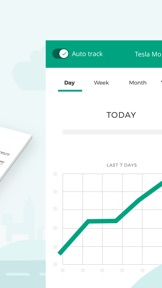
- Never forget to log a trip again, just enable our Auto Tracking and, all your trips will automatically be logged in the background. Just keep the phone in your pocket.
- Forgot a trip? No problem, you can always manually add a trip later on. Simply select where the trip started and ended and we’ll calculate a route.
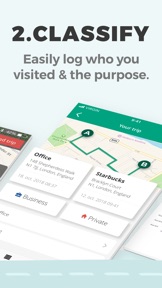
▶ 2. CLASSIFY: Log who you visited & the purpose
- Easily categorise your trips as business or private.
- Start and stop destinations are automatically logged, and you can easily name your locations. We’ll even suggest frequented locations nearby, so you simply select the one you visited.
- When returning to the same place the app automatically finds previous locations nearby which saves you time.
- Do you need to keep a mileage log for multiple vehicles or report mileage to more than one employer? No problem! You can easily split your trips and reports for different vehicles and workplaces.
▶ 3. REPORT: Easily submit your tax compliant logbook
- Your mileage documentation is ready when you are. You’re only one click away from detailed reports available on your phone or desktop. Download as a PDF or Excel file, ready to hand over to your employer or accountant at your convenience.
- We create a complete, detailed report that can be given to your local tax authority (e.g. HMRC) as documentation for reimbursement claims or tax deductions.
- Do you need to log your car’s odometer? We’ve got you covered. You decide how often you log your odometer and we do all the math between trips. You can set the app to remind you daily, weekly or monthly.
▶ COUNTRY SUPPORT & MILEAGE RATES
- We primarily support the following countries: USA (IRS), Canada (CRA), Australia (ATO), United Kingdom (HMRC), Denmark, Sweden, and Finland. But our system is used in more than 50 countries.
- For UK users, the mileage rate will automatically change after the first 10,000 business miles, as required by HMRC.
- Driversnote automatically calculates reimbursements based on the current mileage rates from your local tax authority (that we make sure to keep up-to-date).
- You can set your own custom reimbursement rates or opt out of calculating reimbursements altogether.
▶ YOUR ONLINE ACCOUNT
- All your data is secured on your online account, and is always available even if you lose your phone.
- You can easily manage everything from our website. From here you can access your trips, manage your locations etc. and print reports or download them as PDF or Excel.
▶ AUTO TRACKING WITH IBEACON
- Place a Driversnote iBeacon in your car and the app will automatically record all your trips in the background. You will never forget to log a trip again.
- When you sign up for the annual basic subscription we’ll send you an iBeacon for free.
- Your phone connects to the iBeacon when you enter the vehicle, and starts recording as you begin your drive.
- The app stops recording when you exit your vehicle, and you’ll get a notification that the trip was logged.
▶ SUPPORT
- If you have questions or feedback please contact us at tel. (+45) 71 99 37 54 or support@driversnote.co.uk.
- We do use the GPS in the background when logging a trip, and continued use of GPS running in the background can dramatically decrease battery life.
Happy tracking!

What's New in Version 3.0.10

Here’s what’s new in the app:
- When we detect GPS inaccuracies the app now provides instructions for a fix.
- You can now change mileage reimbursement rates from several places in the app.
- Fixed minor bugs, including one that caused "Unknown GPS Error" to show too often.
- As part of a test, some users will experience a new way of manually creating trips.
We're always trying to improve. If you have feedback on the app please let us know at support@driversnote.co.uk.

Seller

Name

Driversnote ApS

Information

Categories

Version

3.0.10

Size

77.7 MB

Game Center

No

VPP Device Licensing

Yes

Rating

Rated: 4+

Compatibility

iOS 10.0 or later

Devices

iPhone 5, iPhone 5c, iPhone 5s, iPhone 6, iPhone 6 Plus, iPhone 6s, iPhone 6s Plus, iPhone SE, iPhone 7, iPhone 7 Plus, iPhone 8, iPhone 8 Plus, iPhone X, iPhone XR, iPhone XS, iPhone XS Max, iPhone 11, iPhone 11 Pro, iPhone 11 Pro Max, iPhone SE (2nd generation), iPad (4th Generation) (Wi-Fi), iPad (4th Generation) (4G), iPad (5th Generation) Wi-Fi, iPad (5th Generation) Wi-Fi + Cellular, iPad (6th generation) Wi-Fi, iPad (6th generation) Wi-Fi + Cellular, iPad Pro, iPad Pro (Cellular), iPad Pro (9.7-inch), iPad Pro (9.7-inch) (Cellular), iPad Pro 12.9-inch (2nd generation), iPad Pro 12.9-inch (2nd generation) Wi-Fi + Cellular, iPad Pro (10.5-inch), iPad Pro (10.5-inch) Wi-Fi + Cellular, iPad Pro (11-inch), iPad Pro (11-inch) Wi-Fi + Cellular, iPad Pro 12.9-inch (3rd generation), iPad Pro 12.9-inch (3rd generation) Wi-Fi + Cellular, iPad Air, iPad Air (Cellular), iPad Air 2, iPad Air 2 (Cellular), iPad Air (3rd generation), iPad Air (3rd generation) Wi-Fi + Cellular, iPad mini Retina, iPad mini Retina (Cellular), iPad mini 3, iPad mini 3 (Cellular), iPad mini 4, iPad mini 4 (Cellular), iPad mini (5th Generation), iPad mini (5th Generation) Wi-Fi + Cellular, iPad (7th generation) Wi-Fi + Cellular, iPad Pro 11-inch (2nd generation), iPad Pro 11-inch (2nd generation) Wi-Fi + Cellular, iPad Pro 12.9-inch (4th generation), iPad Pro 12.9-inch (4th generation) Wi-Fi + Cellular, iPod touch (6th Generation), iPod touch (7th generation)

Languages

English, Danish

App Store: Customer Ratings

Ratings & Reviews

4.5 of 5 (272 Ratings)

App Store: Customer Reviews

2020-04-08

Works really well

Great app - easy to use and excellent support from real, live techies in real time - a bot-free zone!
GailforceOne
Version 2.0.40
2020-02-28

Trip report

I cannot acces the reports, it is not working
ramderf
Version 2.0.40
2019-09-10

Good app but....

Lite version of the app not helpful as there is a limit placed on amount of trips unless you upgrade. Wish they could have been upfront about this 🤦‍♂️
Arclohan
Version 2.0.30
2018-12-28

Beacon never arrived

Unfortunately my beacon never arrived, for the subscription price of this app this is unacceptable.
aslooten
Version 2.0.15
2018-09-21

Greg

Great App! Only wish I’d had it several years ago & would have simplified process of keeping an accurate record of travel logs for business purposes. The beacon is a must & keeps the process simple. Highly recommended.
GregW.
Version 1.2.30
2018-07-12

Like it but it needs work.

Can not add toll gate fees or scan receipts for that. I can not view or print notes on the reports. The only way to view it is going into every ride separately. I can not delete locations added accidentally from the list of locations.
iNinja69
Version 1.2.28
2018-06-03

Great app

I’m very happy with this app so far. Just wish I had auto tracking.
Rown
Version 1.2.28
2018-01-16

Wonderful app

This app does exactly what I need it to do. It connects seamlessly with google maps and makes tracking super simple. Loving how this app works so well all the way down at the southern tip of Africa.
OddoBam
Version 1.2.28
2017-01-03

Easy to use and feature rich

I use this for all business vehicles (bikes and cars). Great app with accurate reporting making tax submissions a breeze
tk-swarm
Version 1.2.21